

A required command-line tool is missing
Joinery’s backup and restore for PostgreSQL and MySQL shell out to the engines’ own command-line tools. They are not bundled with the app, so when they are not on the machine the wizard replaces its form with a setup view rather than letting you fill in a form that was always going to fail.
| Engine | Binaries Joinery looks for |
|---|---|
| PostgreSQL | pg_dump, pg_restore |
| MySQL | mysqldump, mysql |
SQL Server needs none of this. Its backup and restore are T-SQL statements the server runs, so the probe is skipped entirely and you will never see this view on an MSSQL connection.
The install commands are on Prerequisites, and only there. The in-app view carries the same steps with copy buttons; this page is about the cases where following them does not appear to work.
What the view is telling you
Section titled “What the view is telling you”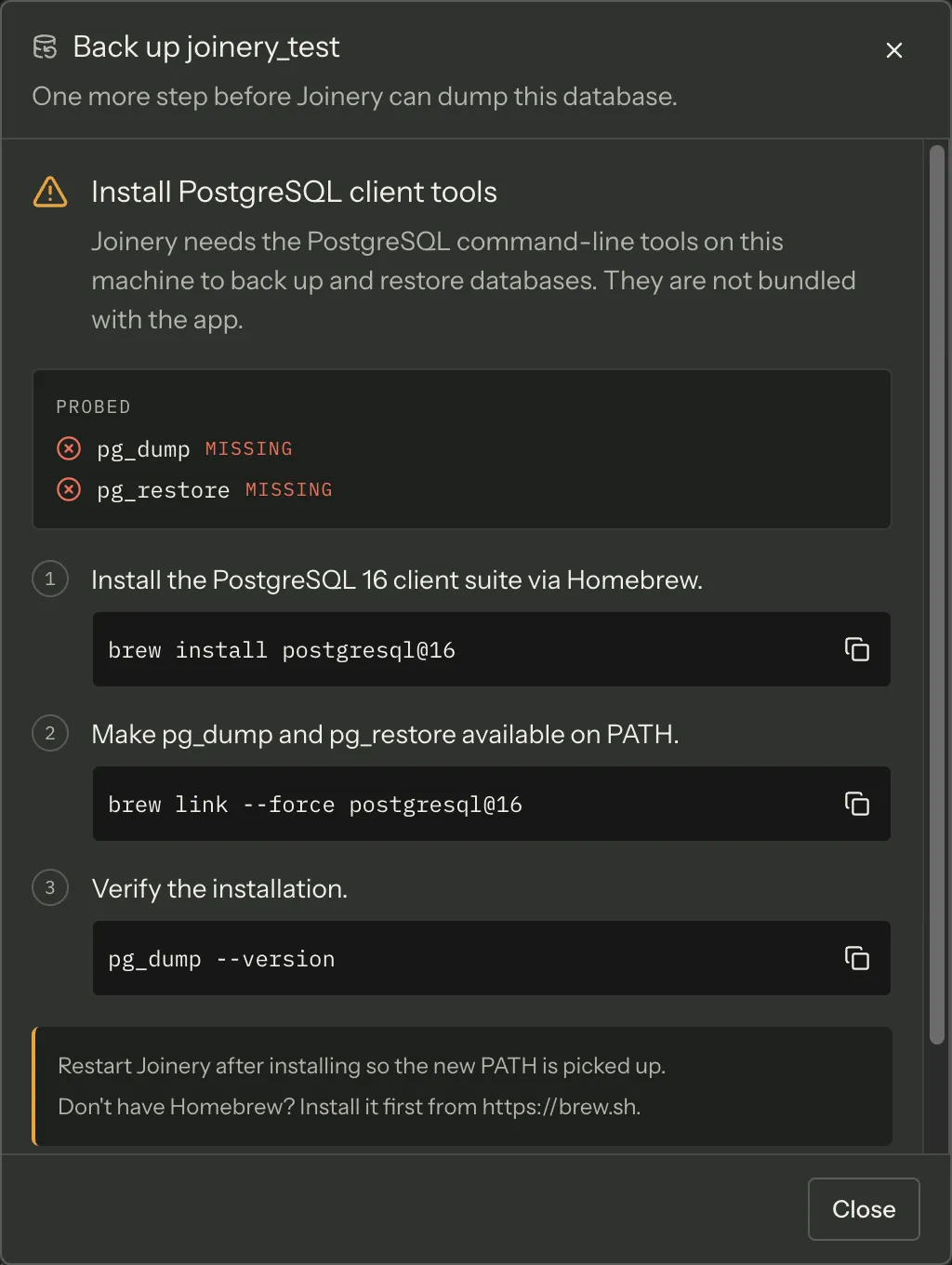
The setup view lists every tool that was probed, marks each found or missing, and prints
the version string of the ones it found. Read that list before anything else — it is the
difference between “neither tool is installed” and “pg_dump is there but pg_restore is not”,
which is a real and common state after a partial install.
Re-check re-probes without closing the dialog. Install in another window, come back, press it.
A tool you installed is still reported missing
Section titled “A tool you installed is still reported missing”Joinery finds a tool by running <tool> --version and seeing whether it exits cleanly. There is
no path configuration and no search of well-known install locations: if the binary is not on the
PATH of the running app, it does not exist as far as Joinery is concerned.
Three things make that go wrong:
- You have not restarted Joinery. A process inherits its PATH at launch. A shell profile you edited afterwards is invisible to an app that was already running. Quit and reopen.
- The app’s PATH is not your shell’s PATH — the big one on Apple Silicon. Homebrew installs to
/opt/homebrew, and/opt/homebrew/bingets onto your PATH through thebrew shellenvline in~/.zprofile. An application launched from the Dock or from Finder never runs that file, so on an Apple Silicon Mac a Dock-launched Joinery cannot see anything installed by Homebrew — not the keg-onlymysql-client, and notpg_dumpeither, however correctly you linked it. Restarting does not help, because the restart is also from the Dock. - The probe timed out. Each
--versioncall is given five seconds and is killed after that, and a killed probe counts as missing. A binary on a slow network volume, or one waiting on something, will be reported missing rather than slow.
The answer is also cached for the lifetime of the app, per engine. That is why Re-check exists: it is the only thing that bypasses the cache short of restarting.
Fixing the PATH case
Section titled “Fixing the PATH case”Start Joinery from a terminal. A process launched from a shell inherits that shell’s environment, Homebrew’s directories included. If the tools are found that way and not otherwise, the PATH is your whole problem — and this is also the fastest way to keep working today.
To fix it for Dock launches, put Homebrew’s directory somewhere the login environment reads
rather than only in an interactive shell profile. Confirm what the app is actually working with
first — echo $PATH in your terminal shows the shell’s, which is the one that is working; the
app’s is the one that is not.
Note — Homebrew’s
postgresql@16is keg-only until you runbrew link --force postgresql@16, andmysql-clientis keg-only permanently, which is why its install needs an explicit PATH line. Both are on the Prerequisites page in full — and both sit under/opt/homebrewon Apple Silicon, so the case above applies to them regardless.
“Joinery could not check for the … command-line tools”
Section titled ““Joinery could not check for the … command-line tools””This is a different state, and the wizard treats it differently: it opens the form anyway and puts that sentence above the button. The probe itself failed — the request to the main process rejected — which is not the same as being told the tools are absent. They may well be there, and the backup is yours to attempt.
If it fails, the failure will be an ordinary spawn error, and the reason is in the output panel (⌘J) — the failed probe is logged there as a warning.
It is the same probe on both wizards
Section titled “It is the same probe on both wizards”Restore uses the same check, on the same channel, for the same engines, so a machine that passes for backup passes for restore. Re-check updates the dialog you pressed it in; if the other wizard is still showing the setup view afterwards, press Re-check there too.
The wizards themselves are documented under Backup and restore.
Where this page's facts come from
| Claim | Source |
|---|---|
PG needs pg_dump + pg_restore; MySQL needs mysqldump + mysql |
packages/main/src/services/sql/cli-deps.ts:32-35 |
| The tools are not bundled, and the view exists so the form does not fail with an ENOENT | packages/main/src/services/sql/cli-deps.ts:1-16 |
| MSSQL skips the probe — the query is disabled when the engine has no CLI | packages/renderer/src/features/backup/backup-dialog.tsx:156-168 |
| The view lists every probed tool as found or missing, with its version | packages/renderer/src/features/backup/missing-cli-tools.tsx:77-108 |
| Re-check re-probes without closing the dialog | packages/renderer/src/features/backup/missing-cli-tools.tsx:188-198, cli-deps.ts:52-65 |
Presence is decided by <tool> --version exiting 0 |
packages/main/src/services/sql/cli-deps.ts:73-104 |
| A spawn error (ENOENT) counts as not available | packages/main/src/services/sql/cli-deps.ts:106-110 |
| The probe is bounded at five seconds, and a timeout counts as missing | packages/main/src/services/sql/cli-deps.ts:37, 87-91 |
| The result is cached per engine for the lifetime of the main process | packages/main/src/services/sql/cli-deps.ts:39-50, 60 |
| The probe spawns with the inherited environment; nothing in main sets or extends PATH | packages/main/src/services/sql/cli-deps.ts:85 (no env argument; no process.env.PATH write anywhere in packages/main/src) |
| “Restart Joinery after installing so the new PATH is picked up” is the app’s own note | packages/shared/src/config/cli-install-instructions.ts:38, 65, 90, 118 |
postgresql@16 needs brew link --force; mysql-client is keg-only and needs a PATH entry |
packages/shared/src/config/cli-install-instructions.ts:30, 77-82 |
Homebrew’s own directory on Apple Silicon is /opt/homebrew — the app’s instructions name it |
packages/shared/src/config/cli-install-instructions.ts:82 |
| Missing tools replace the form; a probe that failed opens the form with a note | packages/renderer/src/features/backup/backup-model.ts:273-275, 288-303 |
| The exact “could not check” sentence | packages/renderer/src/features/backup/backup-dialog.tsx:177-180 |
| A failed probe is logged once as a warning | packages/renderer/src/features/backup/backup-dialog.tsx:183-187 |
| Re-check updates the dialog it was pressed in | packages/renderer/src/features/backup/backup-dialog.tsx:414-424 |
Restore uses the same backup.checkTools channel and the same phase machine |
packages/renderer/src/features/restore/restore-dialog.tsx:193-198 |
| ⌘J toggles the output panel | packages/renderer/src/commands/catalogue.ts:559-566 |