

Command palette
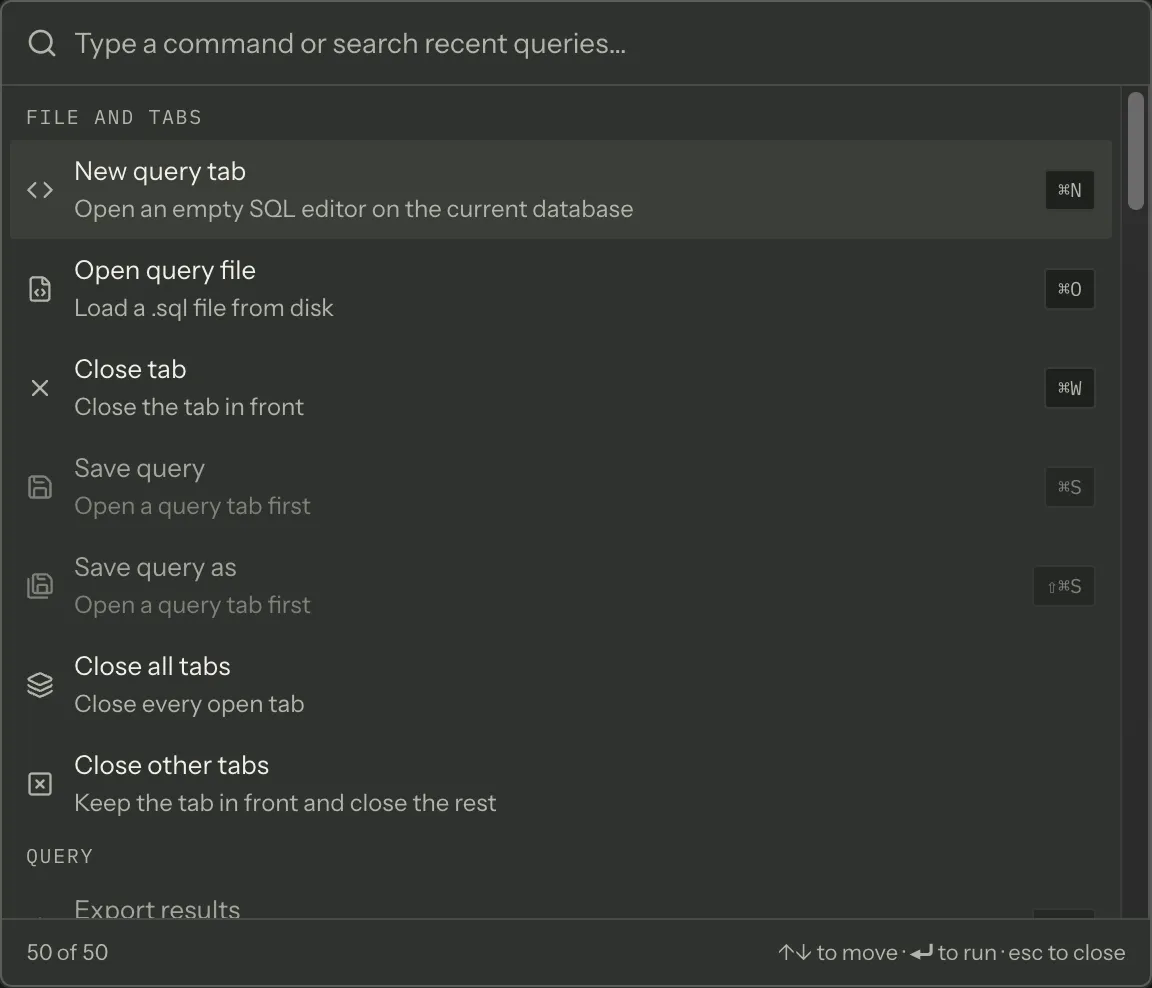
⌘K, or ⇧⌘P, opens the palette. Either key closes it again, and so does Escape.
Both bindings exist because both are muscle memory — ⌘K from Slack and Linear, ⇧⌘P from VS Code — and neither is a menu accelerator, which is why they work everywhere in the window.
That includes while you are typing SQL. The editor is Monaco, which used to claim ⌘K for itself as the opening keystroke of a two-key sequence and swallow it before the palette could see it; it now hands the key back, so ⌘K opens the palette from the editor as it does from anywhere else. The keyboard shortcuts guide has the detail.
What is in it
Section titled “What is in it”Joinery has 58 commands. 45 of them are in the palette; the other thirteen are absent for a stated reason rather than by oversight. They fall into three kinds:
- ten that need a target the palette cannot supply — Back up this database, Rename this database, Reveal in explorer. The explorer’s right-click menu is where those live, and each has a target-free twin the palette offers instead (Back up database resolves the current connection);
- Copy, which is a claim on the ⌘C keystroke rather than an action — the palette cannot be the thing holding your selection, because opening it took the focus;
- two that are not user actions at all: Insert snippet (the snippet library chooses which, and the palette opens that) and the editor telling the status bar where the caret is.
The palette also carries five entries that are not commands: Theme: System / Ivory / Ink, Close all tabs and Close other tabs.
Finally it offers your six most recent successful queries, read when the palette opens. Selecting one opens it in a new tab without running it — the tab lands on the connection and database the query was recorded against.
Recent queries sit last on purpose. They are the only unbounded, user-shaped source in the list, and
a palette whose resting state is twenty SELECTs hides the commands it exists to expose.
Groups
Section titled “Groups”Rows are grouped, and the groups come in a fixed order:
| Group | Palette entries |
|---|---|
| File and tabs | 7 |
| Query | 8, plus recent queries |
| Editor | 7 |
| View | 11 |
| Connections | 5 |
| Databases | 5 |
| Settings | 5 |
| Help | 2 |
Within a group the order is the catalogue’s, so the resting list reads like a menu.
Greyed-out rows
Section titled “Greyed-out rows”The palette never hides a row it cannot run. A row you cannot use right now is disabled and says why, in one of two ways.
“Not applicable yet” — the precondition is not met:
| Row needs | It says |
|---|---|
| Any live connection | Connect to a server first |
| A query tab in front | Open a query tab first |
| Results on screen | Run a query first |
“Results on screen” means a result with at least one result set that has rows — a bare UPDATE has
nothing to export or inspect.
“Not wired yet — …” — nothing in the app is listening for that command, and the row names what owns it. Two commands render this way today: Server properties and Database properties. The palette is the only place either one appears at all: the menu-bar items that used to send them were removed, because a menu row has no way to say “not wired yet” and simply did nothing when clicked.
Object properties and a database’s Delete… are unowned too, but they carry a target and so are never listed here (see above). They have no menu item either, for the same reason — the object explorer no longer offers Properties… or Delete…. Both commands stay registered, so the surfaces behind them have somewhere to land.
Preconditions are checked first, which matters: the twelve commands the query editor owns have no listener when no query tab is open, and the useful answer there is “open a query tab”, not “not wired yet”.
Matching and the row
Section titled “Matching and the row”Typing ranks rather than filters, over each row’s label, its one-line description at a lower weight,
and a set of keywords at a lower weight still — so typing csv finds Export results and ai
finds Toggle assistant. Anything that does not match even as a loose subsequence is dropped rather
than shown at the bottom. At most 60 rows are drawn; the footer counts what is showing against the
whole list.
A row shows one keystroke — its primary binding. The full set, including alternates, is on the keyboard shortcuts cheat sheet. Every command, with its description and whether the palette lists it, is in the command reference.
The palette and the menus
Section titled “The palette and the menus”They are the same list read two ways. Every command’s label, description, group and keystroke live in one table in the app’s source; the palette renders it, the cheat sheet renders it, and a test compares the keystrokes in it against what the Electron menus actually register. A command cannot be in the menus and missing from the palette, and a palette row cannot name a command that does not exist.
What differs is where the keystroke is bound — the menu, the app, or the editor — which is why some keys work inside a text field and some do not. The cheat sheet says which for every binding.
Where this page's facts come from
| Claim | Source |
|---|---|
| ⌘K and ⇧⌘P both toggle it, owned by a renderer key listener | packages/renderer/src/features/command-palette/command-palette.tsx:79-92 |
| ⌘K reaches the palette from inside the SQL editor, which Monaco used to prevent | packages/renderer/src/editor/sql-editor.tsx:452-493, editor/sql-editor.spec.tsx — ‘releases ⌘K, so the palette’s own shortcut reaches the window’ |
| Both bindings, and why they are not menu accelerators | packages/renderer/src/features/command-palette/palette-actions.ts:112-121 |
| 58 commands in the catalogue | packages/renderer/src/commands/catalogue.ts:272-803, commands/registry.ts:331 |
| 45 of them are palette-visible | packages/renderer/src/commands/catalogue.ts:245-249, 813-819 |
| Ten hidden because they carry a target the palette cannot supply, each with a twin | packages/renderer/src/commands/catalogue.ts:251-267, 721-802 |
| Copy is a keystroke claim, not an action | packages/renderer/src/commands/catalogue.ts:690-700 |
| Insert snippet and the caret notification are not user actions | packages/renderer/src/commands/catalogue.ts:701-719 |
| The five local actions: three themes, close all tabs, close other tabs | packages/renderer/src/features/command-palette/palette-actions.ts:35-95 |
| Six recent successful queries, read when the palette opens | packages/renderer/src/features/command-palette/command-palette.tsx:65, 94-117 |
| A recent query opens in a tab and is deliberately not executed | packages/renderer/src/features/command-palette/command-palette.tsx:320-335 |
| It lands on the connection the entry was recorded against | packages/renderer/src/features/command-palette/command-palette.tsx:328-334 |
| Recent queries come last | packages/renderer/src/features/command-palette/palette-model.ts:251-266 |
| The eight groups, their order and their labels | packages/renderer/src/commands/catalogue.ts:110-133 |
| Group order first, catalogue order within a group | packages/renderer/src/features/command-palette/palette-model.ts:167-172 |
| A row that cannot run is disabled with a reason, never hidden | packages/renderer/src/features/command-palette/palette-model.ts:11-25 |
| The three preconditions and their exact wording | packages/renderer/src/features/command-palette/palette-model.ts:98-115 |
| “Results on screen” means a result set with rows | packages/renderer/src/features/command-palette/command-palette.tsx:123-127 |
| An unowned command names its owner in the row | packages/renderer/src/features/command-palette/palette-model.ts:117-154, command-palette.tsx:260-266 |
| Server properties and Database properties are palette-visible and unowned | packages/renderer/src/commands/catalogue.ts:462-469, 507-514, commands/registry.ts:392-397, 414-416, and no useCommand for either |
| Their menu-bar items were removed, so the palette is their only surface | packages/renderer/src/shell/menu-bridge.tsx:25-33, packages/main/src/menu.ts:279-284, 314 |
| Object properties and delete-database are unowned but never listed by the palette | packages/renderer/src/commands/catalogue.ts:762-769, 786-794, commands/registry.ts:483-488, 492-495 |
| Neither has a menu item in the explorer either | packages/renderer/src/shell/sidebar/node-menu.tsx:22-31, 271-273, 309-317 |
| Preconditions are evaluated before the handler check, and why | packages/renderer/src/features/command-palette/palette-model.ts:131-143 |
| Ranking over label, hint (0.6) and keywords (0.5); non-matches dropped | packages/renderer/src/features/command-palette/command-palette.tsx:136-150, utils/fuzzy.ts:29-43 |
| At most 60 rows; the footer counts visible against total | packages/renderer/src/features/command-palette/command-palette.tsx:66, 221-228 |
| A row shows only the primary binding | packages/renderer/src/commands/catalogue.ts:898-906 |
| The palette, the cheat sheet and the menus read one table | packages/renderer/src/commands/catalogue.ts:1-45 |
| A test compares the catalogue’s accelerators against the registered menu items | packages/renderer/src/commands/catalogue.ts:31-45, commands/catalogue.spec.ts |
| A palette entry cannot name a command that does not exist | packages/renderer/src/features/command-palette/palette-model.ts:1-26 |
| Where a keystroke is bound — menu, app or editor — and why it matters | packages/renderer/src/commands/catalogue.ts:144-157 |