

Results grid
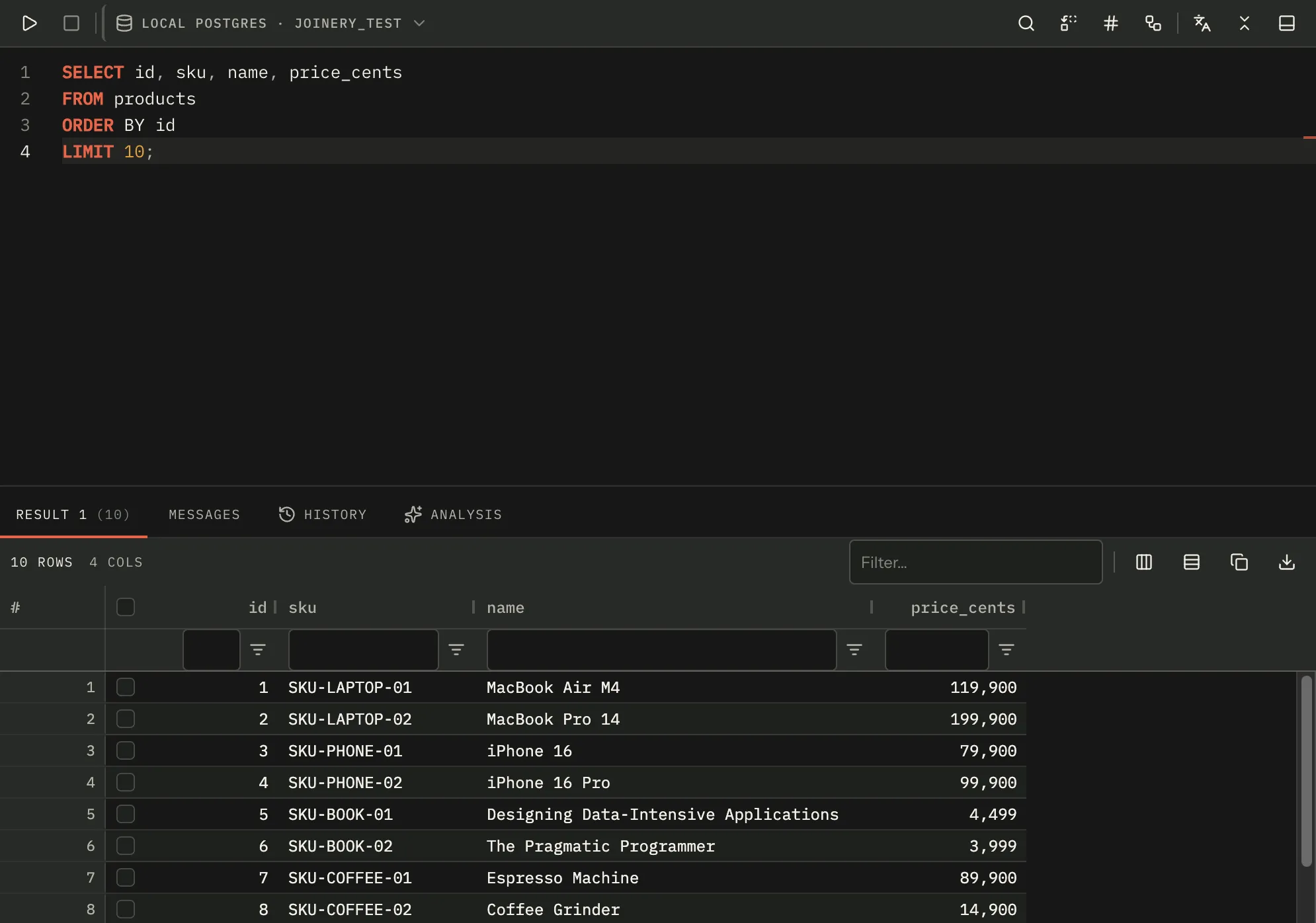
Results appear under the editor in the tab that produced them. A batch that returns several result sets gets one tab per set, numbered with its row count, plus Messages and History — and a Plan tab when you have asked for an execution plan, and an Analysis tab when the AI analysis feature is switched on.
A statement that returns no rows at all — an INSERT, a CREATE — lands on Messages. A statement
that returns zero rows lands on its grid, which says so in words rather than showing an empty
header row.
The row cap
Section titled “The row cap”Settings ▸ Query ▸ Maximum rows to fetch ships at 10,000, and it is enforced in the main process before the rows cross into the interface. When a result is capped, the strip above the grid reads showing first 10,000 of 84,312 rows, with a tooltip explaining that your maximum-rows setting is what capped it. An uncapped result just reads 84,312 rows.
The tooltip names the setting by its own label, Maximum rows to fetch — both read the same constant, so the two cannot drift apart again (they had: the tooltip used to say “maximum rows to display”, which is the field name, not anything the settings panel shows).
Note — the cap is on what is fetched into the app, not on what the server does. The statement runs in full; Joinery keeps the first N rows of each result set.
Sorting, filtering and columns
Section titled “Sorting, filtering and columns”Every column is sortable and resizable, has a filter appropriate to its declared SQL type
(number, date or text), and carries a floating filter row under its header. The strip above the
grid also has a quick filter that matches across all columns at once, and a filtered marker
appears while it has text in it.
Primary-key columns are pinned to the left, so they stay on screen as you scroll sideways. A
# gutter counts the rows as displayed — sort descending and it still reads 1, 2, 3 — and it
can be turned off under Settings ▸ Grid ▸ Row numbers.
Columns are auto-sized to their contents when a result lands, capped at 1100px so one long JSON cell cannot produce a column wider than the window. The toolbar’s Fit columns to their contents button re-runs that.
Values are formatted for reading: NULL in muted italics for an absent value (which is how you
tell it from the string “NULL”), numbers with locale grouping, dates as ISO strings, objects as
JSON. A column that references another table is marked with a dotted underline, and its header
tooltip names the target.
Copying
Section titled “Copying”The toolbar’s copy button, and ⌘C while the grid has focus, copy in the format set by Settings
▸ Grid ▸ Copy format — tsv by default, with csv and json available, and a separate
include headers switch that json ignores.
With rows selected, it copies the selection. With nothing selected, it copies every displayed row — post-sort, post-filter, in displayed order, with only the columns you can see. The confirmation says which it did: 3 rows against all 412 rows.
Two menu items under the export button override the setting for one copy: Copy as JSON and Copy as TSV with headers.
⌘C hands the keystroke back rather than eating it in three cases: focus is outside the grid, focus is in an editable field (the quick filter, a floating filter), or you have dragged out a real text selection across cell text — in which case you get the text you highlighted.
Copied values are raw, never the grid’s display formatting: a number reaches the clipboard as
1234.5, not 1,234.5. TSV collapses embedded tabs and newlines to a space so a paste into a
spreadsheet keeps its row structure; CSV quotes per RFC 4180.
Exporting
Section titled “Exporting”The export menu writes a file through a native save dialog, as CSV, JSON, or a set of SQL INSERT statements. ⇧⌘X exports the active tab’s grid as CSV.
Copy and export mean the same thing by “the results”: what you are looking at — the rows your sort and your filters left on screen, in the order they are on screen, with only the columns you can see, in the order you can see them. Export a filtered grid and you get the filtered rows; hide a column and it is not in the file.
An export with nothing on screen — a filter that matched nothing — writes no file and says so. Copy, unlike export, honours a selection first: with rows ticked it copies those rows.
Note — one copy or one export reads at most 1,000,000 displayed rows. The fetch cap above is far lower by default, so you are unlikely to meet this one; if you do, the app says how many of how many it took rather than quietly writing a subset.
The row inspector
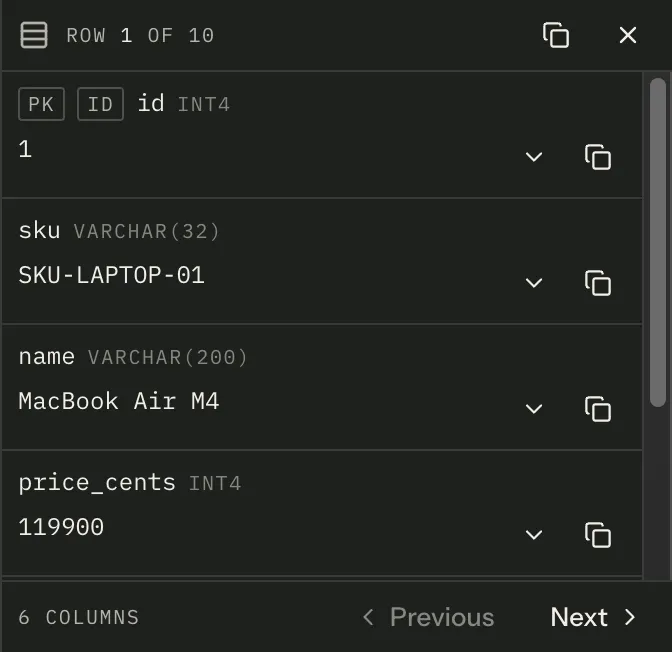
Section titled “The row inspector”Double-click a row, press the toolbar’s inspect button, or run Inspect row from the command
palette to open a rail beside the grid that reads one row vertically: each column with its type,
its value, and pk / fk / id markers.
The command opens the focused row, or the first selected one, or the first displayed one, in that order — so it works with the keyboard alone. Previous and Next walk the grid’s displayed order, not the original row order, so they follow your sort. Escape closes the rail; the grid stays visible and usable beside it the whole time.
A field expands in place to show an untruncated value plus what the catalogue knows about the column — nullability, its default, and what it references. Copy buttons cover one value or the whole row.
Following a foreign key
Section titled “Following a foreign key”When the statement was a straightforward single-table SELECT, Joinery fetches that table’s
catalogue metadata and marks the columns that point elsewhere. Clicking one previews the row it
references, in place, with its own primary key marked; a second button opens that row in a new
query tab instead.
The preview’s lookup is not recorded anywhere: not in your query history, and
not in the result history either, so peeking at a referenced row leaves neither list longer than it
was. Joinery builds that statement itself and sends the cell’s value to the server as a bound
parameter rather than writing it into the SQL, which is also why there is no statement text worth
keeping — a history entry would read WHERE "id" = $1 with the value missing from it. Opening the
referenced row in a tab is an ordinary query you can see and edit, and that one is recorded
like any other.
A join, a CTE or a multi-statement batch has no single table to enrich from, so no foreign keys are offered — the values render as plain text rather than as links that could not resolve.
Saved results
Section titled “Saved results”The History tab in the results panel is per-tab, and it is not the same thing as query history: it holds snapshots of what queries returned, written by the main process on every execute.
Each row shows its time, its row count and duration, and whether it succeeded. You can:
- click a snapshot to put its rows back in the grid — the pane says, in amber, that you are looking at a saved result and that running the query again returns you to live results;
- label one inline (Enter commits, Escape abandons, clicking away commits);
- pin one, which keeps it through purges;
- capture the result currently on screen as a pinned snapshot, which is what a comparison needs to survive;
- select two and compare them, which produces a row-level diff.
The comparison matches rows by key, not by position — a column named id or flagged as a
primary key, else the first column whose name ends in id, else the first column — so the same rows
returned in a different order count as unchanged. It covers the first result set only and is
capped at 10,000 rows per side, and the panel draws at most 200 changed rows and 12 changed cells per
row.
Deleting and purging snapshots are not available from this panel.
Where this page's facts come from
| Claim | Source |
|---|---|
| One tab per result set with its row count, plus Messages and History | packages/renderer/src/features/query/query-results.tsx:339-365 |
| The Plan tab appears only when a plan was parsed for this result | packages/renderer/src/features/query/query-results.tsx:129, 366-375 |
| The Analysis tab is gated on the AI analysis feature switch alone | packages/renderer/src/features/query/query-results.tsx:130-136, 376-385 |
| A statement with no result sets lands on Messages | packages/renderer/src/features/query/query-results.tsx:287-291 |
| Zero rows renders a sentence over the grid | packages/renderer/src/features/query/results-grid.tsx:687-696 |
maxRowsToDisplay ships at 10,000 |
packages/shared/src/types/settings.types.ts:66 |
| The cap is applied in the main process before the reply crosses IPC, keeping the true count | packages/main/src/services/sql/row-cap.ts:1-31, services/sql/query-executor.ts:220-230 |
| “showing first N of M”, and the uncapped form | packages/renderer/src/features/query/results-grid.tsx:488-517 |
| The tooltip and the settings control read one shared label constant | packages/renderer/src/features/settings/settings-labels.ts, quoted by features/query/results-grid.tsx and features/settings/settings-groups.tsx |
| Sortable, filterable, resizable, with a floating filter row | packages/renderer/src/features/query/grid-columns.ts:221-229 |
| Filter type follows the declared SQL type | packages/renderer/src/features/query/grid-columns.ts:141-173 |
The quick filter, and the filtered marker |
packages/renderer/src/features/query/results-grid.tsx:526-560, 671 |
| Primary-key columns are pinned left | packages/renderer/src/features/query/grid-columns.ts:169-170 |
The # gutter counts displayed positions and is refreshed on sort and filter |
packages/renderer/src/features/query/grid-columns.ts:175-203, results-grid.tsx:231-246 |
| Row numbers are a setting, on by default | packages/shared/src/types/settings.types.ts:74, features/settings/settings-groups.tsx:419 |
| Auto-size on load, capped at 1100px, with a toolbar button to re-run it | packages/renderer/src/features/query/results-grid.tsx:124-128, 204-229, 564-572 |
| NULL in muted italics, locale-grouped numbers, ISO dates, JSON for objects | packages/renderer/src/features/query/grid-columns.ts:85-125 |
| An FK column is marked and its header tooltip names the target | packages/renderer/src/features/query/grid-columns.ts:108-138 |
Copy format tsv default, plus csv and json; headers ignored for json |
packages/shared/src/types/settings.types.ts:26-41, 77-78, features/query/results-clipboard.ts:97-107 |
| Selection first, otherwise every displayed row; the confirmation says which | packages/renderer/src/features/query/results-grid.tsx:277-326, results-clipboard.ts:109-119 |
| Copy covers displayed columns in displayed order | packages/renderer/src/features/query/grid-view.ts (displayedColumns) |
| Copy as JSON / Copy as TSV with headers override the setting | packages/renderer/src/features/query/results-grid.tsx:627-641 |
| ⌘C declines outside the grid, in an editable field, or with a text selection | packages/renderer/src/features/query/results-grid.tsx:378-391 |
| Clipboard values are raw; TSV collapses tabs/newlines; CSV is RFC 4180 | packages/renderer/src/features/query/results-clipboard.ts:1-21, 40-53 |
| Export offers CSV, JSON and SQL INSERT through a native save dialog | packages/renderer/src/features/query/results-grid.tsx, the exportResults callback and the export menu |
| ⇧⌘X exports the active tab’s grid as CSV | packages/renderer/src/commands/catalogue.ts:325-333, features/query/results-grid.tsx, the export-results command handler |
| Copy and export both read the grid’s displayed model | packages/renderer/src/features/query/grid-view.ts (readGridView, viewResultSet), called by both handlers in results-grid.tsx |
| An export with an empty view writes nothing and says so | packages/renderer/src/features/query/results-grid.tsx, the No results to export guard |
| One copy or export reads at most 1,000,000 displayed rows, and reports hitting it | packages/renderer/src/features/query/grid-view.ts (MAX_VIEW_ROWS, cappedMessage) |
| The inspector opens on double-click, the toolbar button, or the command | packages/renderer/src/features/query/results-grid.tsx:425-448, 574-582, 450-477 |
| The command prefers focused, then selected, then first row | packages/renderer/src/features/query/results-grid.tsx:454-477 |
| Previous/Next walk the grid’s displayed order | packages/renderer/src/features/query/row-detail-panel.tsx:75-86, results-grid.tsx:399-423 |
| Escape closes the rail, and the grid stays visible beside it | packages/renderer/src/features/query/row-detail-panel.tsx:8-16, 179-196 |
| A field expands to the full value plus nullability, default and reference | packages/renderer/src/features/query/row-detail-panel.tsx:400-403, 505-533 |
| pk / fk / id markers, and copy-one-value / copy-the-row | packages/renderer/src/features/query/row-detail-panel.tsx:239-249, 411-421, 492-502 |
| FK enrichment needs a single-table SELECT to parse | packages/renderer/src/features/query/row-detail-panel.tsx:346-374 |
| The FK preview, and the open-in-a-new-tab button | packages/renderer/src/features/query/row-detail-panel.tsx:555-670, 679-696 |
| The preview’s lookup is neither recorded in query history nor snapshotted | packages/renderer/src/features/query/row-detail-panel.tsx:573-599, packages/main/src/ipc/query.ipc.ts:177-192 |
| Its value is bound, not written into the SQL | packages/main/src/services/sql/fk-record.ts:64-91, services/sql/dialect/sql-dialect.ts:89-101 |
| Opening the referenced row in a tab is an ordinary, recorded query | packages/renderer/src/features/query/fk-lookup.ts:331-349, row-detail-panel.tsx:679-696 |
| Snapshots are written by the main process on every execute | packages/main/src/ipc/query.ipc.ts:64-85 |
| Viewing a snapshot shows an amber “saved result” notice | packages/renderer/src/features/query/query-results.tsx:315-326 |
| Label inline (Enter commits, Escape abandons, blur commits), pin, capture, compare | packages/renderer/src/features/query/result-history-panel.tsx:196-267, 430-477 |
| Matching is by inferred key column rather than by position | packages/main/src/services/config/query-results-store.ts:524-543 |
| The comparison covers the first result set of each snapshot only | packages/main/src/services/config/query-results-store.ts:364-365 |
| It is capped at 10,000 rows per side | packages/main/src/services/config/query-results-store.ts:551-563 |
| The panel draws at most 200 rows and 12 cells per row | packages/renderer/src/features/query/result-diff.ts:26-31 |
| Delete and purge are not in this panel | packages/renderer/src/features/query/result-history-panel.tsx:6-19 |