

AI assistant
The assistant is a chat surface that can read your schema, run queries and explain what comes back. It needs a provider with an API key first — see AI setup.
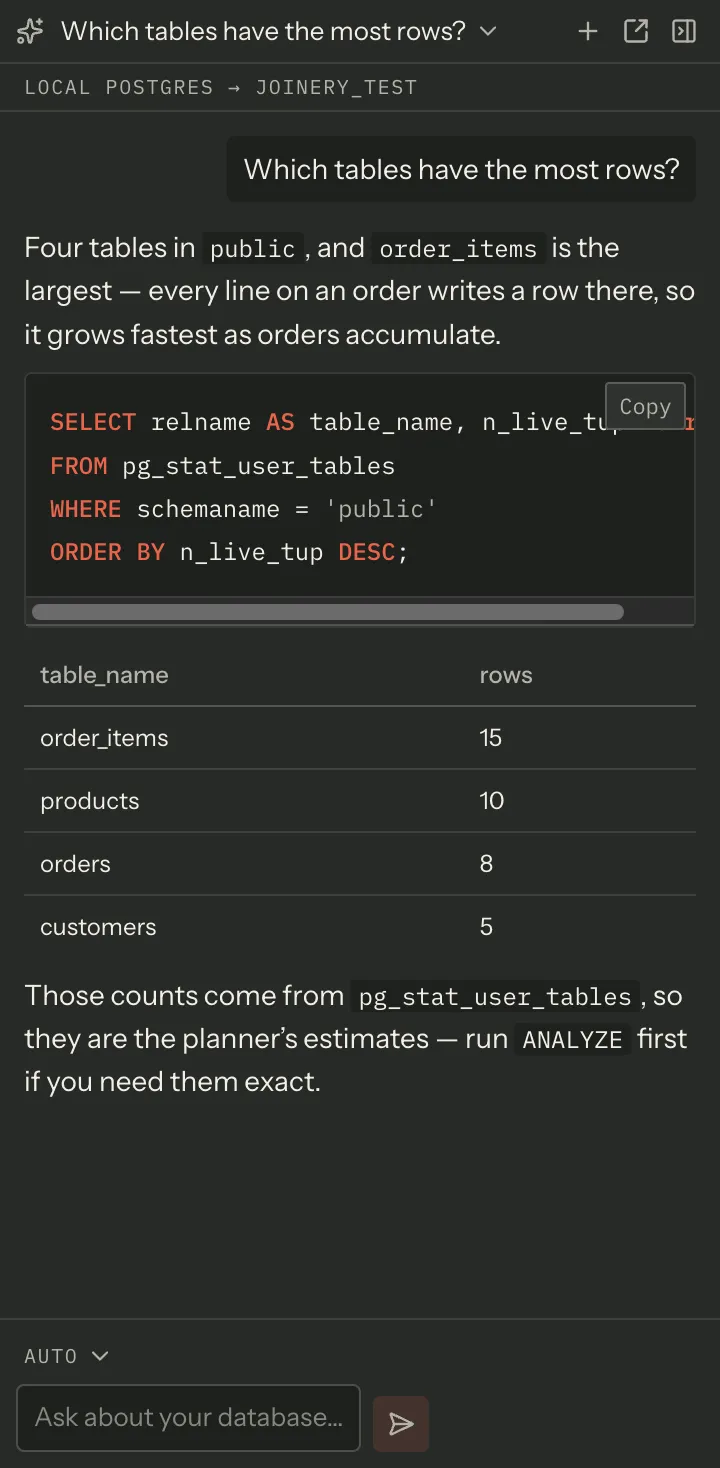
That transcript is a fixture, not a recording: the screenshot tooling seeds a conversation into the panel rather than calling a model, so nothing in these docs depends on what a vendor happened to reply on the day the shot was taken.
Two places it lives
Section titled “Two places it lives”⇧⌘I toggles the assistant as a side panel. ⌘K ▸ Open assistant as a tab opens a full-width chat tab in the dock instead, with its own conversation.
The panel’s header carries Open this conversation as a tab, which closes the panel and takes the conversation with it — one conversation never has two live surfaces writing the same transcript.
Every chat tab keeps its own conversation, so two open chats cannot overwrite each other.
What the assistant is told
Section titled “What the assistant is told”A line under the header states the context, and it reads the same source the message does — it cannot claim context the model does not get.
With a query tab in front, the assistant is sent:
- the connection and its engine (and engine variant),
- the selected database,
- the SQL in that editor.
A chat tab carries the connection it was opened from, so it keeps that context with a chat tab in front — popping the panel out with ⧉ takes the panel’s connection and database with it, and the palette’s Open chat tab uses the connection a new query tab would target. What a chat tab does not carry is the SQL in an editor: there is no editor in front of you, so there is none to send.
Note — a chat tab opened when nothing had a connection has no context, and the line says so: No database context — open a query tab. It never implies a database the model was not told about.
Asking
Section titled “Asking”Type and press ↩. ⇧↩ is a newline. The box grows with what you type, up to about eight lines.
An empty conversation offers four openers — Show me all tables, Describe the schema, List stored procedures, Count rows in each table — all of them reads, all of them sendable before the model has seen anything.
Answers stream. While one is arriving the box is disabled and the Send button becomes Stop. Stopping keeps whatever had arrived and marks it: the transcript ends with — stopped, or reads Stopped before the answer began if nothing had. A truncated answer that did not say it was truncated would be a lie about what the model said.
The transcript follows the stream only while you are at the bottom of it. Scroll up to re-read something and it stays put; a Jump to latest button appears.
Answers are rendered as Markdown, with syntax highlighting, mermaid diagrams and per-block copy buttons. Diagrams and copy buttons appear when a message finishes — a fence is unterminated for as long as it is being written. Diagrams already on screen are redrawn when you switch between the ink and ivory themes, so an old message’s colours never disagree with the canvas under it.
The model picker
Section titled “The model picker”Above the box, a picker shows which model this message goes to. Auto lets the main process choose; picking a model pins it. Re-selecting the model you pinned goes back to Auto.
Pinning one of OpenRouter’s auto-routers — openrouter/auto or openrouter/auto-beta — reveals
a second picker beside it: the auto-router cost tier. See AI setup
for what the bands mean; it is the same per-vendor setting the setup dialog edits, so changing it in
either place changes it in both.
The picker only appears at all once at least one vendor is enabled. A trigger opening an empty menu is worse than no trigger.
Tool calls
Section titled “Tool calls”The assistant does not only answer — it can call tools, and each call appears in the transcript as its own card: the tool’s name, how long it took, and a status glyph (running, done, failed).
Expand a card to see the result. A tabular result is rendered as a table, capped, with Showing the first N of M rows beneath it; anything else is shown as JSON, capped at 4,000 characters. A failure shows the tool’s own error.
Anything that writes is confirmed
Section titled “Anything that writes is confirmed”A dangerous tool stops and asks. The confirmation card names the tool, states what that tool does, shows the exact arguments, and offers Run it and Cancel.
While a confirmation is on screen the composer refuses new messages and says why: Answer the tool request above — run it or cancel it — before sending another message.
Both buttons disarm on the first click, and a tool call is answered once: an approval that arrives for a tool call you have already run — or already cancelled — is refused rather than run again. So a double-click cannot execute a DDL statement twice.
Cancel is final. The cancelled card records the refusal, and approving the same request afterwards does nothing.
The turn stays open while the card waits, so the composer’s button is Stop rather than a disabled Send. Pressing it answers any request still waiting: those cards are marked Stopped by user, the composer comes back, and — as with Cancel — approving one of them afterwards does nothing.
Stop does not reach back into work already under way. A tool you have approved runs to completion and records its real result; what Stop ends is the answer the assistant was going to write about it.
Note — the card does not invent a result. It reads as pending until the real result arrives, whichever way you answered.
Conversations
Section titled “Conversations”The title in the header opens the conversation list. + starts a new one.
A conversation is titled from the first 50 characters of your first message, with an ellipsis when it was longer. You can rename one in place from its row, and delete it — delete asks twice: the first click arms the row, the second commits.
Conversations are held by the main process, one JSON file each in the app’s own data directory, so they survive a restart.
What the assistant can open for you
Section titled “What the assistant can open for you”The model can ask the app to do a small, fixed set of things, and Joinery routes each through the same command the menus use:
| It asks for | What happens |
|---|---|
| A query tab | Opens one on the focused connection and database, with the SQL in it — it does not run unless the model asked for that |
| A database | Moves the database picker |
| Settings | Opens the settings panel |
| Backup | Opens the backup wizard |
| A new database | Opens the create-database dialog |
Each surface consumes its own request, so a panel and a tab cannot both open the same dialog.
When no provider is set up
Section titled “When no provider is set up”The transcript says No AI provider configured with a Set up AI button, and the box’s placeholder reads Configure an AI provider to chat. That gate is the same one the main process uses — a vendor that is enabled and has a key saved — so the panel cannot invite you to send a message that would be refused.
Where this page's facts come from
| Claim | Source |
|---|---|
| ⇧⌘I toggles the panel; the palette opens a chat tab | packages/renderer/src/commands/catalogue.ts:533-550, features/chat/chat-commands.tsx:25-30 |
| “Open this conversation as a tab” closes the panel first | packages/renderer/src/features/chat/chat-surface.tsx:210-215, 262-274 |
| Every chat tab has its own store | packages/renderer/src/features/chat/chat-surface.tsx:11-17 |
| The context line reads the same source the message does | packages/renderer/src/features/chat/chat-surface.tsx:80-107 |
| Connection, database, engine, variant and the editor’s SQL are sent | packages/renderer/src/state/chat.ts:403-423 |
| Context derives from the active query tab, so a chat tab has none | packages/renderer/src/features/chat/chat-surface.tsx:83-87, state/chat.ts:406-409 |
| The exact “no database context” wording | packages/renderer/src/features/chat/chat-surface.tsx:94-97 |
| Enter sends, Shift+Enter is a newline | packages/renderer/src/features/chat/chat-composer.tsx:348-353 |
| The box grows and caps at about eight lines | packages/renderer/src/features/chat/chat-composer.tsx:354-356 |
| The four opening suggestions, verbatim | packages/renderer/src/features/chat/chat-transcript.tsx:42-51 |
| The box is disabled and Send becomes Stop while streaming | packages/renderer/src/features/chat/chat-composer.tsx:282-283, 359-384 |
| A stopped answer is marked in the transcript | packages/renderer/src/state/chat.ts:207-217 |
| Stop answers a waiting confirmation instead of leaving it armed | packages/renderer/src/state/chat.ts:179-205, packages/main/src/services/ai/chat-service.ts:216-271 |
| Scroll only follows while pinned to the bottom; a Jump button appears | packages/renderer/src/features/chat/chat-transcript.tsx:4-14, 39-40 |
| Mermaid and code-copy switch on when a message completes | packages/renderer/src/features/chat/chat-message.tsx:21-27 |
| Answers render through the sanitising markdown pipeline | packages/renderer/src/features/chat/chat-message.tsx:30-36 |
| Auto, and re-selecting a pinned model returns to Auto | packages/renderer/src/features/chat/chat-composer.tsx:60-66, 222-256 |
| The cost-tier picker appears only beside a pinned auto-router | packages/renderer/src/features/chat/chat-composer.tsx:104-106, 315-319 |
| The two auto-router model names | packages/shared/src/types/ai.types.ts:54-57 |
| It writes the same per-vendor setting the setup dialog edits | packages/renderer/src/features/chat/chat-surface.tsx:128-153 |
| The model picker is hidden when no vendor is enabled | packages/renderer/src/features/chat/chat-composer.tsx:200-202, 312 |
| A tool card shows name, duration and a status glyph | packages/renderer/src/features/chat/tool-call-card.tsx:172-244 |
| Table results are rendered as a table with a truncation line | packages/renderer/src/features/chat/tool-call-card.tsx:54-111 |
| Non-tabular results are JSON, capped at 4,000 characters | packages/renderer/src/features/chat/tool-call-card.tsx:57-69 |
| A failure shows the tool’s own error | packages/renderer/src/features/chat/tool-call-card.tsx:250-262 |
| The confirmation names the tool, describes it, and shows the arguments | packages/renderer/src/features/chat/tool-call-card.tsx:128-149 |
| Run it and Cancel, and both disarm on the first click | packages/renderer/src/features/chat/tool-call-card.tsx:114-126, 149-170 |
| A repeat approval or decline is refused, and a cancel is final | packages/main/src/services/ai/chat-service.ts:408-484 |
| The composer’s refusal sentence while a confirmation waits | packages/renderer/src/features/chat/chat-composer.tsx:325-329 |
| The card stays pending until the real result lands | packages/renderer/src/features/chat/tool-call-card.tsx:31-33 |
| The conversation list toggle and the new-conversation button | packages/renderer/src/features/chat/chat-surface.tsx:229-260 |
| The title is the first 50 characters of the first message | packages/renderer/src/state/chat.ts:39-40, 389-398 |
| Rename in place, and delete asks twice | packages/renderer/src/features/chat/conversation-list.tsx:20, 66-92 |
| Conversations are held by the main process, one JSON file each | packages/main/src/services/ai/chat-service.ts:99-137 |
| The five UI actions the model can ask for | packages/renderer/src/state/chat.ts:169-200, features/chat/chat-surface.tsx:186-193 |
| A query tab opened this way does not auto-execute unless asked | packages/renderer/src/state/chat.ts:180-190 |
| Each surface consumes its own parked action | packages/renderer/src/features/chat/chat-surface.tsx:26-31 |
| The no-provider empty state, its button and the placeholder | packages/renderer/src/features/chat/chat-transcript.tsx:64-85, chat-composer.tsx:340-346 |
| The gate is enabled-vendor-with-a-key, the same one main uses | packages/renderer/src/features/chat/chat-transcript.tsx:16-23 |