

Query editor
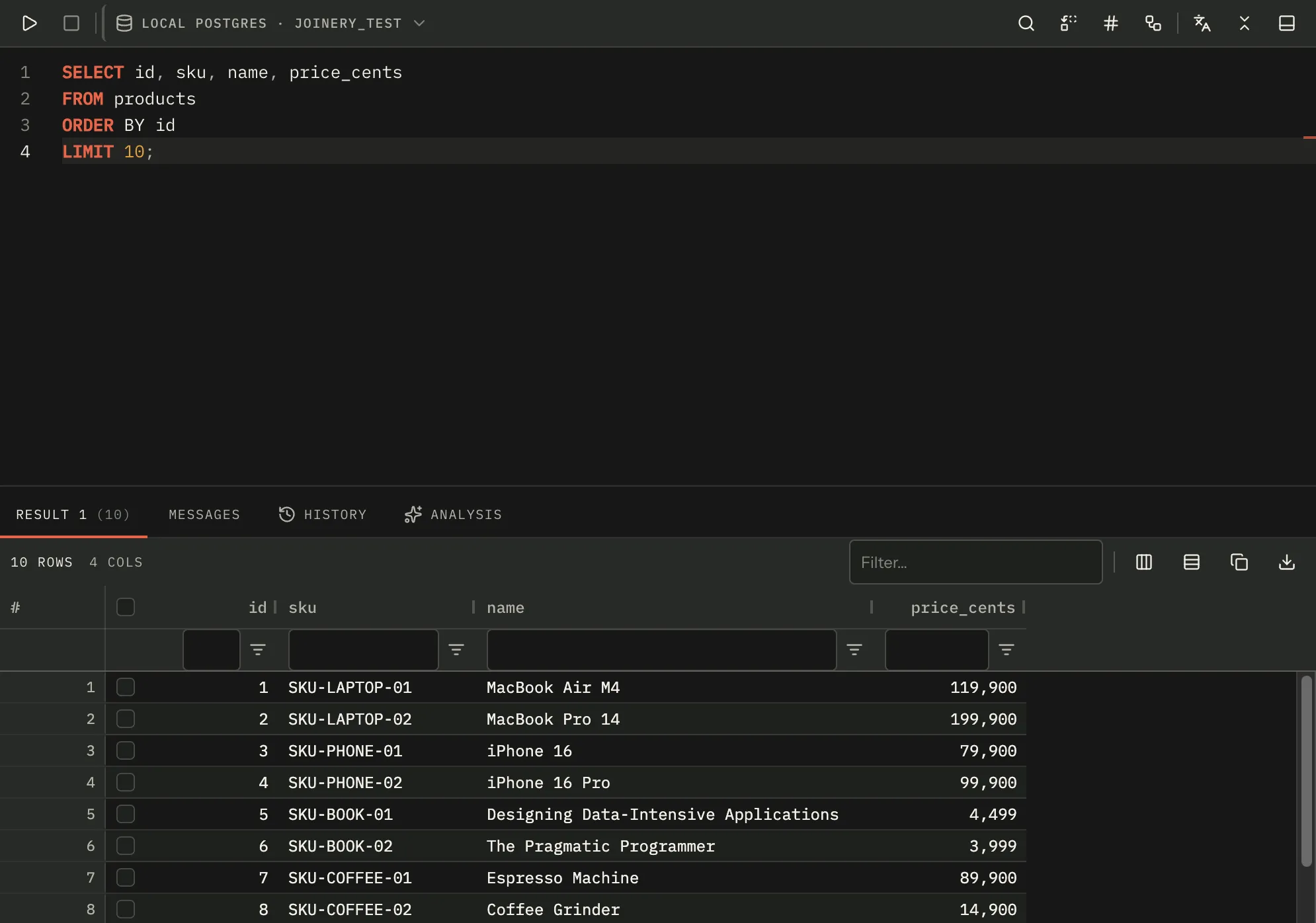
A query tab is a SQL editor with its results underneath. ⌘N opens an empty one on the current database; the explorer, the object search and the query history all open one already filled in.
The tab is three bands: a toolbar, the editor, and the results panel. The divider between the last two is draggable, and where you leave it is remembered for every query tab — it is one setting, not one per tab. ⇧⌘\ collapses the results away entirely and gives the editor the whole pane.
Every tab carries its own connection and database. Two tabs open against two servers stay that way, and the toolbar’s context chip shows which is which.
Running SQL
Section titled “Running SQL”Three keystrokes run the editor, and they differ only in what they ask you first.
| Keys | What runs | Confirmation |
|---|---|---|
| ⌘E | What Execute scope selects | A one-time “are you sure?” the first time, with a Don’t ask again |
| ⌘↩ or F5 | What Execute scope selects | None |
| ⇧⌘↩ | The selection only | None |
A selection always wins. If any text is highlighted, all three run exactly that text and the Execute scope setting is not consulted at all. Highlighting nothing but whitespace still counts as a selection, so ⌘E, ⌘↩ and F5 refuse with “No query to execute” rather than quietly running the whole buffer; ⇧⌘↩ refuses the same case with “Select some SQL to execute”.
Execute scope lives in Settings ▸ Query and ships as The whole editor. The other option
is The statement at the caret, which scans outwards from the caret line for a boundary: a
semicolon anywhere on a line, or GO alone on a line. A trailing semicolon belongs to the
statement it ends; a GO belongs to neither side.
Note — boundaries are found per line, not per character.
select 1; select 2written on one line is one statement to Joinery. This is a known limitation, not a bug in your SQL.
⇧⌘↩ (Ctrl+Shift+E outside macOS) means the selection and nothing else. With nothing selected it refuses — it does not fall back to the current statement or to the whole buffer.
Settings ▸ Query ▸ Confirm before every execute puts a confirmation in front of every one of those paths. It is off by default. When it is on it takes precedence over ⌘E’s one-time gate, so you never see a Don’t-ask-again on a prompt that will come back anyway.
⌘. cancels a run in progress (Alt+Break outside macOS). The toolbar’s stop button does the same and is enabled only while something is running.
What a run produces
Section titled “What a run produces”A successful run renames the tab from the SQL — or, when the AI tab-namer is switched on, from a model’s one-line summary of it. Everything Joinery executes is also written to the query history, and a snapshot of the result is filed under the tab for the results panel’s own History tab.
Placeholders
Section titled “Placeholders”SQL containing Flyway-style ${name} markers prompts before it runs: one field per distinct
placeholder, in the order they first appear, pre-filled with whatever you last answered. Every
occurrence of a name is substituted, not just the first. Cancelling the prompt abandons the run.
A name you leave unanswered is left in the SQL as it stands rather than being replaced with an empty string. Pressing Execute again while a prompt is already open does nothing except pull the caret back to the field that is blocking the run.
The editor
Section titled “The editor”Joinery’s editor is Monaco, tokenised for the tab’s engine — changing a tab’s connection to a different engine re-tokenises in place and keeps your undo history.
Six preferences under Settings ▸ Editor are live: font size (13), tab size (4), word wrap (off), the minimap (off), line numbers (on) and autocomplete (on). Changing one applies to every open editor immediately. Indentation is always spaces.
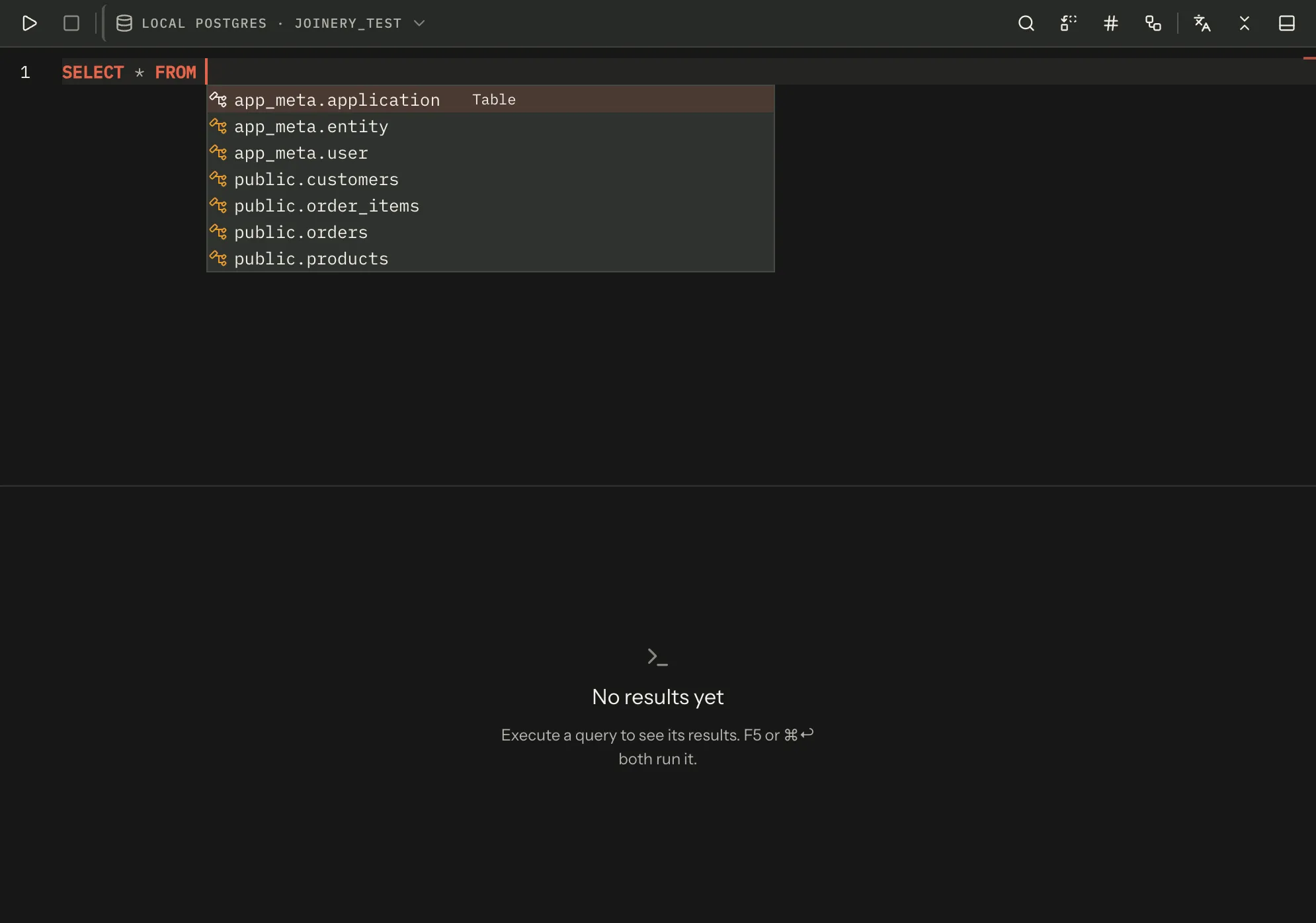
Turning autocomplete off stops the suggestion list appearing as you type; ⌃Space still asks for it on demand.
Completions follow the tab’s engine
Section titled “Completions follow the tab’s engine”What the list offers, and what it inserts, is written for the engine the tab is connected to — the same engine that picks the tokenizer and the formatter.
- Quoting. Names are inserted with that engine’s delimiters:
"public"."customers"on PostgreSQL,`customers`on MySQL,[dbo].[customers]on SQL Server. A name that contains its engine’s closing delimiter has it doubled, so it still parses. MySQL names get no schema part, because MySQL has no schema layer between a database and its tables. - Keywords. A shared SQL vocabulary on every engine, plus that engine’s own —
LIMIT,RETURNING,ILIKEandON CONFLICTon PostgreSQL;LIMIT,AUTO_INCREMENT,IFNULLandON DUPLICATE KEY UPDATEon MySQL;TOP,NOLOCK,GETDATEandCHARINDEXon SQL Server. One engine’s keywords are never offered on another. - Snippets.
select_top,try_catchandmergeare SQL Server’s; PostgreSQL and MySQL getselect_limitand anupsertwritten in their own grammar.create_procedurehas a different body on each of the three. - Stored procedures. Typing
CALLoffers them on PostgreSQL and MySQL;EXECorEXECUTEdoes on SQL Server.
Typing a quoted name and then a dot — "customers". — offers that table’s columns on every
engine, in any of the three quoting styles.
The AI ghost text is the exception: it does not yet tell the model which dialect it is completing for.
| Action | Keys | Also |
|---|---|---|
| Find | ⌘F | Toolbar |
| Find and replace | ⌥⌘F | Toolbar — Ctrl+H on Windows |
| Go to line | — | Toolbar only |
| Toggle comment | ⌘/ | — |
| Format SQL | ⇧⌘F | Toolbar |
Format re-indents the whole document for the tab’s engine. It replaces the document as a single undoable edit, so ⌘Z gets you back. If the formatter cannot parse the SQL it says which token it choked on instead of silently doing nothing.
The toolbar also carries a dialect converter and a Show execution
plan button. The converter rewrites the selection, or the whole buffer
when nothing is selected, into another engine’s dialect; it needs Python and sqlglot on the
host, and the current engine is not offered as a target.
Right-clicking inside the editor does nothing: Monaco’s own context menu is switched off and Joinery has not yet put one in its place.
Snippets
Section titled “Snippets”Inserting from the snippet library appends to the editor after a blank line rather than replacing what is there or pasting at the caret. An empty editor simply becomes the snippet.
Query files
Section titled “Query files”| Action | Keys | Behaviour |
|---|---|---|
| Open | ⌘O | Reads a .sql file into the active tab |
| Save | ⌘S | Writes back to the file this tab came from; asks for a path only once |
| Save as | ⇧⌘S | Always asks for a path |
Both dialogs filter for .sql and offer All Files. Dismissing one is not an error — nothing is
written and nothing is reported.
A tab remembers the path it was saved to or opened from, and saving clears the tab’s unsaved marker. Opening a file does the same: a file you have not touched does not come up looking like unsaved work.
Saving an empty editor is refused with “No query to save”.
Tabs opened with SQL already in them
Section titled “Tabs opened with SQL already in them”Some actions open a query tab pre-filled. Only the ones whose label promises a run actually run: the explorer’s Select Top 1000 Rows executes on arrival, Edit Top 200 Rows and every Script as… item do not. Query history’s ⇧Enter runs; its Enter loads. A pre-filled tab is never put through the Confirm-before-execute gate, because you asked for it by name.
Where this page's facts come from
| Claim | Source |
|---|---|
| The tab is toolbar / editor / divider / results, with a persisted split | packages/renderer/src/features/query/query-panel.tsx:497-570 |
| The split percentage is one workbench-wide value, not per tab | packages/renderer/src/features/query/query-panel.tsx:82, 559-560 |
| ⇧⌘\ hides the results and the editor takes the whole pane | packages/renderer/src/features/query/query-panel.tsx:475, 516-523, commands/catalogue.ts:551-558 |
| ⌘N opens a new query tab | packages/renderer/src/commands/catalogue.ts:284-291 |
| Each tab holds its own connection and database | packages/renderer/src/features/query/query-panel.tsx:71-74, 122-135 |
⌘E is bound by Monaco, not by the menu (registerAccelerator: false) |
packages/renderer/src/editor/sql-editor.tsx:345-349, packages/main/src/menu.ts:210-213 |
| ⌘E goes through the one-time gate; the setting takes precedence over it | packages/renderer/src/features/query/query-panel.tsx:216-227 |
| ⌘↩ and F5 are ungated | packages/renderer/src/editor/sql-editor.tsx:350-356, query-panel.tsx:161-168 |
| ⇧⌘↩ runs only the selection and refuses when there is none | packages/renderer/src/features/query/query-panel.tsx:186-206, commands/catalogue.ts:408-415 |
| A non-empty selection wins over the scope setting | packages/renderer/src/editor/statements.ts:91-97 |
| A whitespace-only selection is a real selection to Monaco | packages/renderer/src/editor/statements.ts:82-92 |
| ⌘E / ⌘↩ / F5 then refuse with “No query to execute” | packages/renderer/src/features/query/use-run-query.ts:131-134 |
| ⇧⌘↩ refuses with “Select some SQL to execute” | packages/renderer/src/features/query/query-panel.tsx:189-198 |
Execute scope options, and all as the shipped default |
packages/renderer/src/features/settings/settings-groups.tsx:293-294, packages/shared/src/types/settings.types.ts:70 |
Statement boundaries are a semicolon on a line or GO alone on a line, and are line-granular |
packages/renderer/src/editor/statements.ts:14-19, 25, 38-70 |
confirmBeforeExecute ships off and applies to every execute path |
packages/shared/src/types/settings.types.ts:69, query-panel.tsx:163-166, 201-204, 218-221 |
| ⌘. / Alt+Break cancels; the stop button is enabled only while executing | packages/renderer/src/commands/catalogue.ts:416-424, features/query/query-toolbar.tsx:126-135 |
| A successful run renames the tab, from the SQL or from the AI namer | packages/renderer/src/features/query/use-run-query.ts:168-170, 197-211, state/ai.ts:315-317 |
| Every execute is recorded in history and snapshotted per tab | packages/main/src/ipc/query.ipc.ts:38-85 |
${name} placeholders: the pattern, first-appearance order, every occurrence replaced |
packages/renderer/src/features/query/placeholders.ts:13, 22-32, 35-44 |
| Remembered placeholder values pre-fill the prompt; cancelling abandons the run | packages/renderer/src/features/query/query-panel.tsx:86, 604-617, use-run-query.ts:141-147 |
| An unanswered placeholder is left in place | packages/renderer/src/features/query/placeholders.ts:34-44 |
| A second execute while the prompt is open re-focuses the field instead of running | packages/renderer/src/features/query/use-run-query.ts:104-110 |
| The editor is Monaco and re-tokenises in place when the engine changes | packages/renderer/src/editor/sql-editor.tsx:325-331, 394-398 |
| The six live editor settings and their defaults | packages/renderer/src/editor/sql-editor.tsx:144-156, 380-384, packages/shared/src/types/settings.types.ts:53-63 |
| Indentation is always spaces — there is no tabs-vs-spaces preference | packages/renderer/src/editor/sql-editor.tsx:160-170 |
| Autocomplete off means no suggest widget, but ⌃Space still works | packages/renderer/src/editor/sql-editor.tsx:150-155 |
| Completions read the tab’s engine from its connection profile | packages/renderer/src/editor/intellisense.ts:40-52, features/query/query-panel.tsx:472-482 |
| Inserted names are quoted per engine, closing delimiter doubled, no schema part on MySQL | packages/renderer/src/editor/sql-intellisense.ts:801, 818, 835, 860, shell/sidebar/sql-text.ts:28-48 |
| A shared keyword set plus one per engine, and they do not leak between engines | packages/renderer/src/editor/sql-intellisense.ts:142-331 |
select_top / try_catch / merge are SQL Server’s; select_limit and upsert are not |
packages/renderer/src/editor/sql-intellisense.ts:346-451 |
Procedures are offered after CALL on PostgreSQL and MySQL, EXEC/EXECUTE on SQL Server |
packages/renderer/src/editor/sql-intellisense.ts:711-712 |
| A name in any of the three quoting styles resolves to a table after a dot | packages/renderer/src/editor/sql-intellisense.ts:501-504, 714-715, 723-728 |
| Ghost text carries no dialect | packages/renderer/src/editor/sql-intellisense.ts:1096-1099 |
| Find ⌘F, replace ⌥⌘F (Ctrl+H elsewhere), toggle comment ⌘/, format ⇧⌘F | packages/renderer/src/commands/catalogue.ts:336-360, 388-395 |
| Go to line is toolbar-only — no command and no menu item has it | packages/renderer/src/features/query/query-toolbar.tsx:163-171, features/query/query-panel.tsx:507 |
| Format replaces the document as one undoable edit and reports a parse failure | packages/renderer/src/editor/sql-editor.tsx:250-265, features/query/query-panel.tsx:229-245 |
| The converter takes the selection or the whole buffer, and omits the current engine | packages/renderer/src/features/query/query-panel.tsx:266-282, query-toolbar.tsx:200-225 |
| Monaco’s own context menu is disabled | packages/renderer/src/editor/sql-editor.tsx:216-218 |
| A snippet is appended after a blank line | packages/renderer/src/editor/sql-editor.tsx:293-298 |
⌘O / ⌘S / ⇧⌘S, and the .sql + All Files filters |
packages/renderer/src/commands/catalogue.ts:292-324, features/query/query-files.ts:58-61 |
| ⌘S reuses the remembered path; ⇧⌘S always prompts; a cancelled dialog is silent | packages/renderer/src/features/query/query-files.ts:71-103 |
| Saving marks the tab clean; opening a file does too | packages/renderer/src/features/query/query-files.ts:112-113, 136-150 |
| An empty editor refuses to save | packages/renderer/src/features/query/query-files.ts:84-87 |
| Only “Select Top 1000 Rows” auto-executes among the explorer’s items | packages/renderer/src/shell/sidebar/node-actions.ts:11-18, 130-134 |
| An auto-executing tab is not put through the confirm gate | packages/renderer/src/features/query/query-panel.tsx:392-407 |