

Connection failures and dropped tunnels
A connection can fail in three different places — the network, the login, or the SSH bastion in front of them — and Joinery says a different thing about each. This page is how to tell which one you are looking at, and what the app does on its own before it gives up.
Use Test, not Connect, to diagnose
Section titled “Use Test, not Connect, to diagnose”Connect reports a failure as a single toast — Failed to connect — and writes the underlying error to the output panel. Test, in the connection editor, renders the failure inline: a headline, plus every line of guidance the app has for what it matched.
So the first move on any connection problem is: open the connection, press Test, read the
panel. If you would rather read the raw error, ⌘J opens the output panel where Connect’s
failure was logged in full — including engine-specific fields like a SQL Server error number or a
PostgreSQL hint, which do not survive the trip to the window.
What the categories mean
Section titled “What the categories mean”Every engine gets guidance — the bulleted list under the headline — chosen from the driver’s own error code. The headline works differently, and it is worth knowing which one you are reading:
- SQL Server replaces the driver’s sentence with a category name: Login failed, Cannot connect to server, Connection timed out, Certificate validation failed.
- PostgreSQL and MySQL show the driver’s own sentence, verbatim —
password authentication failed for user "…",connect ECONNREFUSED 127.0.0.1:5432. The guidance below it is still Joinery’s.
So the table below is a map from what went wrong to what to check, not a list of sentences you will see word for word on every engine.
| What went wrong | Codes matched | SQL Server headline | What to check |
|---|---|---|---|
| The login was rejected | SQL Server 18456 / ELOGIN, PostgreSQL 28P01/28000, MySQL ER_ACCESS_DENIED_ERROR |
Login failed | Username, password, and whether the login may connect to that database |
| Nothing answered | ESOCKET / ECONNREFUSED |
Cannot connect to server | The engine is running, the host and port are right, no firewall in between, and — for a container — that the port is published |
| The server was too slow | ETIMEOUT (ETIMEDOUT / ECONNRESET on MySQL) |
Connection timed out | Network reachability, then raise the profile’s Timeout field |
| TLS was refused | The word certificate in the driver’s message — SQL Server only |
Certificate validation failed | Turn on Trust the server certificate for a development server; fix the certificate for a real one |
| The database is not there | PostgreSQL 3D000, MySQL ER_BAD_DB_ERROR — no SQL Server branch |
— | The Default database field |
A login failure also gets the paste-artifact check described under Credential and keychain problems — if your password carries a stray space or a curly quote, the guidance says so.
Anything the app does not recognise comes back as the driver’s own message with Check the error details and try again. That is not a fallback worth fighting; read the output panel instead, where the full error including its stack was logged.
Timeouts
Section titled “Timeouts”Each connection profile carries a Timeout (seconds) field, defaulting to 30. It is the connection timeout only — how long the driver waits to establish the connection. It does not govern how long a query may run.
How long a query may run is the Settings dialog’s Query timeout, which defaults to 30 seconds
and applies on every engine (see Settings). Separately, SQL Server and
PostgreSQL pools carry a request timeout taken from the profile’s requestTimeout — a field no
control in the connection editor writes, so it is always its fallback of 30 seconds. A query
ends at whichever of the two deadlines arrives first; MySQL pools carry no request timeout, so
there the Settings value is the only limit. A Test on SQL Server is stricter again — its
request timeout is pinned at 10 seconds, so a SELECT @@VERSION that takes longer fails the test
on a connection that would otherwise work.
Raising the profile’s timeout is the right move for a server that is genuinely slow to accept
connections — a cold Azure SQL database, a container still starting. It will not help a refused
connection, which fails immediately, and it will not help a slow query: raise Query timeout in
Settings for that, and remember the 30-second requestTimeout on SQL Server and PostgreSQL is
still the other ceiling.
Aurora DSQL
Section titled “Aurora DSQL”Two things behave differently. Authentication is AWS IAM rather than a password, so a failure
usually means the AWS credentials could not be minted rather than that the database refused you —
the guidance says which AWS profile it used and offers the aws sso login --profile … line for
it. And DSQL cannot be tunnelled: it is reached over a public TLS endpoint, and a profile with
both AWS IAM and an SSH tunnel enabled is refused before the tunnel is opened, with a sentence
saying so.
The connection dropped while I was working
Section titled “The connection dropped while I was working”Joinery pings every open connection with SELECT 1 every 30 seconds, allowing 10 seconds for
each ping. The status bar’s cloud glyph is a real read of that: a filled cloud means the last ping
answered, and a struck-through cloud with a spinner means it did not and a reconnect is in
flight. The sidebar’s connection list marks an unresponsive connection with a warning triangle.
When a ping fails, Joinery makes one reconnect attempt on that tick. After three consecutive failures it gives up, stops the heartbeat and says so:
Lost connection to <profile> after 3 attempts. Reconnect manually to retry.
That is a deliberate stop, not a crash. Reconnect from the sidebar when the server is back — the heartbeat starts again with it. A successful reconnect in between announces itself as Connection restored.
Separately, a pool that has been idle for ten minutes with no queries running is closed. A sweep runs every five minutes. You will not notice: the next query opens a fresh pool.
A server can also end a connection from its own side while Joinery is holding it idle — a database
restart, an administrator’s pg_terminate_backend, or a DROP DATABASE … WITH (FORCE) against a
database you still have open, including from Joinery’s own Drop database. Joinery discards that
one connection and writes a line to the output panel naming the pool and the driver’s code:
Pool error on PostgreSQL <profile> (<database>) [57P01]: terminating connection due to administrator command
Your next query opens a fresh connection on the same pool. Nothing else in the app is disturbed, and no work in another tab is affected.
MySQL reports the same thing in its own driver’s words — an administrator’s KILL, a server
restart, or anything else that closes the socket under a connection Joinery is holding:
MySQL connection error on MySQL <profile> (<database>, restricted) [PROTOCOL_CONNECTION_LOST]: Connection lost: The server closed the connection.
The trailing restricted or script names which of the two pools Joinery keeps per MySQL database
lost the connection; script is the one the query editor uses. The outcome is the same as above —
one connection discarded, the next query opens a fresh one.
Dropped SSH tunnels
Section titled “Dropped SSH tunnels”A silently dropped TCP socket — a NAT or firewall idle timeout, a network change, a laptop going to sleep — leaves an SSH session that looks alive and answers nothing. Joinery sends SSH-level keepalives every 30 seconds and gives up after three unanswered ones, so a dead session is detected in about 90 seconds rather than hanging indefinitely. Opening the session to the bastion in the first place times out after 15 seconds.
When a tunnel dies, every database pool that was riding it is discarded together, even the
ones whose own connected flag still says true — the local socket is dead and the operating
system has not noticed yet. The next operation opens a fresh tunnel and fresh pools. There is one
tunnel per connection profile, reused by every database on it.
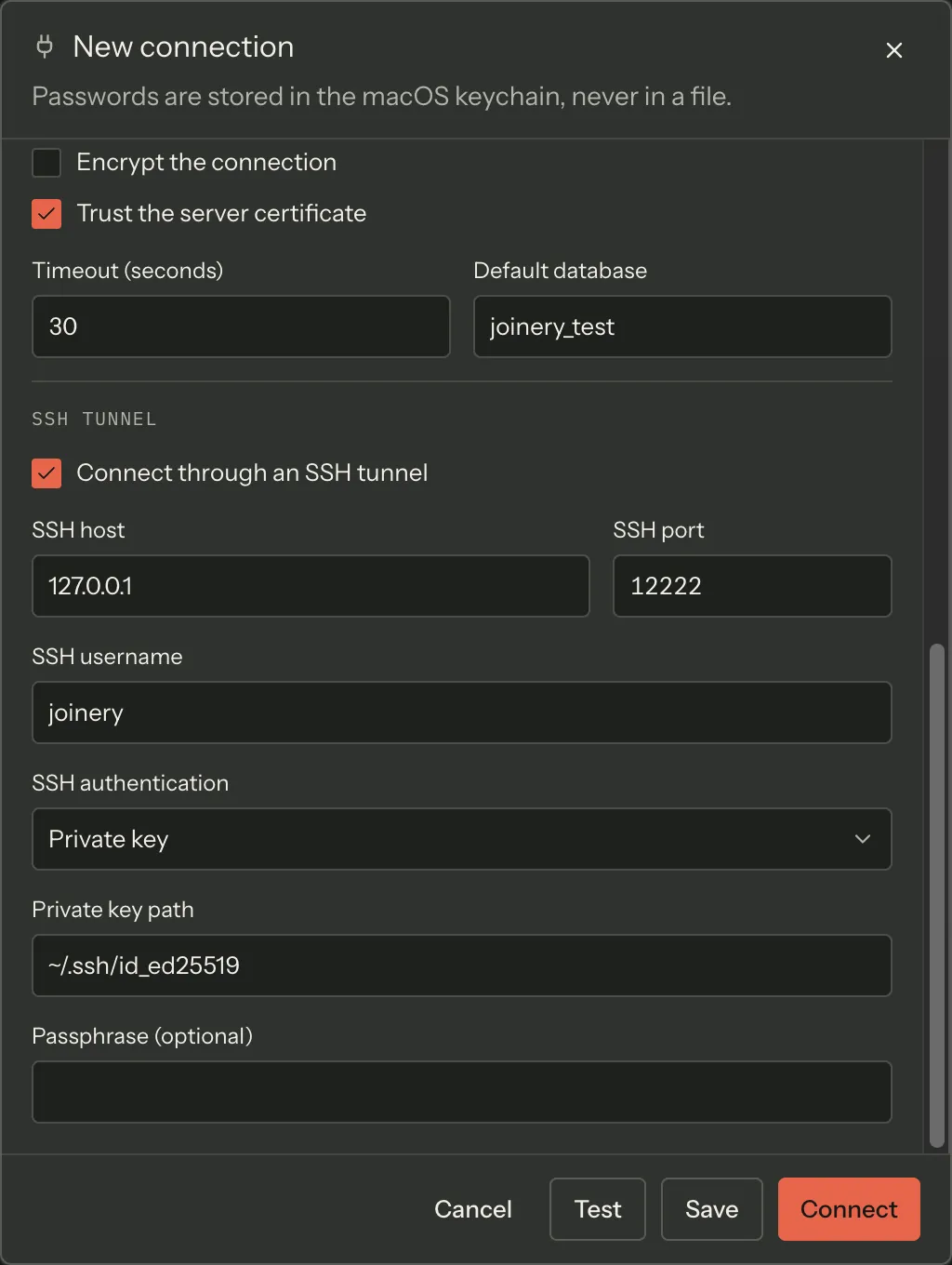
The fields these errors are about are the ones in the editor’s SSH tunnel section:
SSH errors and what they mean
Section titled “SSH errors and what they mean”Most of what the SSH library reports is rewritten into a sentence before you see it. Two of the
messages below are raised directly instead — the unreadable key file and the missing stored
password, both of which Joinery detects itself before the library is involved. Anything the
rewriter does not recognise is passed through prefixed with SSH error:, which is the sign that
the table below does not cover your case and the output panel is the place to look.
| Message | Cause |
|---|---|
| SSH authentication failed — check your username, password, or private key | The bastion rejected every method offered |
| SSH host not found — check the hostname “…” | DNS could not resolve the bastion |
| SSH connection refused — check that the SSH server is running and the port is correct | Nothing is listening on that host and port |
| SSH connection timed out — check network connectivity and firewall rules | No answer within the 15-second window |
| Failed to parse SSH private key — check the key file format or passphrase | The key is in a format ssh2 cannot read, or the passphrase is wrong |
| Failed to read SSH private key at “…” | The path is wrong or unreadable — the message names the path it tried |
| SSH password not found in Keychain | Password authentication is selected but no password is stored |
~ at the start of the private key path is expanded to your home directory. The key file itself
is never copied into Joinery; it is read from that path at connect time, so moving or
permission-changing the file breaks the connection.
Note — Server and Port in the connection editor stay the database’s address as the bastion sees it, not
localhost. The forwarded local port is chosen by Joinery and never typed anywhere. Entering the tunnel’s local port here is the most common tunnel misconfiguration.
A tunnelled Test opens a real tunnel, so a failure there is a real failure of the same path Connect will take. When a tunnel is configured and the test fails before the database is reached, the guidance is Check your SSH tunnel settings / Verify the SSH host is reachable rather than an engine diagnosis.
The tunnel fields are documented under Connect over an SSH tunnel.
Where this page's facts come from
| Claim | Source |
|---|---|
| Connect reports a bare “Failed to connect” and logs the error | packages/renderer/src/state/connection.ts:412-419 |
| Test returns a result the panel renders as a headline plus every guidance line | packages/renderer/src/features/connections/test-result-panel.tsx:29-60 |
| SQL Server replaces the driver’s sentence with a category name | packages/main/src/services/sql/connection-pool.ts:510-518 |
PostgreSQL and MySQL return the driver’s own err.message as the headline |
packages/main/src/services/sql/connection-pool.ts:567-574, 693-701 |
| The certificate category exists only in the MSSQL categoriser | packages/main/src/services/sql/connection-pool.ts:1245-1254, absent from categorizePgError (:1285-1322) and categorizeMySQLError (:1329-1348) |
| The missing-database codes exist only for PostgreSQL and MySQL | packages/main/src/services/sql/connection-pool.ts:1313-1314, 1340-1341 |
| Engine-specific error fields are captured into the log, not the IPC reject | packages/main/src/ipc/safe-handle.ts:14-46 |
SQL Server login failure is 18456 or ELOGIN |
packages/main/src/services/sql/connection-pool.ts:1194-1204 |
| MSSQL refused / timed out / certificate categories and their guidance | packages/main/src/services/sql/connection-pool.ts:1219-1259 |
PostgreSQL codes: 28P01, 28000, 3D000, ECONNREFUSED, ETIMEOUT |
packages/main/src/services/sql/connection-pool.ts:1297-1320 |
MySQL codes: ER_ACCESS_DENIED_ERROR, ER_BAD_DB_ERROR, ECONNREFUSED, ETIMEDOUT/ECONNRESET |
packages/main/src/services/sql/connection-pool.ts:1329-1346 |
| The unrecognised fallback is the driver’s message plus one generic line | packages/main/src/services/sql/connection-pool.ts:1254-1259, 1321-1322, 1347-1348 |
| Auth failures append the password-hygiene findings | packages/main/src/services/sql/connection-pool.ts:1166-1180 |
| The profile’s Timeout field, and its default of 30 seconds | packages/renderer/src/features/connections/connection-editor.tsx:446-451, form-model.ts:141, 155 |
| It is applied as the driver’s CONNECTION timeout only | packages/main/src/services/sql/connection-pool.ts:485, 552, 643, 682, 824 |
The request timeout is profile.requestTimeout || 30, and no editor control writes that field |
packages/main/src/services/sql/connection-pool.ts:634, 651, 821; no requestTimeout input in connection-editor.tsx |
| The Settings Query timeout is sent per query and enforced on every engine | packages/renderer/src/features/query/use-run-query.ts:156, packages/main/src/services/sql/query-executor.ts:71, 292, 369, 447 |
MySQL pools set only connectTimeout, so no request timeout bounds a MySQL query |
packages/main/src/services/sql/mysql-pool-options.ts:51-75 |
| A SQL Server Test pins its request timeout at 10 seconds | packages/main/src/services/sql/connection-pool.ts:484-487 |
Aurora DSQL credential failures name the AWS profile and the aws sso login line |
packages/main/src/services/sql/connection-pool.ts:1286-1296 |
| A DSQL profile with a tunnel is refused before any tunnel is opened | packages/main/src/services/sql/connection-pool.ts:404-415 |
The heartbeat pings SELECT 1 every 30 s with a 10 s tick budget |
packages/renderer/src/state/connection.ts:45-47, 175-187, packages/main/src/ipc/connection.ipc.ts:125-128 |
| One reconnect per failed tick; three consecutive failures stop it, with that sentence | packages/renderer/src/state/connection.ts:189-216 |
| A recovered connection announces “Connection restored” | packages/renderer/src/state/connection.ts:204 |
| The status-bar cloud glyph and its spinner read the heartbeat | packages/renderer/src/shell/status-bar.tsx:205, 229-241 |
| The sidebar marks an unresponsive connection with a warning triangle | packages/renderer/src/shell/sidebar/connection-picker.tsx:117-131 |
| Pools idle for ten minutes with no active queries are closed, swept every five | packages/main/src/services/sql/connection-pool.ts:1357-1396 |
keepaliveInterval: 30000, keepaliveCountMax: 3 → ~90 s; readyTimeout: 15000 |
packages/main/src/services/ssh/ssh-tunnel-manager.ts:66-76 |
A dead tunnel discards every pool for that profile, connected flag notwithstanding |
packages/main/src/services/sql/connection-pool.ts:193-246 |
| One tunnel per profile, reused | packages/main/src/services/ssh/ssh-tunnel-manager.ts:34, 54-59 |
Five rewritten SSH sentences, plus an SSH error: <msg> pass-through fallback |
packages/main/src/services/ssh/ssh-tunnel-manager.ts:262-282 |
“Failed to read SSH private key at …” names the path, and ~ is expanded |
packages/main/src/services/ssh/ssh-tunnel-manager.ts:78-86 |
| “SSH password not found in Keychain” | packages/main/src/services/ssh/ssh-tunnel-manager.ts:96-100 |
| The key is read from its path at connect time, never copied | packages/main/src/services/ssh/ssh-tunnel-manager.ts:79-81 |
| Server and Port stay the database’s address as the bastion sees it | packages/main/src/services/ssh/ssh-tunnel-manager.ts:47-53, 162-173 |
| A tunnelled Test opens a real tunnel, and tunnel failures get their own guidance | packages/main/src/services/sql/connection-pool.ts:416-425, 445-452 |
| ⌘J toggles the output panel | packages/renderer/src/commands/catalogue.ts:559-566 |