

SQL dialect conversion
Joinery can rewrite the SQL in a query tab for a different engine — T-SQL into PostgreSQL, MySQL into T-SQL, and every other pairing of the three.
Note — this is the one feature in Joinery that needs Python on your machine. See Prerequisites for the install, and What it needs below for why.
Converting
Section titled “Converting”Two ways in, and they behave slightly differently.
The query toolbar carries a translate button — Convert SQL dialect — whose menu is headed Convert to and lists the two engines that are not this tab’s. The button is only there when the tab has a connection, because without one there is no source dialect to convert out of.
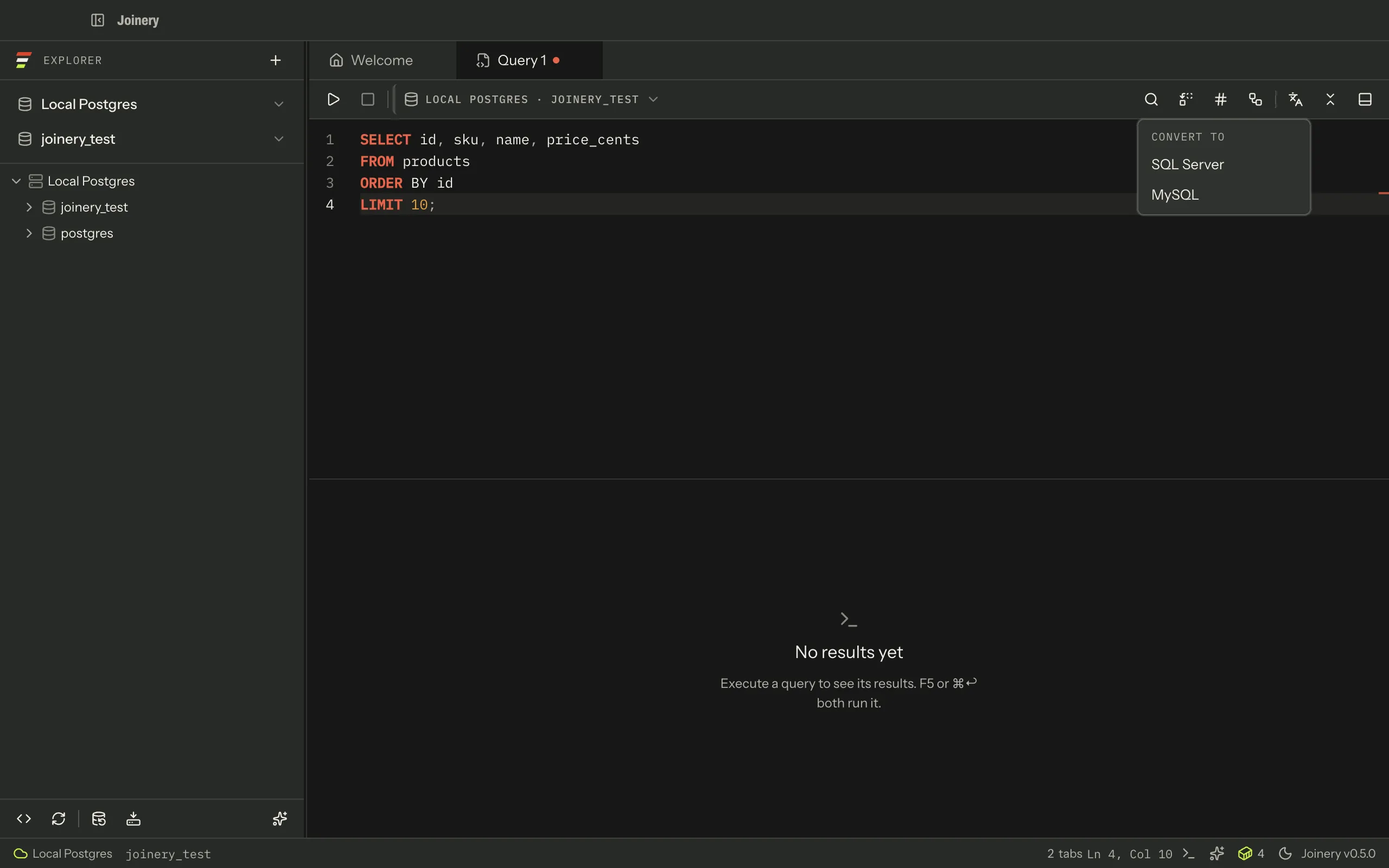
⌘K offers all three by name — Convert SQL to SQL Server, Convert SQL to PostgreSQL, Convert SQL to MySQL — because a palette row has no engine to hide. Asking for the one you are already on is answered with a sentence rather than a silently missing row: This tab is already PostgreSQL.
Neither has a keyboard shortcut. Both need a query tab in front.
What gets converted
Section titled “What gets converted”The selection if there is one, and the whole document otherwise. Converting one highlighted statement inside a long script is the common case; converting the whole file is the other one.
The result replaces the whole document, exactly as Format does — so a conversion is one ⌘Z away. It is not spliced back at the selection’s offsets, because the converter answers whole statements and splicing would leave you with a file in two dialects and no way to tell which lines were which.
The source dialect is the tab’s own connection engine. The editor’s execute scope setting is not consulted: that setting is about what runs, and choosing “current statement” is not a request for a partial conversion.
On success you get Converted to engine and the editor holds the rewritten SQL. Nothing is run.
What it needs
Section titled “What it needs”Conversion is done by sqlglot, a Python library. Joinery
spawns a small local service from resources/python/sqlglot-server.py, on 127.0.0.1 with an
ephemeral port, and talks to it over HTTP. It finds the interpreter by probing python3, then
python, and on Windows the py -3 launcher — the first that runs and has all four
packages. The setup dialog names exactly what it tried.
Run Joinery from source and one more name goes first: JOINERY_PYTHON, if you set it. Any
packaged Joinery ignores that variable and logs one line saying so, because it names the executable
the app spawns — honouring it in a signed app would let whoever controls the launch environment run
their own binary with Joinery’s permissions.
That service is started lazily, on your first conversion — not at launch — and stopped when the app quits. It gets 15 seconds to come up and 30 seconds to answer a conversion.
Engine names are mapped to sqlglot’s own: SQL Server is tsql, PostgreSQL is postgres, MySQL is
mysql. The transpiler is asked for pretty-printed output at its WARN error level.
Careful — sqlglot’s warnings are not shown to you. The bridge between the two halves of Joinery carries only success, the SQL and an error, so a conversion that succeeded with caveats looks identical to one that did not. Read the converted SQL before you run it.
What failure looks like
Section titled “What failure looks like”Every refusal arrives as a message in the app — none of them throw, and none of them touch your SQL.
| Situation | What you see |
|---|---|
| The editor (or the selection) is empty | There is no SQL to convert. |
| You asked for the engine you are already on | This tab is already … |
| No interpreter could be run at all | SQL conversion needs Python 3, and none was found (tried python3, python…). — with the pip command that fixes it |
| An interpreter ran but a package is missing | SQL conversion needs the sqlglot package for python3, which is not installed. — naming each missing package |
| The service script is missing from the build | SQL conversion is unavailable: the sqlglot server script is missing from this build. |
| The service did not come up in time | SQL conversion service timed out. The microservice may still be starting — try again. |
| sqlglot could not parse or rewrite the SQL | The transpiler’s own error |
| Anything else | Could not convert this SQL to …, with the cause written to the output panel |
Note — the message distinguishes the two failures it used to conflate: no interpreter at all, and an interpreter that is there without the packages. On a machine with Python 3 and no
sqlglot, “install Python 3” was advice that did nothing.
When the refusal is “this machine cannot run the converter”, you get the same setup-instructions
view the backup and restore CLI tools have: a dialog naming the
interpreter that was found, ticking off which of the four packages it has, the numbered fix with a
copyable pip command, and a Check again button. That last one matters — the probe is cached
for the life of the app, so re-checking is how you tell Joinery you have installed something
without restarting it.
A conversion that fails for any other reason — sqlglot could not parse your SQL, the service timed out — is still a message, because there is nothing to set up.
If one of those messages is what brought you here — SQL conversion fails, or Python is not found works through each of them.
Where this page's facts come from
| Claim | Source |
|---|---|
| The toolbar’s “Convert SQL dialect” button and its “Convert to” menu | packages/renderer/src/features/query/query-toolbar.tsx:200-225 |
| The menu omits the tab’s own engine | packages/renderer/src/features/query/query-toolbar.tsx:215 |
| The button is absent when the tab has no engine | packages/renderer/src/features/query/query-toolbar.tsx:78-83, 200 |
| The three palette entries, their labels and their absent shortcuts | packages/renderer/src/commands/catalogue.ts:361-387 |
| They need a query tab in front | packages/renderer/src/commands/catalogue.ts:367, 376, 385, features/query/query-commands.tsx:110-121 |
| Asking for the current engine is refused with a sentence | packages/renderer/src/features/query/sql-convert.ts:20-25, 66-68 |
| The selection is converted when there is one, else the whole document | packages/renderer/src/features/query/query-panel.tsx:247-270 |
| The result replaces the whole document, so it is one undo away | packages/renderer/src/features/query/query-panel.tsx:260-264, 279 |
| The execute-scope setting is deliberately not read | packages/renderer/src/features/query/query-panel.tsx:254-259 |
| The source dialect is the tab’s connection engine | packages/renderer/src/features/query/query-panel.tsx:266-272 |
| The success message names the target engine | packages/renderer/src/features/query/query-panel.tsx:278 |
| Conversion runs through a Python sqlglot service, whose interpreter is probed | packages/main/src/services/sql/python-deps.ts, sql-converter.ts (ensureRunning), sqlglot/sqlglot-client.ts:52-59 |
| A failed probe opens the setup-instructions dialog, with Check again | packages/renderer/src/features/query/python-setup-dialog.tsx, query-panel.tsx (recheckPython) |
| The script path, and that it must live outside the asar archive | packages/main/src/services/sql/sql-converter.ts:26-52 |
| It starts on the first conversion and stops at shutdown | packages/main/src/services/sql/sql-converter.ts:105-127, 195-207 |
| The 15-second startup and 30-second request timeouts | packages/main/src/services/sql/sql-converter.ts:96-100 |
| Engine → sqlglot dialect mapping | packages/main/src/services/sql/sql-converter.ts:64-69 |
| Pretty output, and a WARN error level | packages/main/src/services/sql/sql-converter.ts:139-144 |
| Warnings never reach the renderer — the bridge carries three fields | packages/preload/src/index.ts:249-253, packages/renderer/src/features/query/sql-convert.ts:74-81 |
| “There is no SQL to convert.” | packages/renderer/src/features/query/sql-convert.ts:63-65 |
| The three main-process failure sentences, and their match order | packages/main/src/services/sql/sql-converter.ts:163-176 |
| The transpiler’s own errors are returned as the error | packages/main/src/services/sql/sql-converter.ts:150-158 |
| The generic fallback, with the cause logged to diagnostics | packages/renderer/src/features/query/sql-convert.ts:75-85 |
| Nothing here throws — every refusal is a returned sentence | packages/renderer/src/features/query/sql-convert.ts:49-61 |
| A failed conversion is a message, not a setup view | packages/renderer/src/features/query/query-panel.tsx:272-280 |