

Connect to PostgreSQL
Open the connection editor, then set Database engine to PostgreSQL. Switching the engine
moves the port to 5432 and, if the username is still blank or still another engine’s convention,
sets it to postgres.
The fields
Section titled “The fields”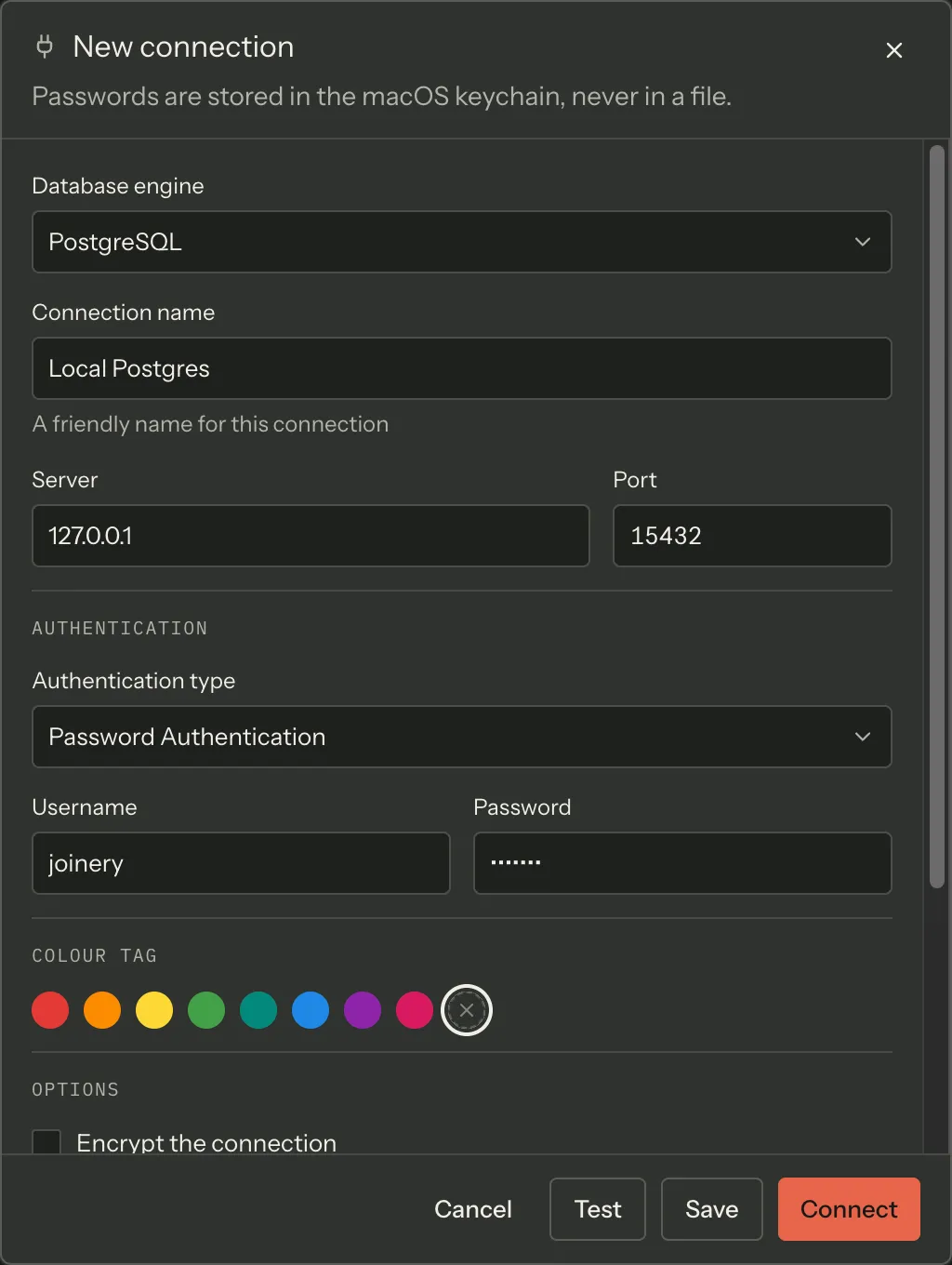
| Field | Default | Notes |
|---|---|---|
| Connection name | — | Required to save; not required to test |
| Server | — | A pasted host:port is split across Server and Port when you leave the field |
| Port | 5432 | |
| Authentication type | Password Authentication | Or AWS IAM (Aurora DSQL) |
| Username | postgres |
Always collected on PostgreSQL |
| Password | — | Goes to the system keychain, never to a file |
| Colour tag | none | |
| Encrypt the connection | on | |
| Trust the server certificate | on | |
| Timeout (seconds) | 30 | |
| Default database | blank → postgres |
|
| SSH tunnel | off | See Connect over an SSH tunnel |
The two checkboxes map onto node-postgres’s ssl option directly:
| Encrypt | Trust the server certificate | Result |
|---|---|---|
| off | — | ssl: false — plaintext |
| on | on | TLS, certificate not verified |
| on | off | TLS, certificate verified against the system trust store |
The shipped default is the middle row. Turn Trust the server certificate off when you are connecting to a server whose certificate chain your machine can validate — a managed cloud Postgres, usually.
One pool per database
Section titled “One pool per database”PostgreSQL connections are pooled per database, not per server. The pool key is the profile plus the database name, so switching the active database in the explorer opens a second pool rather than reusing the first against a different catalogue. Each pool holds up to ten connections and closes idle ones after 30 seconds. Every pool belonging to one profile shares that profile’s SSH tunnel, if it has one.
A blank Default database means the first pool opens against postgres.
Aurora DSQL
Section titled “Aurora DSQL”Amazon Aurora DSQL is PostgreSQL-compatible and authenticates with AWS IAM rather than a password, so it gets its own authentication mode.
It is usually selected for you. Paste a DSQL endpoint — <id>.dsql.<region>.on.aws — into
Server on an otherwise untouched PostgreSQL profile, and leaving the field switches the
authentication type to AWS IAM (Aurora DSQL), sets the default database to postgres, turns
encryption on, and defaults the AWS profile to default. It will not do this if you have
already typed a password or already chosen a different authentication mode.
Choosing AWS IAM changes three things in the form:
- AWS profile replaces the password. If Joinery found profiles in your AWS configuration it
offers them in a picker — including your saved value even when the discovered list no longer
has it — and falls back to free text when it found none. A blank username resolves to
admin. - The TLS checkboxes disappear, replaced by a note: TLS is always on and the server certificate is always validated for Aurora DSQL.
- SSH tunnelling is unavailable, and says so: Aurora DSQL is reached over a public TLS endpoint.
Nothing is stored in the keychain for a DSQL profile. Tokens are minted from your AWS credentials on each connect.
Where this page's facts come from
| Claim | Source |
|---|---|
| Default port 5432 | packages/shared/src/types/connection.types.ts:10-14 |
Switching engine sets the port and the conventional username postgres |
packages/renderer/src/features/connections/form-model.ts:108-113, 289-310 |
| Auth modes offered for PostgreSQL | packages/renderer/src/features/connections/form-model.ts:91-94 |
| A username is always collected on non-mssql engines | packages/renderer/src/features/connections/form-model.ts:179-184 |
Default-database placeholder postgres |
packages/renderer/src/features/connections/form-model.ts:102-106 |
ssl: encrypt ? { rejectUnauthorized: !trustServerCertificate } : false |
packages/main/src/services/sql/connection-pool.ts:647-649 |
| Encrypt on / trust cert on are the shipped defaults | packages/renderer/src/features/connections/form-model.ts:152-153 |
Pool key is <profileId>:<database>; blank falls back to postgres |
packages/main/src/services/sql/connection-pool.ts:588-599 |
max: 10, idleTimeoutMillis: 30000 |
packages/main/src/services/sql/connection-pool.ts:652-653 |
| All of a profile’s pools share its SSH tunnel and are discarded together when it dies | packages/main/src/services/sql/connection-pool.ts:194-246, 590 |
| DSQL endpoint detection, and the four fields it sets | packages/renderer/src/features/connections/form-model.ts:249-275 |
Detection is gated on postgresql + sql auth + no typed password |
packages/renderer/src/features/connections/form-model.ts:259-266 |
| AWS profile picker vs free text, and the saved-value union | packages/renderer/src/features/connections/form-model.ts:321-327, connection-editor.tsx:384-406 |
A blank username resolves to admin for aws-iam |
packages/renderer/src/features/connections/form-model.ts:342-345 |
| The DSQL TLS note and the DSQL SSH note | packages/renderer/src/features/connections/connection-editor.tsx:423-426, 494-498 |
Nothing is written to the keychain for aws-iam; tokens are minted per connect |
packages/renderer/src/features/connections/connection-editor.tsx:407-410, packages/main/src/services/sql/connection-pool.ts:607-611 |