

Connect to SQL Server
Open the connection editor from the welcome tab’s Fit a connection, the + button at the top of the explorer, or File ▸ New Connection…. SQL Server is the engine the editor starts on.
The fields
Section titled “The fields”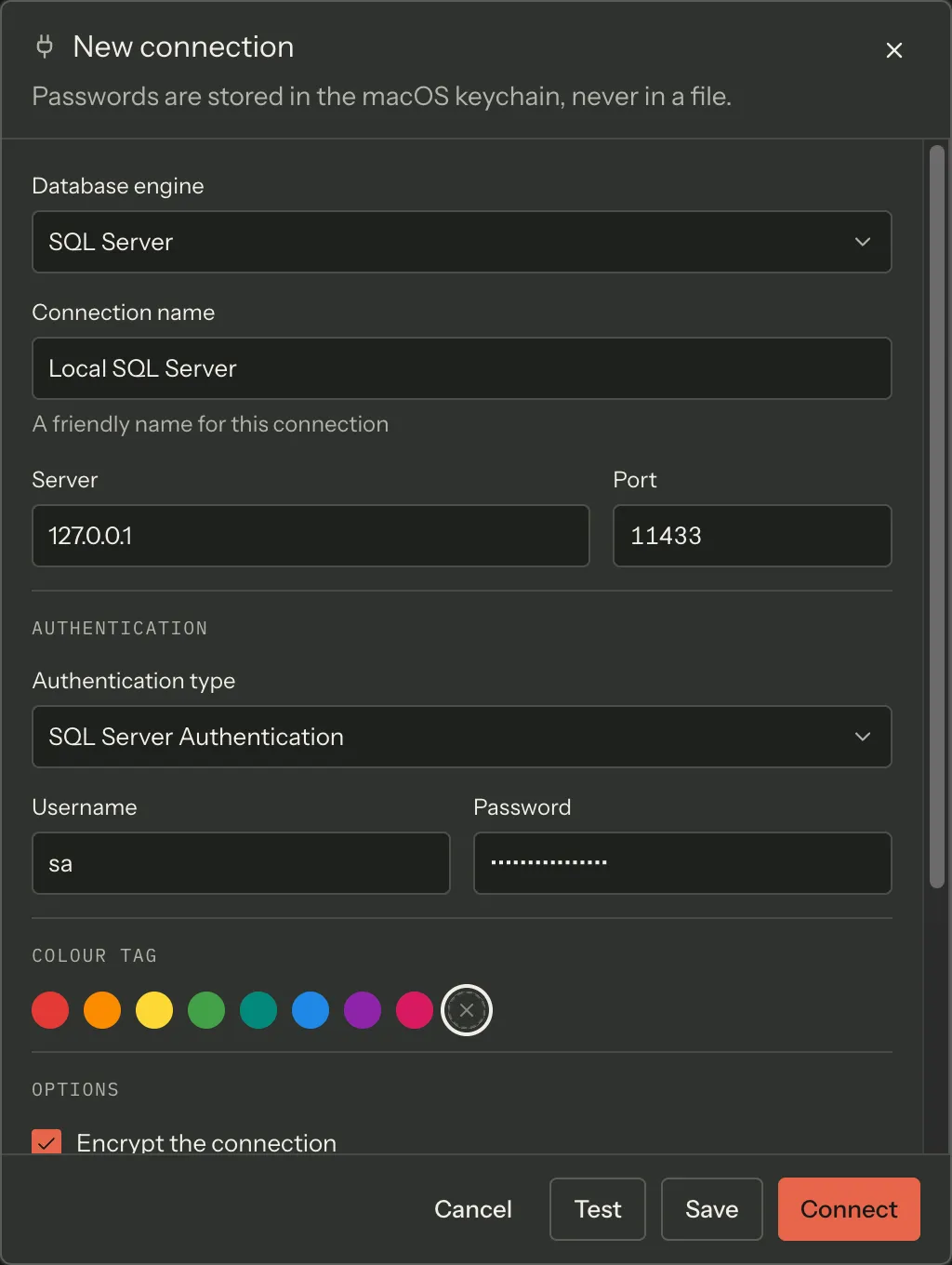
| Field | Default | Notes |
|---|---|---|
| Database engine | SQL Server | Changing it resets the port and the authentication type, and replaces a username that is still another engine’s convention |
| Connection name | — | A friendly name. Required to save; not required to test |
| Server | — | Hostname or IP — IPv4, IPv6 (compressed, bracketed or with a %zone), or a hostname, underscores included so a Docker container name works. A pasted host:port is split across this field and Port — see below |
| Port | 1433 | |
| Authentication type | SQL Server Authentication | Or Windows Authentication, or Microsoft Entra ID |
| Username / Password | — | Collected for SQL Server Authentication only |
| Colour tag | none | Eight preset colours. The chosen colour paints a strip along the top of the status bar while that connection is active |
| Encrypt the connection | on | |
| Trust the server certificate | on | |
| Timeout (seconds) | 30 | Emptying the field falls back to 30 |
| Default database | blank → master |
Joinery substitutes master when the field is blank, so the greyed placeholder is what you actually get |
| SSH tunnel | off | See Connect over an SSH tunnel |
Server accepts a pasted host and port together
Section titled “Server accepts a pasted host and port together”Type or paste sqldev.internal:1433 into Server and, when you leave the field, Joinery
splits it: the host goes to Server and 1433 to Port. The split runs on blur rather
than on every keystroke, so typing a partial port does not rewrite the field under you, and
IPv6 literals — bare 2001:db8::1 or bracketed [::1] — are left alone.
Authentication
Section titled “Authentication”SQL Server Authentication collects a username and a password. The password goes straight to the system keychain; the renderer never persists it. When you reopen an existing connection the password field is blank, and leaving it blank keeps the one already stored.
Windows Authentication collects nothing — it uses the operating system principal.
Microsoft Entra ID collects nothing either. Choosing it shows the note “Signs in through
the Microsoft login window. Supports MFA.” Joinery opens your system browser against
login.microsoftonline.com, receives the response on a loopback listener, and caches the
resulting MSAL token in the keychain so you stay signed in across restarts with silent refresh.
The login window times out after two minutes.
Three things worth knowing about Entra sign-in:
- No app registration is needed in your tenant. Joinery uses a Microsoft-owned public client ID that is already pre-authorised for the Azure SQL scope.
- Work and school accounts only. The default authority is the
organizationstenant; Azure SQL does not accept personal Microsoft accounts. - Set a Default database. The field’s hint says it: leaving it blank connects to
master, and most Azure SQL users want a specific database.
Azure SQL Database
Section titled “Azure SQL Database”Azure SQL is reached the same way as any other SQL Server: the server name, port 1433, and either SQL authentication or Entra ID. Joinery detects that a connection is Azure and adjusts its behaviour where the two differ.
Test, Save, Connect
Section titled “Test, Save, Connect”The action row has four buttons.
- Test validates only what a connection attempt needs — server, port, authentication type, username, and the SSH fields when the tunnel is on. It does not need a connection name, because nothing is being saved. When you are editing an existing connection, Test can resolve the stored keychain password for a blank password field, so it exercises what Connect will.
- Save additionally requires a connection name.
- Connect saves and then connects.
- Cancel discards.
A single line above the buttons names the topmost unfinished field — prefixed with that field’s visible label, so “SSH host: Server is required” cannot be mistaken for a complaint about the Server field.
Connecting to a local container instead
Section titled “Connecting to a local container instead”If SQL Server is running in Docker, open the container list from the status bar’s container control and press Connect on the row. That opens this same editor with the host and port already filled in.
Where this page's facts come from
| Claim | Source |
|---|---|
| Entry points: welcome hero, explorer +, File ▸ New Connection… | packages/renderer/src/features/welcome/welcome-panel.tsx:105-112, packages/renderer/src/shell/sidebar/sidebar.tsx:117-126, packages/main/src/menu.ts:57 |
| A new profile starts as mssql / 1433 / SQL auth / encrypt on / trust cert on / timeout 30 / no SSH | packages/renderer/src/features/connections/form-model.ts:143-167 |
| Field labels, order, placeholders and hints | packages/renderer/src/features/connections/connection-editor.tsx:266-502 |
| Default port 1433 | packages/shared/src/types/connection.types.ts:10-14 |
| Auth modes offered for mssql, and their labels | packages/renderer/src/features/connections/form-model.ts:86-90 |
Username/password collected for sql auth only on mssql |
packages/renderer/src/features/connections/form-model.ts:179-191 |
master is the field’s placeholder, and a blank field is substituted with master at connect time |
packages/renderer/src/features/connections/form-model.ts:98-106, packages/main/src/services/sql/connection-pool.ts:816-817 |
| Timeout falls back to 30 when the field is emptied | packages/renderer/src/features/connections/form-model.ts:141, 373-375 |
| Eight preset colours | packages/renderer/src/features/connections/form-model.ts:126-135 |
| The colour paints a strip on the status bar | packages/renderer/src/shell/status-bar.tsx:340-347 |
host:port is split on blur, with an IPv6 guard |
packages/renderer/src/features/connections/form-model.ts:221-233, 240-255, connection-editor.tsx:296-299 |
| “Passwords are stored in the macOS keychain, never in a file” / “Leave a password blank to keep the one already in your keychain” | packages/renderer/src/features/connections/connection-editor.tsx:250-254 |
| The Entra note text | packages/renderer/src/features/connections/connection-editor.tsx:371-375 |
| Entra: system browser, loopback listener, MSAL cache in the keychain, 120 s timeout | packages/main/src/services/azure/entra-auth.ts:4-14, 56-59 |
| No app registration needed; Microsoft-owned pre-authorised client ID | packages/main/src/services/azure/entra-auth.ts:35-50 |
organizations authority; personal accounts not accepted |
packages/main/src/services/azure/entra-auth.ts:52-54 |
| The Entra-specific Default database hint | packages/renderer/src/features/connections/connection-editor.tsx:455-459 |
| Azure SQL is detected and cached per profile | packages/main/src/services/sql/connection-pool.ts:120, 280-292 |
| Test validates a subset of Save’s fields, and resolves the stored password | packages/renderer/src/features/connections/form-schema.ts:198-219, form-model.ts:412-430 |
| The four buttons, in order | packages/renderer/src/features/connections/connection-editor.tsx:514-542 |
| The hint line is label-prefixed | packages/renderer/src/features/connections/form-schema.ts:221-272 |
| Docker Connect pre-fills this editor with the container’s host and port | packages/renderer/src/features/docker/docker-panel.tsx:277-288, packages/renderer/src/features/connections/connection-dialogs.tsx:94 |