

Prerequisites
This page is the only place install commands for Joinery’s host-side prerequisites are written down. Feature pages and troubleshooting pages link here rather than repeating them.
Operating system
Section titled “Operating system”| Platform | Versions | Architectures |
|---|---|---|
| macOS | 13 (Ventura) or later | Apple Silicon, Intel |
| Windows | 10 / 11 | x64, ARM64 |
Joinery’s build targets are macOS and Windows. Nothing prevents the source build from running elsewhere, but the packaged app and the platform-specific setup instructions inside it cover those two only.
Database engines
Section titled “Database engines”You need at least one of:
| Engine | Supported | Notes |
|---|---|---|
| SQL Server | 2017 and later | Includes Azure SQL Database, with SQL authentication or Microsoft Entra ID |
| PostgreSQL | 12 and later | Includes Aurora DSQL, which authenticates with AWS IAM |
| MySQL | 5.7 and 8.0 and later | MariaDB images are detected as MySQL containers |
The automated test harness runs against mcr.microsoft.com/mssql/server:2022-latest,
postgres:16-alpine and mysql:8, so those three are the versions Joinery is continuously
exercised on.
Building from source
Section titled “Building from source”- Node.js 20 or later
- pnpm 11 or later —
corepack enable pnpm - Xcode Command Line Tools on macOS, for the native modules
Docker (optional)
Section titled “Docker (optional)”Docker is optional. When Docker Desktop is running, Joinery lists local containers whose image
name looks like a database — anything containing mssql, sqlserver or azure-sql-edge;
postgres, postgresql or postgis; mysql or mariadb — and offers to start, stop or
connect to them. Detection talks to the Docker daemon over /var/run/docker.sock.
Host CLI tools for PostgreSQL and MySQL backup and restore
Section titled “Host CLI tools for PostgreSQL and MySQL backup and restore”Joinery’s backup and restore for PostgreSQL and MySQL shell out to the engines’ own command-line tools. They are not bundled with the app, and the app will tell you so: when a binary is missing, the Backup and Restore dialogs render setup instructions instead of a form, rather than letting you fill the form in and fail with a spawn error.
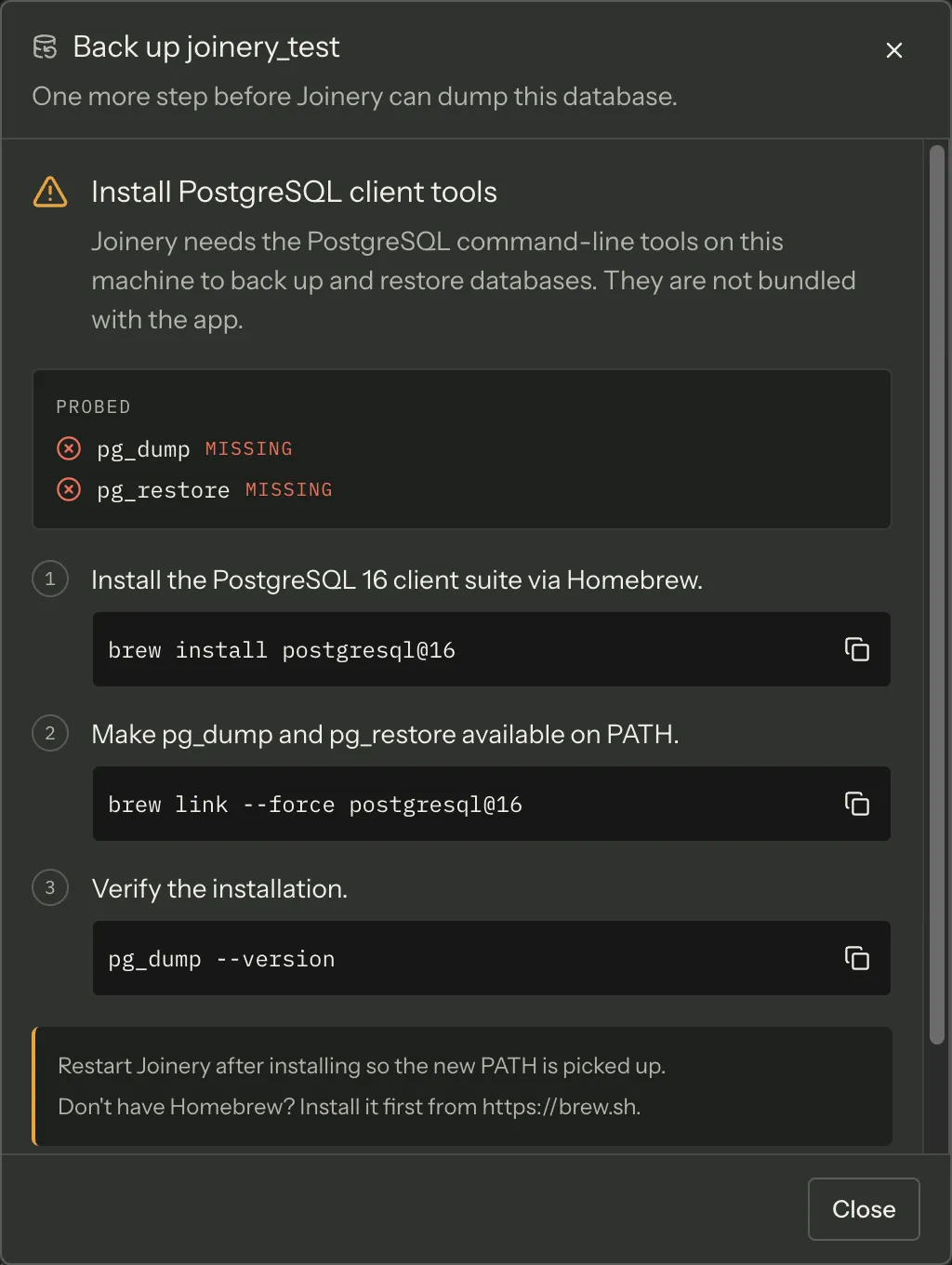
| Engine | Binaries Joinery looks for |
|---|---|
| PostgreSQL | pg_dump, pg_restore |
| MySQL | mysqldump, mysql |
Joinery probes for each by running <tool> --version and caches the answer for the lifetime of
the app; the dialogs offer a re-check after you install something.
SQL Server needs none of this — its backup and restore are T-SQL statements run on the server.
macOS — PostgreSQL client tools
Section titled “macOS — PostgreSQL client tools”brew install postgresql@16brew link --force postgresql@16pg_dump --versionmacOS — MySQL client tools
Section titled “macOS — MySQL client tools”brew install mysql-clientecho 'export PATH="/opt/homebrew/opt/mysql-client/bin:$PATH"' >> ~/.zshrcsource ~/.zshrc && mysqldump --versionmysql-client is keg-only, which is why the PATH line is needed. If you use bash rather than
zsh, write to ~/.bash_profile instead. Don’t have Homebrew? Install it first from
brew.sh.
Windows — PostgreSQL client tools
Section titled “Windows — PostgreSQL client tools”Download the installer from
PostgreSQL for Windows. You only need the
Command Line Tools component; the server install is optional. Then open a new Command Prompt
or PowerShell window and run pg_dump --version. If it is still not found, put the PostgreSQL
bin folder — typically C:\Program Files\PostgreSQL\16\bin — on your PATH.
Windows — MySQL client tools
Section titled “Windows — MySQL client tools”Download the
MySQL Installer for Windows and select MySQL
Shell and Client only; you do not need the full server. Then open a new Command Prompt or
PowerShell window and run mysqldump --version.
Careful — restart Joinery after installing any of these. The app inherits its PATH from the process that launched it, so a shell change made after launch is invisible to it.
Python and sqlglot, for SQL dialect conversion
Section titled “Python and sqlglot, for SQL dialect conversion”Converting SQL between dialects (“Convert SQL to PostgreSQL” and its two siblings) is the one
feature that needs a Python interpreter. Joinery spawns a small local FastAPI service from
resources/python/sqlglot-server.py, on 127.0.0.1 with an ephemeral port, and talks to it over
HTTP.
If you installed Joinery from a release, it looks for python3, then python, and on
Windows the py -3 launcher. The first one that runs and has all four packages wins. Install
the packages into that interpreter — a released Joinery does not read an interpreter path from
the environment, so pointing it at a virtualenv is not an option. It ignores JOINERY_PYTHON, logs
one line saying so, and probes the three names above. The variable would name an executable the
signed app then spawns, which is why any packaged bundle refuses it.
If you run Joinery from source, JOINERY_PYTHON is honoured and tried first, ahead of those
three, so you can point it at a virtualenv.
Install the four packages it imports:
python3 -m pip install --user sqlglot fastapi uvicorn pydanticpython3 --versionOn Windows, use the launcher: py -3 -m pip install sqlglot fastapi uvicorn pydantic.
Everything else in Joinery works without Python. Only dialect conversion needs it.
Note — Joinery used to spawn
python3and nothing else, which failed on Windows whatever was installed, and reported a machine with Python 3 but nosqlglotas a machine with no Python. Both are fixed (J-29): it probes the names above, and the message names what is actually missing — the interpreters it tried, or the packages the one it found is lacking — with thepipcommand that fixes it. SQL dialect conversion lists the other messages that surface.
Where credentials go
Section titled “Where credentials go”Nothing on this page asks you to put a password in a file. Database passwords, SSH passwords and
passphrases, AI provider API keys and the Entra ID token cache all go to the operating system’s
credential store through keytar — the macOS Keychain, or the Windows Credential Store — as a
single JSON entry that Joinery reads once at startup.
Where this page's facts come from
| Claim | Source |
|---|---|
| macOS 13+, Windows 10/11, x64 + ARM64 | README.md:193-194 |
| SQL Server 2017+ incl. Azure SQL; PostgreSQL 12+; MySQL 5.7+/8.0+ | README.md:47-49, 196-198 |
| Aurora DSQL is PostgreSQL-compatible and uses AWS IAM auth | packages/renderer/src/features/connections/form-model.ts:91-95, 257-275 |
Test harness images: mssql/server:2022-latest, postgres:16-alpine, mysql:8 |
tests/docker-compose.test.yml:13, 32, 48 |
Node 20+, pnpm 11+ (corepack enable pnpm), Xcode CLI Tools |
CONTRIBUTING.md:26-28, package.json:8-11 |
| Container images are matched by name substring | packages/main/src/services/docker/detector.ts:56-67 |
Docker is reached at /var/run/docker.sock |
packages/main/src/services/docker/detector.ts:22 |
PG needs pg_dump + pg_restore; MySQL needs mysqldump + mysql |
packages/main/src/services/sql/cli-deps.ts:32-35 |
Presence is probed with <tool> --version, cached, with a re-check path |
packages/main/src/services/sql/cli-deps.ts:42-65, 85 |
| The dialogs render setup instructions instead of a form when a binary is missing | packages/main/src/services/sql/cli-deps.ts:5-16 |
| The exact macOS and Windows install commands | packages/shared/src/config/cli-install-instructions.ts:19-121 |
| “Restart Joinery after installing so the new PATH is picked up” | packages/shared/src/config/cli-install-instructions.ts:38, 65, 90, 118 |
sqlglot service is spawned as python3 against resources/python/sqlglot-server.py |
packages/main/src/services/sql/sqlglot/sqlglot-client.ts:56, 98 |
It is a FastAPI app importing fastapi, pydantic, sqlglot, uvicorn, bound to loopback on an ephemeral port |
resources/python/sqlglot-server.py:1-12 |
| The interpreter is probed (JOINERY_PYTHON, python3, python, py -3) and the message names what is missing | packages/main/src/services/sql/python-deps.ts, sql-converter.ts (ensureRunning, describeMissingPython) |
| Any packaged build ignores JOINERY_PYTHON, warns once, then probes the other names | packages/main/src/services/sql/python-deps.ts (resolvePythonOverride) |
Credentials are stored via keytar as one JSON vault entry, read once at startup |
packages/main/src/services/keychain/credential-store.ts:1-4, 13-14, 52-64 |
AI provider keys go to the same store, as ai-<vendorId> |
packages/main/src/services/ai/ai-service.ts:136-138 |
SSH passwords and passphrases go there as <profileId>:ssh-password / :ssh-passphrase |
packages/main/src/services/ssh/ssh-tunnel-manager.ts:88-97 |
| The Entra ID (MSAL) token cache is persisted to the same store | packages/main/src/services/azure/entra-auth.ts:12-13, 57 |