

Connect over an SSH tunnel
Any connection can be made through an SSH bastion. Joinery opens an SSH session to the bastion, forwards a local port through it to the database’s host and port, and points the driver at the local end. The engine and its own settings are unchanged — the tunnel is a transport, not a different kind of connection.
Turning it on
Section titled “Turning it on”The connection editor’s last section is SSH tunnel, with a single checkbox: Connect through an SSH tunnel. Tick it and six more fields appear.
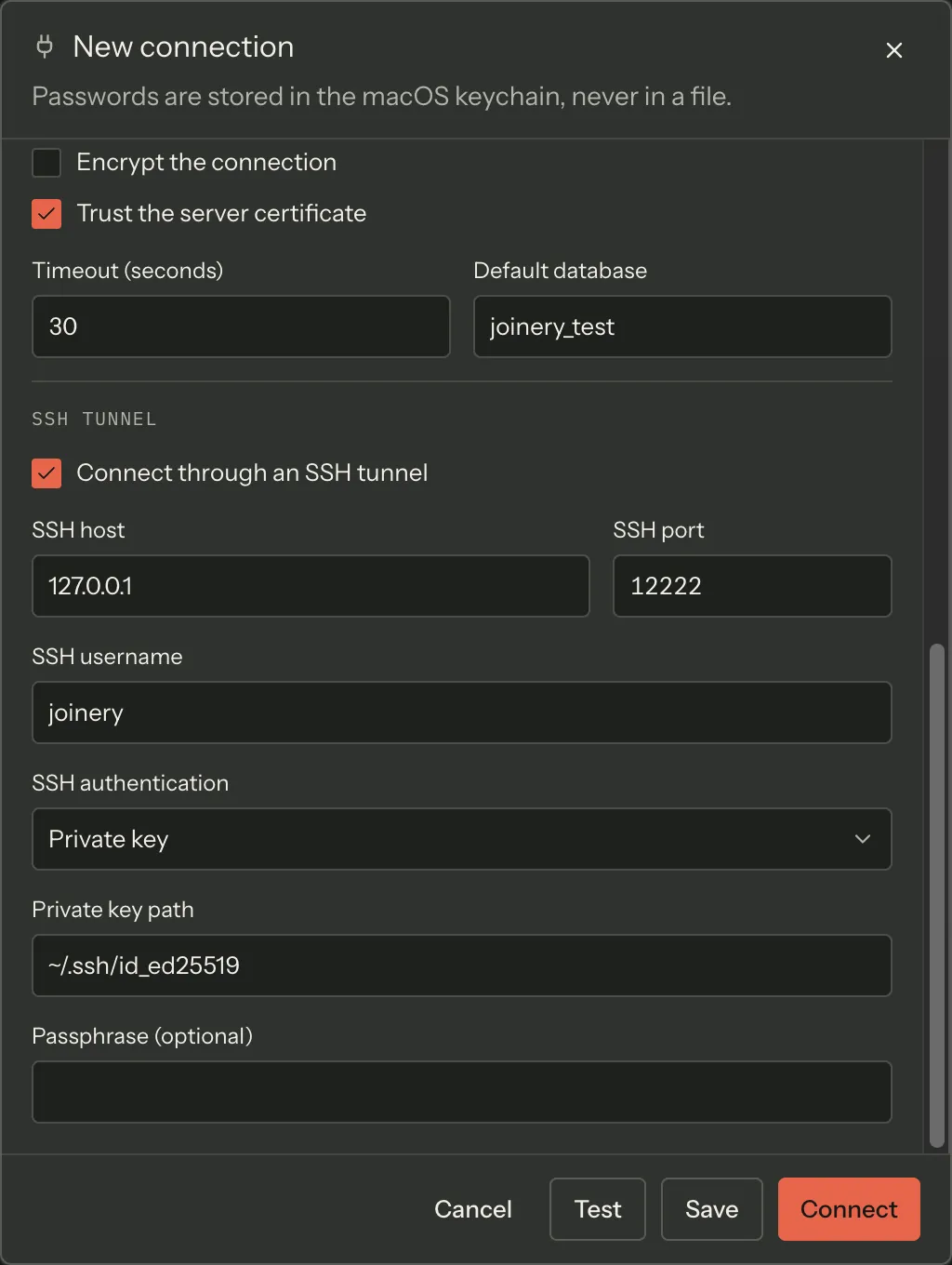
| Field | Default | Notes |
|---|---|---|
| SSH host | — | The bastion’s hostname or IP, e.g. bastion.example.com |
| SSH port | 22 | Emptying it falls back to 22 |
| SSH username | — | Required whenever the tunnel is on |
| SSH authentication | Password | Or Private key |
| SSH password | — | Password authentication only |
| Private key path | — | Private-key authentication only, e.g. ~/.ssh/id_rsa. Required |
| Passphrase (optional) | — | Private-key authentication only |
Server and Port, higher up the form, stay the database’s own address as the bastion sees
it — usually a private hostname or localhost from the bastion’s point of view. You do not
enter the forwarded local port anywhere; Joinery picks one and uses it internally.
~ at the start of Private key path is expanded to your home directory. If the file cannot
be read, the connection fails with a message that names the path it tried.
Both secret fields raise the same advisory banner the database password field does when the value looks like a paste artifact — leading or trailing whitespace, a stray line break, smart quotes. It never blocks you and never echoes the value; a password may legitimately contain any of those.
What is stored
Section titled “What is stored”The SSH password and the key passphrase go to the system keychain alongside the database password, keyed to the profile. The private key itself is never copied — Joinery reads it from the path you gave, at connect time.
One tunnel per connection profile
Section titled “One tunnel per connection profile”Tunnels are keyed by connection profile and reused. Opening a second database on the same profile does not open a second SSH session; every pool for that profile rides the one tunnel.
If the tunnel dies, all of that profile’s pools are discarded together rather than left holding sockets to a forwarded port that no longer forwards anything. The next operation opens a fresh tunnel.
Dropped connections and idle timeouts
Section titled “Dropped connections and idle timeouts”A silently dropped TCP socket — a NAT or firewall idle timeout, a network change, a laptop going to sleep — leaves an SSH session that looks alive and answers nothing. Joinery sends SSH-level keepalives every 30 seconds and gives up after three unanswered ones, so a dead session is detected in roughly 90 seconds instead of hanging indefinitely. Opening the connection to the bastion itself times out after 15 seconds.
Not available with AWS IAM
Section titled “Not available with AWS IAM”Aurora DSQL connections cannot be tunnelled. Selecting AWS IAM (Aurora DSQL) replaces the SSH section with a note saying so: DSQL is reached over a public TLS endpoint.
Testing a tunnelled connection
Section titled “Testing a tunnelled connection”Test validates the SSH host, port, username and — for key authentication — the private key path, along with the database fields, before it tries anything. A tunnelled Test opens a real tunnel, so a failure here is a real failure of the same path Connect will take.
Where this page's facts come from
| Claim | Source |
|---|---|
| The section, its checkbox, and every field label and placeholder | packages/renderer/src/features/connections/connection-editor.tsx:493-501, 635-737 |
| Default SSH port 22, and the fallback when the field is emptied | packages/renderer/src/features/connections/form-model.ts:138, 347-358 |
| SSH username is required; the key path is required for key auth | packages/renderer/src/features/connections/form-schema.ts:63-66, 182-195 |
| SSH host and port go through the same validators as the database host and port | packages/renderer/src/features/connections/form-schema.ts:184-185 |
| A random local port is forwarded to the target host and port | packages/main/src/services/ssh/ssh-tunnel-manager.ts:1-5, 47-58 |
~ expansion, and the error message naming the key path |
packages/main/src/services/ssh/ssh-tunnel-manager.ts:78-86 |
| Password-hygiene banner on both secret fields, advisory only, never echoes the value | packages/renderer/src/features/connections/connection-editor.tsx:707-710, 728-731, password-hygiene-warning.tsx:1-21, 40-41 |
| SSH password / passphrase are keychain entries keyed to the profile | packages/main/src/services/ssh/ssh-tunnel-manager.ts:88-97 |
| Tunnels are keyed by profile and reused | packages/main/src/services/ssh/ssh-tunnel-manager.ts:34, 54-59 |
| All of a profile’s pools are discarded when its tunnel is gone | packages/main/src/services/sql/connection-pool.ts:194-246 |
keepaliveInterval: 30000, keepaliveCountMax: 3 → detection in ~90 s; readyTimeout: 15000 |
packages/main/src/services/ssh/ssh-tunnel-manager.ts:66-76 |
SSH is unavailable with aws-iam, and the note that replaces the section |
packages/renderer/src/features/connections/connection-editor.tsx:494-498 |
| Test’s field list includes the SSH fields | packages/renderer/src/features/connections/form-schema.ts:210-219 |