

Settings
⌘, opens Settings. So does Joinery ▸ Settings… on macOS, and Edit ▸ Preferences… on Windows and Linux — one menu per platform, wherever that platform’s users look for it.
There are five groups: Appearance, Editor, Query, Results grid and AI. The first four hold preferences. The fifth holds a door to AI setup and no preference at all, because an API key is a write to the operating system’s credential store rather than a preference.
How the controls behave
Section titled “How the controls behave”Switches and radios apply the moment you move them. Number fields hold what you type and commit it when you leave the field or press Enter — a font size committed per keystroke would resize every open editor while you were still typing “18”. A number outside its range is clamped into it rather than rejected, and a field you leave with an uncommitted number still commits when you close the dialog.
Note — every control here changes real behaviour, or it ships disabled and says who owns it. That rule exists because of J-44: the previous renderer hardcoded its editor options while this panel wrote them to disk, so six editor toggles and three query settings persisted and changed nothing, invisibly, for months. One control is disabled today, and it is named below.
Appearance
Section titled “Appearance”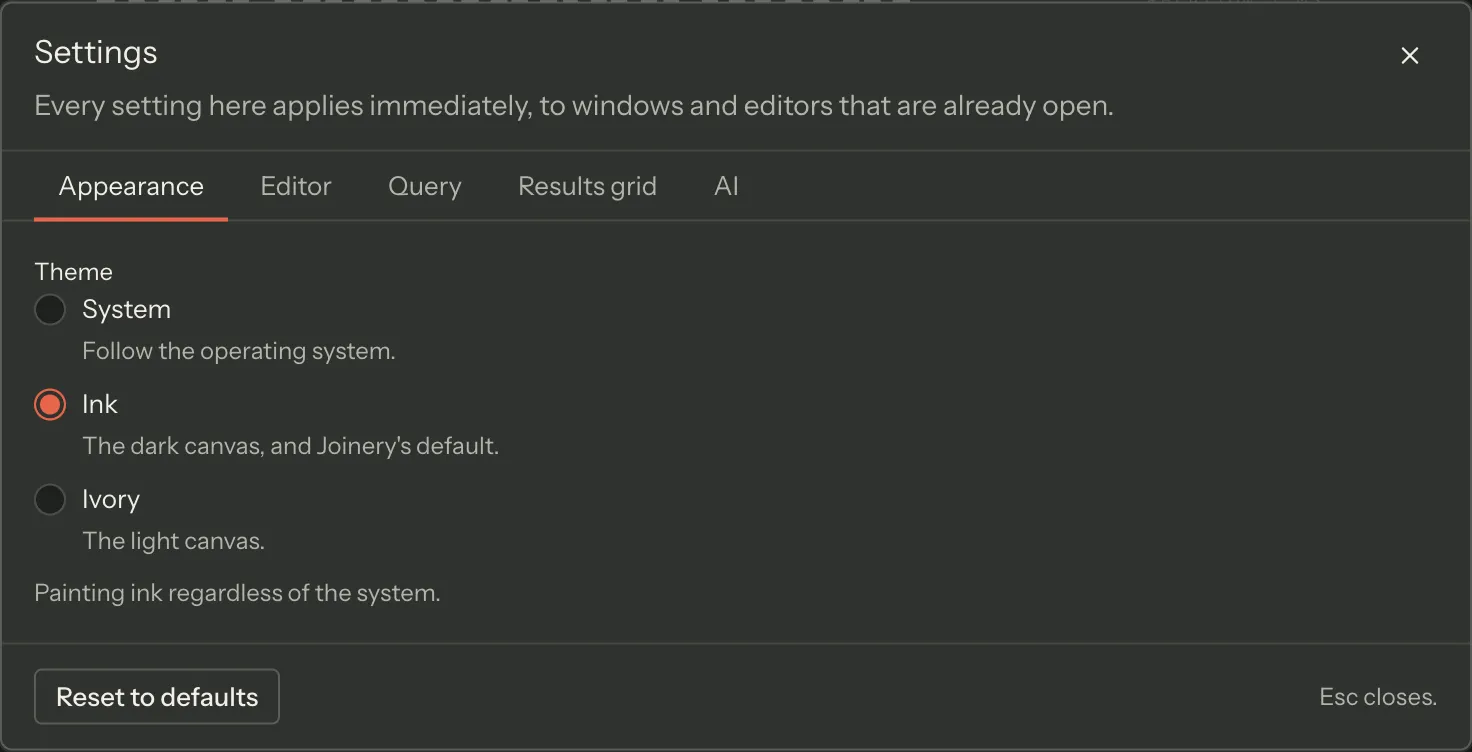
| Setting | Default | What it changes |
|---|---|---|
| Theme | System | System, Ink (the dark canvas) or Ivory (the light one), applied to the whole app. |
The Ink option’s own description still calls itself “Joinery’s default” — that text predates this table and is stale (tracked as J-107); the shipped default is System.
System follows the operating system, and the control says which way it currently resolves. When the app cannot read a system preference at all it paints ink.
Editor
Section titled “Editor”All six of these are live on every open editor — nothing has to be reopened.
| Setting | Default | What it changes |
|---|---|---|
| Font size | 13 | Editor text size in pixels. 10–24. |
| Tab size | 4 | Spaces per indent level. 2–8. Joinery always indents with spaces. |
| Wrap long lines | Off | Wrap instead of scrolling sideways. |
| Minimap | Off | The condensed overview down the right-hand edge. |
| Line numbers | On | The line-number gutter. |
| Suggest as you type | On | Autocomplete. With it off, ⌃Space still asks for suggestions. |
The group also carries Ask me again, which resets the “don’t ask me again” tick on the ⌘E execute confirmation. It is disabled while there is nothing to reset, and the hint says which state you are in.
| Setting | Default | What it changes |
|---|---|---|
| Maximum rows to fetch | 10,000 | 100–100,000. The executor truncates before results cross to the grid, and the grid says so. |
| Execute runs | The whole editor | Or the statement at the caret. With text selected, Execute always runs the selection. |
| Show execution time | On | The duration line on the Messages pane. |
| Confirm before every execute | Off | Every Execute asks first, not only the first ⌘E. |
| Query timeout (seconds) | 30 | 5–300. A query is stopped at this limit, on every engine. See below. |
Query timeout and the connection’s own timeout are both ceilings, and the shorter one wins.
This setting is the per-query limit: Joinery sends it with the query and stops the query itself
when the limit passes — a cancel on SQL Server, a discarded connection on PostgreSQL and MySQL.
Separately, each connection profile’s requestTimeout bounds every query on that connection
(30 seconds unless the profile says otherwise). Nothing reconciles the two: a query ends at
whichever deadline arrives first. On MySQL the connection carries no request timeout at all, so
this setting is the only limit a MySQL query has.
A stopped query reports Query timed out after N s in the results pane rather than looking like a failure in your SQL. Lower it if you want runaway queries to give up sooner; raise it for a warehouse that is honestly slow.
Execute runs is the setting behind a surprise worth knowing: with the default the whole
editor, ⌘E runs everything in the tab, not the statement your caret is in. Select the text you
mean, or switch this to the statement at the caret.
Results grid
Section titled “Results grid”All six apply to an open grid without re-running the query.
| Setting | Default | What it changes |
|---|---|---|
| Row height | 24 | Pixels per result row. 20–48. |
| Row numbers | On | The ordinal gutter down the left of the results. |
| Alternating row shading | On | One surface step on every other row. |
| Animate row changes | Off | Slide rows when sorting or filtering. |
| Copy format | Tab-separated | Or comma-separated, or JSON. Used by the results Copy button; the Export menu always offers all three. |
| Include column names when copying | On | Prepend the column names as the first row. Disabled while the copy format is JSON, which carries them as object keys. |
No preferences. The group says whether a provider is configured and opens AI setup, where the provider, its key, the preferred model and the OpenRouter routing band live.
Reset to defaults
Section titled “Reset to defaults”The footer’s Reset to defaults takes two presses: the first arms it and the label changes to Reset everything?, the second resets every preference on this page. Arming lapses after about four seconds, so a primed button does not wait for you.
Where these are kept
Section titled “Where these are kept”Preferences are written by the main process, not the browser storage of the window — see where Joinery stores things.
Where this page's facts come from
| Claim | Source |
|---|---|
| ⌘, opens Settings, from the app menu on macOS and the Edit menu elsewhere | packages/main/src/menu.ts (app menu, and the !isMac Edit block), packages/renderer/src/commands/catalogue.ts:587-595 |
| The five groups and their labels, in this order | packages/renderer/src/features/settings/settings-dialog.tsx:69-79 |
| The AI group holds no preference, and why | packages/renderer/src/features/settings/settings-groups.tsx:484-502 |
| Switches apply immediately; number fields commit on blur or Enter, clamped | packages/renderer/src/features/settings/setting-controls.tsx:100, 107-112, 143-150 |
| A field left uncommitted still commits when the dialog closes | packages/renderer/src/features/settings/setting-controls.tsx:21-31, settings-dialog.tsx:92-104 |
| Every control changes real behaviour or ships disabled with its owner named (J-44) | packages/renderer/src/features/settings/settings-groups.tsx:7-27 |
| The three theme choices and their names | packages/renderer/src/features/settings/settings-groups.tsx:71-79 |
| Theme defaults to System, and an unreadable system preference resolves to dark | packages/shared/src/types/settings.types.ts:51, packages/renderer/src/state/settings.ts:94-95 |
| The control says what System currently resolves to | packages/renderer/src/features/settings/settings-groups.tsx:141-145 |
| The six editor settings, their labels, hints and ranges | packages/renderer/src/features/settings/settings-groups.tsx:241-286 |
| Editor settings are applied to open editors without reopening them | packages/renderer/src/features/settings/settings-groups.tsx:239-240 |
| Editor defaults: 13, 4, off, off, on, on | packages/shared/src/types/settings.types.ts:53-63 |
| Ask me again resets the ⌘E confirmation and is disabled with nothing to reset | packages/renderer/src/features/settings/settings-groups.tsx:193-231 |
| The ⌘E label is rendered per platform (Ctrl+E off macOS) | packages/renderer/src/utils/platform.ts:22-29, settings-groups.tsx:207, 212 |
| Maximum rows 10,000, range 100–100,000, truncated before the grid | packages/shared/src/types/settings.types.ts:66, settings-groups.tsx:318-329 |
| Execute scope defaults to the whole editor; a selection always wins | packages/shared/src/types/settings.types.ts:70, settings-groups.tsx:292-295, 331-348 |
| Show execution time on; confirm before every execute off | packages/shared/src/types/settings.types.ts:68-69, settings-groups.tsx:350-364 |
| Query timeout is 30 s by default, range 5–300, and reaches the executor | packages/shared/src/types/settings.types.ts:79, settings-groups.tsx:367-380, packages/renderer/src/features/query/use-run-query.ts:156, packages/renderer/src/state/query-execution.ts:179 |
| The executor enforces it per engine — mssql cancel, pg client discarded, mysql2 connection destroyed | packages/main/src/services/sql/query-executor.ts:71, 292, 369, 416, 447-454, query-timeout.ts:48-105 |
| The shorter of the two ceilings wins, and MySQL pools carry no request timeout | packages/main/src/services/sql/connection-pool.ts:634, 651, 821, mysql-pool-options.ts:51-75 |
| The six grid settings, their hints and ranges | packages/renderer/src/features/settings/settings-groups.tsx:405-471 |
| Grid defaults: 24, on, on, off, tab-separated, on | packages/shared/src/types/settings.types.ts:72-79 |
| Include-headers is disabled for JSON, which carries names as object keys | packages/renderer/src/features/settings/settings-groups.tsx:457-471 |
| Copy format drives the results Copy button; Export offers all three | packages/renderer/src/features/settings/settings-groups.tsx:444 |
| Reset to defaults arms on the first press and lapses after four seconds | packages/renderer/src/features/settings/settings-groups.tsx:555-581 |