

Backup and restore
Backup and restore are two wizards over three completely different mechanisms. Which controls you see, where the file lives and what “overwrite” means all follow the engine.
| Engine | Backup runs | Restore runs | The file is on |
|---|---|---|---|
| SQL Server | BACKUP DATABASE in the server |
RESTORE DATABASE in the server |
the server |
| PostgreSQL | pg_dump on this machine |
pg_restore on this machine |
this machine |
| MySQL | mysqldump on this machine |
the mysql client on this machine |
this machine |
Before you start on PostgreSQL or MySQL
Section titled “Before you start on PostgreSQL or MySQL”Those four binaries are not bundled with Joinery — it shells out to whatever is on your PATH. If
they are not there, the wizard says so instead of failing later with a spawn error: it probes
pg_dump --version and friends when the dialog opens, and shows a setup view in place of the form,
listing which tool was found, which was missing, and the platform-specific commands to install them.
Each command has a copy button; Re-check re-probes without closing the dialog, so you can install
in another window and carry on.
The install commands live in one place — Prerequisites — and that is the page to follow. The in-app view carries the same steps.
SQL Server skips the probe entirely. The server does the work, so there is nothing on your machine to check.
Note — a probe that fails is not the same as a tool that is missing. If Joinery cannot run the probe at all it opens the form anyway and states the reason above the button: the tools may well be there, and the backup is yours to attempt.
Installed the tools and still seeing the setup view? A required command-line tool is missing covers the reasons that happens — the PATH an app is launched with being the usual one.
Opening the wizards
Section titled “Opening the wizards”| Where | Backup | Restore |
|---|---|---|
| A database’s right-click menu | Backup Database… | Restore Database… |
| A server’s right-click menu | — | Restore Database… |
| The explorer footer | Back up a database | Restore a database |
| ⌘K | Back up database | Restore database |
| The menu bar ▸ Database | Backup… | Restore… |
The menu and palette entries carry no target, so they resolve the most recent connection and its selected-or-default database. The sidebar’s entries name the node you clicked.
Backing up
Section titled “Backing up”The form is short, and what it holds depends on the engine.
SQL Server gets a Backup type picker (Full, Differential or Transaction log), a
Backup path on the server
with a browser over the server’s own drives and directories, Compress the backup
(WITH COMPRESSION), an optional Description stored in the backup header, a Statement
preview, and a Recent backups list read from msdb.
PostgreSQL and MySQL get one field — Backup file on this machine — plus a Choose… button that opens the native save dialog, and a note stating what the format is rather than offering a choice of it:
- pg_dump writes a compressed custom-format archive. Restore it with Joinery, or with pg_restore.
- mysqldump writes a plain SQL script. Restore it with Joinery, or with the mysql client.
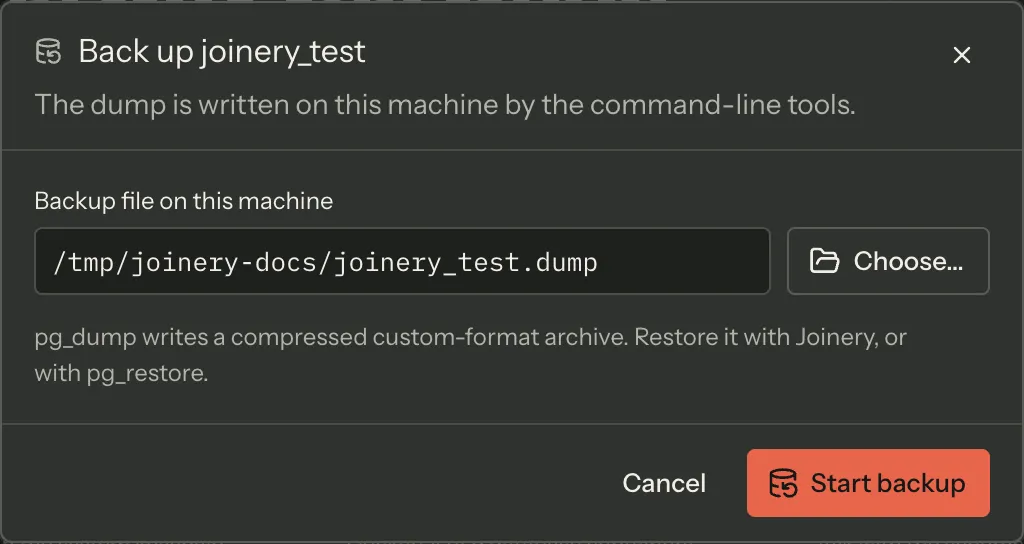
Neither engine gets a backup type, a compression box, a description, a statement preview or a history, because none of those reach the tool: the format is fixed in the arguments Joinery passes, and neither engine keeps backup metadata for a history to read.
The format is not a setting with one option — there is no setting. pg_dump is always given
-F c, mysqldump is given no format flag at all, and the request those two engines receive
carries no format field that could say otherwise.
The suggested file name is <database>_<timestamp>.<ext> — sales_2026-08-16T14-32-05.bak — with
the timestamp written in a form that is legal in a Windows path.
The statement preview
Section titled “The statement preview”On SQL Server, the Statement box is the statement. It carries WITH INIT and STATS = 5 even
though you never chose either, because the server is sent both: INIT is why writing to the same
path twice overwrites rather than appends, and STATS = 5 is what makes the percentage progress
arrive at all.
While it runs
Section titled “While it runs”The form stays on screen with its controls disabled, and a band above the buttons carries the phase
line and a progress bar. SQL Server reports a real percentage; pg_dump and mysqldump report phase
lines and no percentage at all, so the bar runs indeterminate rather than showing a misleading 0%.
There is no cancel button yet. Closing the dialog does not stop the dump — it finishes in the
background, and the dialog says so. The button was withheld because cancelling did not cancel:
every cancel was routed to the SQL Server service, which does not hold the PostgreSQL or MySQL
operations, so it stopped the progress readout and left pg_dump running. That routing is fixed,
and a cancel now reaches the child process those two engines spawn. The button follows once the
dialogs are wired to it. SQL Server remains uncancellable: its backup runs inside the server, not
in a process Joinery owns.
When it finishes, the same band states Backup complete, the elapsed time and the path that was written. A failure states the server’s own message in the same place, with Try again beside Close.
Note — Joinery refuses to start a second operation against a destination it is already writing: a backup to a path a backup is already writing, or a restore into a database a restore is already writing. Two dumps writing one archive corrupt it while both report success. The window disables the button and the band says which run is in the way; the refusal itself is enforced in the main process, so it holds across windows, across a reload, and for any other caller — not just the dialog you started it from.
Restoring
Section titled “Restoring”Restore is the one workflow in Joinery that can destroy data, and the wizard is shaped around that.
The form asks for three things: the backup file, the database to restore into, and what to do if something is already there.
Restore into is a picker over the databases the server reports, plus A database that does not
exist yet…, which reveals a name field. Below it, a note states what will happen to the name you
chose — it already exists and you will be asked to confirm; it does not exist and the restore creates
it; Joinery will create it first because pg_restore cannot; or the database list could not be read,
so Joinery cannot tell and will ask you to confirm anyway.
That decision is made from the name, never from which option you picked. Choosing “a database that does not exist yet” and typing the name of one that does is exactly what someone restoring yesterday’s backup over today’s database would do, so the name is the only thing consulted.
Overwrite what is already there does something different on each engine, and the hint under the box says which:
| Engine | What overwrite does |
|---|---|
| SQL Server | WITH REPLACE. The server refuses to restore over an existing database without it. |
| PostgreSQL | pg_restore --clean --if-exists. Every object the archive contains is dropped and recreated. |
| MySQL | DROP DATABASE, then CREATE. The whole target goes, including tables the dump does not contain. |
SQL Server additionally gets Leave the database recovering (NORECOVERY), a Where the files go
section listing each logical file with the path it will be written to, a Statement preview, and a
Recent backups on this server list you can pick a source from. Reading the backup header
(RESTORE HEADERONLY) reports which database the file came from, its type, when it was taken and how
big it is.
The relocation defaults aim each file at the server’s own data and log directories, named after the
target database. Defaulting to the file’s original path is what breaks the common case: restoring
sales.bak into sales_copy would try to write sales.mdf, which the live sales database still
has open.
The confirmation
Section titled “The confirmation”The options screen’s primary button is labelled from what would happen next. If the target does not exist it reads Start restore and runs. If it exists — or Joinery could not prove it does not — it reads Review the restore, and there is no button on that screen that can destroy anything.
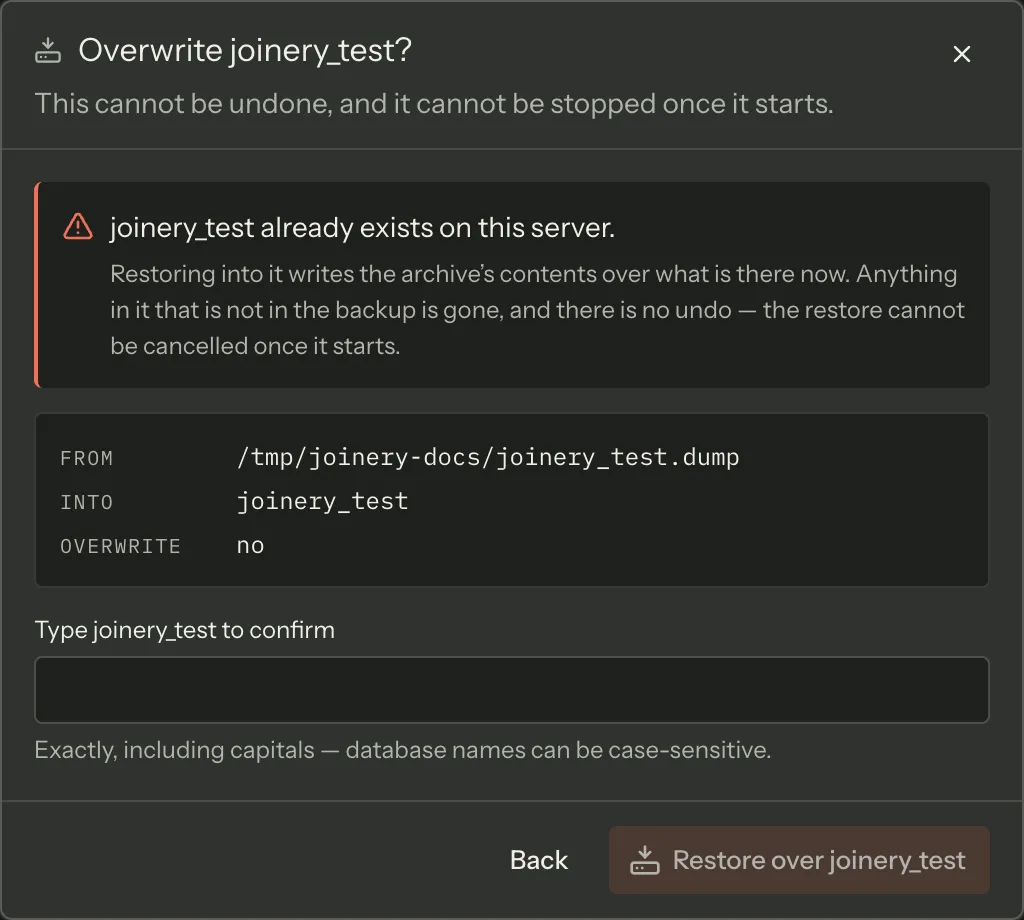
The review screen is titled Overwrite name? with the flat statement This cannot be undone, and
it cannot be stopped once it starts. It lists the file, the target and whether overwrite is on, and
asks you to type the target database’s name to proceed. The match is exact, including case —
accepting SALES for sales would teach you the two are the same name on the one screen where that
could be false.
PostgreSQL creates the target first
Section titled “PostgreSQL creates the target first”pg_restore cannot create a database, so Joinery does it before the restore starts, and says so
before it does. That has a consequence the wizard is honest about: if the restore then fails, the
empty database is still there. The failure names it, tells you it is empty, and points out that
trying again restores into it — which is why the confirmation will now ask for its name.
If the connection is not allowed to create databases, the wizard refuses at the form: pg_restore cannot create a database, and this connection is not allowed to either. Restore into a database that already exists.
MySQL target names
Section titled “MySQL target names”MySQL restores are limited to a name of letters, digits and underscores. The wizard checks that at the form rather than letting the restore reject it after you have worked through a confirmation.
PostgreSQL and MySQL restores are checked against the server
Section titled “PostgreSQL and MySQL restores are checked against the server”Neither mysql nor pg_restore is a reliable witness to its own success. An empty or invalid dump,
a missing CREATE privilege, a target pg_restore was never told to create — all of them can end
with an exit code that looks like success and nothing applied. So when the tool exits, Joinery
reconnects and asks the server whether the target database is actually there, and only then reports
success. If it is not, the failure says so and names the likely causes.
That server check is the only thing that decides the verdict. Once it answers yes, the restore is a success — including when the housekeeping that follows it fails. Joinery drops the connection’s cached database list at that point so the restored database appears in the sidebar right away, and if that refresh cannot run it is reported as its own line in the Output panel and the restore still reads as succeeded. Reload the connection if the new database has not appeared.
That check connects with the profile’s own settings, Encrypt the connection and Trust the
server certificate included. A server that refuses unencrypted connections — MySQL’s
require_secure_transport, a PostgreSQL hostssl rule — answers the check rather than rejecting it,
so a restore that succeeded against such a server is reported as a success.
Where this page's facts come from
| Claim | Source |
|---|---|
| The three mechanisms, per engine | packages/renderer/src/features/restore/restore-model.ts:11-21, backup-model.ts:56-80 |
| MSSQL writes on the server; PG/MySQL write on this machine | packages/renderer/src/features/backup/backup-model.ts:67-80 |
The four host binaries, probed with --version |
packages/main/src/services/sql/cli-deps.ts:32-35, 71-107 |
| They are not bundled, and the probe exists to avoid a spawn ENOENT | packages/main/src/services/sql/cli-deps.ts:1-16 |
| The setup view replaces the form and lists each tool found or missing | packages/renderer/src/features/backup/missing-cli-tools.tsx:64-108 |
| Per-step install commands with a copy button, and a Re-check that re-probes | packages/renderer/src/features/backup/missing-cli-tools.tsx:113-198, cli-deps.ts:52-64 |
| MSSQL skips the probe entirely | packages/renderer/src/features/backup/backup-model.ts:56-65, 305-310 |
| A failed probe opens the form and states the reason | packages/renderer/src/features/backup/backup-model.ts:300-309, backup-dialog.tsx:172-181 |
| The sidebar’s database and server menus carry Backup / Restore Database… | packages/renderer/src/shell/sidebar/node-menu.tsx:192-202, 241-258 |
| The explorer footer’s back-up and restore actions | packages/renderer/src/shell/sidebar/sidebar.tsx:146-228 |
| The palette entries “Back up database” and “Restore database” | packages/renderer/src/commands/catalogue.ts:489-505 |
| The menu bar’s Database ▸ Backup… / Restore… | packages/main/src/menu.ts:300-313 |
| Targetless entries resolve the most recent connection and its default database | packages/renderer/src/features/backup/backup-dialogs.tsx:1-20 |
| MSSQL’s backup-type picker holds Full, Differential and Transaction log | packages/renderer/src/features/backup/backup-model.ts:82-94 |
| Which controls each engine gets, and the two format notes verbatim | packages/renderer/src/features/backup/backup-model.ts:114-150 |
pg_dump always gets -F c and mysqldump no format flag |
packages/main/src/services/sql/backup-args.ts (buildPgDumpArgs, buildMysqlDumpArgs) |
| The PG/MySQL request has no format field to override them | packages/shared/src/types/backup.types.ts (CliBackupRequest) |
| Compression, description, preview and history are MSSQL-only | packages/renderer/src/features/backup/backup-model.ts:91-112 |
| PG/MySQL keep no backup metadata, so there is no history to read | packages/renderer/src/features/backup/backup-model.ts:101-105 |
| The server file browser reads the server’s own drives and directories | packages/renderer/src/features/backup/server-file-browser.tsx:1-8, backup-dialog.tsx:342-365 |
| PG/MySQL use the native save dialog | packages/renderer/src/features/backup/backup-dialog.tsx:297-319 |
| The suggested file name and its path-safe timestamp | packages/renderer/src/features/backup/backup-model.ts:166-180 |
The preview carries INIT and STATS = 5, and why |
packages/renderer/src/features/backup/backup-model.ts:185-225 |
| The preview is checked against the statement the main process actually builds | tests/fixtures/tsql-preview/mssql-statements.sql (generated), packages/main/src/services/sql/mssql-preview-fixture.spec.ts, packages/renderer/src/features/tsql-preview-drift.spec.ts |
| The form stays visible with controls disabled while a dump runs | packages/renderer/src/features/backup/backup-dialog.tsx:21-27 |
| An indeterminate bar when the tool reports no percentage | packages/renderer/src/features/backup/backup-model.ts:394-407, backup-dialog.tsx:720-762 |
| There is no cancel button, and closing does not stop the dump | packages/renderer/src/features/backup/backup-dialog.tsx:29-36, 761-764 |
| Cancel reaches the PG/MySQL child process; SQL Server cannot be stopped | packages/main/src/ipc/backup.ipc.ts (cancelOperation), packages/main/src/services/sql/backup-restore.ts (cancel) |
| The success band names the elapsed time and the path | packages/renderer/src/features/backup/backup-dialog.tsx:768-795 |
| A failure states the message with Try again beside Close | packages/renderer/src/features/backup/backup-dialog.tsx:797-818, 587-602 |
| A second operation on the same database is refused, and why | packages/renderer/src/features/backup/backup-dialog.tsx:638-678 |
| Restore asks for file, target and overwrite | packages/renderer/src/features/restore/restore-dialog.tsx:696-813 |
| The target picker plus “A database that does not exist yet…” | packages/renderer/src/features/restore/restore-dialog.tsx:746-780 |
| The four target notes, verbatim | packages/renderer/src/features/restore/restore-dialog.tsx:1081-1121 |
| The destructive decision is derived from the name, not from a mode toggle | packages/renderer/src/features/restore/restore-model.ts:172-216 |
| An unreadable database list is treated as an overwrite | packages/renderer/src/features/restore/restore-model.ts:180-185, 213-216 |
| What overwrite does on each engine, verbatim | packages/renderer/src/features/restore/restore-model.ts:128-164 |
| NORECOVERY, relocations, preview and history are MSSQL-only | packages/renderer/src/features/restore/restore-model.ts:104-119, 128-140 |
| The backup header read reports database, type, date and size | packages/renderer/src/features/restore/restore-dialog.tsx:1124-1165 |
| Relocation defaults aim at the server’s data and log directories, named for the target | packages/renderer/src/features/restore/restore-model.ts:283-306 |
| The button reads “Review the restore” or “Start restore” | packages/renderer/src/features/restore/restore-dialog.tsx:897-911 |
| The confirmation is a separate phase, so no options-screen button is destructive | packages/renderer/src/features/restore/restore-model.ts:460-470 |
| The review screen’s title and its warning sentence | packages/renderer/src/features/restore/restore-dialog.tsx:616-621 |
| It lists file, target and overwrite, and asks for the typed name | packages/renderer/src/features/restore/restore-dialog.tsx:1040-1060 |
| The typed name must match exactly, including case | packages/renderer/src/features/restore/restore-model.ts:222-243 |
| PostgreSQL’s target is created by Joinery before the restore | packages/renderer/src/features/restore/restore-model.ts:90-102, restore-dialog.tsx:1167-1177 |
| A failed PostgreSQL restore leaves the created database behind, and says so | packages/renderer/src/features/restore/restore-model.ts:487-518, restore-dialog.tsx:1267-1297 |
| The refusal when the connection cannot create databases | packages/renderer/src/features/restore/restore-model.ts:441-443 |
| MySQL target names are limited to letters, digits and underscores | packages/renderer/src/features/restore/restore-model.ts:245-258 |
| The restore is checked against the server after the tool exits | packages/main/src/services/sql/restore-verify.ts, mysql-backup.ts (runRestoreProcess), pg-backup.ts (runProcess) |
| Only the server check decides the verdict; a failed cache refresh is logged, not fatal | packages/main/src/services/sql/metadata.ts (invalidateDatabasesAfterRestore), pg-backup.ts (onRestored), mysql-backup.ts (runRestoreProcess) |
| The check connects with the profile’s encryption settings | packages/main/src/services/sql/mysql-pool-options.ts (mysqlVerifyConnectionOptions), restore-verify.ts (pgDatabaseExists) |