

Snippets
⌥⌘S opens the snippet library (Ctrl+Alt+S on Windows). Pressing it again closes it, and Snippet library in the command palette is the other way in.
Note — it is ⌥⌘S, not ⇧⌘S. ⇧⌘S is File ▸ Save Query As, and a menu accelerator always wins over a key listener in the window, so a library on ⇧⌘S would simply never open.
Saving one
Section titled “Saving one”New opens a form seeded with the SQL in the active query tab — so the usual way to make a snippet is to write it, run it, and press ⌥⌘S then New. With no query tab in front, the form opens empty.
Three fields: Name (required), Tags (comma separated; blanks and duplicates are dropped) and SQL (required). Save is refused until the name and the SQL both have non-whitespace in them.
The same form edits an existing snippet, from the pencil on its row. Editing changes what future inserts produce; SQL you have already pasted into an editor is untouched.
Inserting
Section titled “Inserting”Enter on a row, or clicking it, inserts into the active query editor and closes the overlay. The snippet is appended after a blank line — it does not replace the editor’s contents and it does not paste at the caret. An empty editor simply becomes the snippet.
When there is no query tab to insert into, rows are disabled and say why — Open a query tab to insert into, or Bring a query tab to the front to insert — rather than firing an insert that lands nowhere. The Edit and Delete buttons on a disabled row still work: they have nothing to do with there being an editor to paste into.
Finding one
Section titled “Finding one”Typing ranks rather than filters, over the snippet’s name, its tags at a lower weight, and its SQL at a lower weight still. A snippet that does not match even as a loose subsequence is dropped. At most 60 rows are drawn, and the footer counts what is showing against the whole library.
Each row shows the name (or Untitled snippet), its tags, a one-line collapsed preview of the SQL capped at 100 characters, and a relative date: Today, Yesterday, 4d ago, then a plain date past a week.
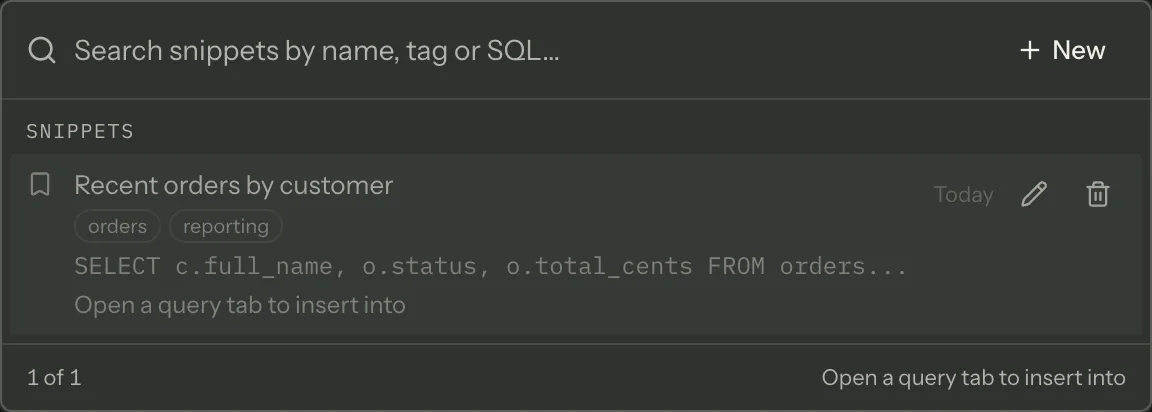
Deleting is immediate — there is no confirmation and no undo.
Where they are stored
Section titled “Where they are stored”Snippets live in main-process application state, not in the renderer. Joinery does not keep your preferences in browser storage; anything that has to survive a quit is held by the main process, and a one-off migration lifted any snippets from the pre-rewrite browser-storage key into it.
Where this page's facts come from
| Claim | Source |
|---|---|
| ⌥⌘S toggles it (Ctrl+Alt+S elsewhere), and the palette is the other producer | packages/renderer/src/features/snippet-library/snippet-library.tsx:89-103, commands/catalogue.ts:632-642 |
| Why not ⇧⌘S — File ▸ Save Query As registers it and the menu wins | packages/renderer/src/commands/catalogue.ts:637-639, 144-157, packages/main/src/menu.ts:101 |
| New seeds the form with the active query tab’s SQL, else empty | packages/renderer/src/features/snippet-library/snippet-library.tsx:153-161 |
| Name, Tags and SQL; tags are comma separated with blanks and duplicates dropped | packages/renderer/src/features/snippet-library/snippet-library.tsx:390-415, snippet-model.ts:11-22 |
| Save is refused unless name and SQL are both non-blank, on click and on Enter | packages/renderer/src/features/snippet-library/snippet-library.tsx:173-189, 376 |
| Editing affects future inserts only | packages/renderer/src/features/snippet-library/snippet-library.tsx:382-388 |
| Insert appends after a blank line, or becomes the content when empty | packages/renderer/src/editor/sql-editor.tsx:293-298 |
| Insert reaches the editor through the command bus | packages/renderer/src/features/snippet-library/snippet-library.tsx:145-151, features/query/query-commands.tsx:125-128 |
| Rows are disabled with a reason when there is no query tab to insert into | packages/renderer/src/features/snippet-library/snippet-library.tsx:132-143, 349-353 |
| Edit and Delete still work on a disabled row | packages/renderer/src/features/snippet-library/snippet-library.tsx:291-324 |
| Ranking over name, tags (0.8) and SQL (0.5); non-matches dropped | packages/renderer/src/features/snippet-library/snippet-library.tsx:105-120, utils/fuzzy.ts:29-43 |
| At most 60 rows; the footer counts visible against total | packages/renderer/src/features/snippet-library/snippet-library.tsx:65-66, 221-228 |
| The row’s preview is one collapsed line capped at 100 characters | packages/renderer/src/features/snippet-library/snippet-model.ts:29-37 |
| “Untitled snippet” for an unnamed one | packages/renderer/src/features/snippet-library/snippet-model.ts:60-64 |
| Today / Yesterday / Nd ago / a date past a week | packages/renderer/src/features/snippet-library/snippet-model.ts:39-58 |
| Delete is immediate, with no confirmation | packages/renderer/src/features/snippet-library/snippet-library.tsx:191-194 |
Snippets are main-process state, never localStorage, migrated once |
packages/renderer/src/features/snippet-library/snippet-library.tsx:5-13 |