

Query history
⇧⌘H, or Query ▸ Query History…, opens a searchable list of every statement this app has executed. The command palette has an entry for it, and also offers your six most recent successful queries inline.
What is recorded
Section titled “What is recorded”Every statement run through the query editor, from every surface that uses it. The main process writes an entry as each one returns, with its connection, its database, the SQL, when it ran, how long it took, the row count, and the error if it failed.
That includes things you did not type: an execution plan request appears as
the EXPLAIN or SET STATISTICS PROFILE statement that was really sent. It is a true record of
something that executed against your database, which is the point.
What is not here is the foreign-key preview in the row inspector. Joinery
builds that lookup itself and sends the cell’s value to the server as a bound parameter rather than
writing it into the SQL, so there is no statement text worth keeping — the entry would read
WHERE "id" = $1 with the value missing from it. Opening that referenced row in a tab runs a
query you can see and edit, and that one is recorded.
The last 1,000 entries are kept. Past that, the oldest fall off. The SQL itself is capped at 10,000 characters per entry.
History survives quitting the app. It is written to disk on a short delay and flushed on quit.
The list
Section titled “The list”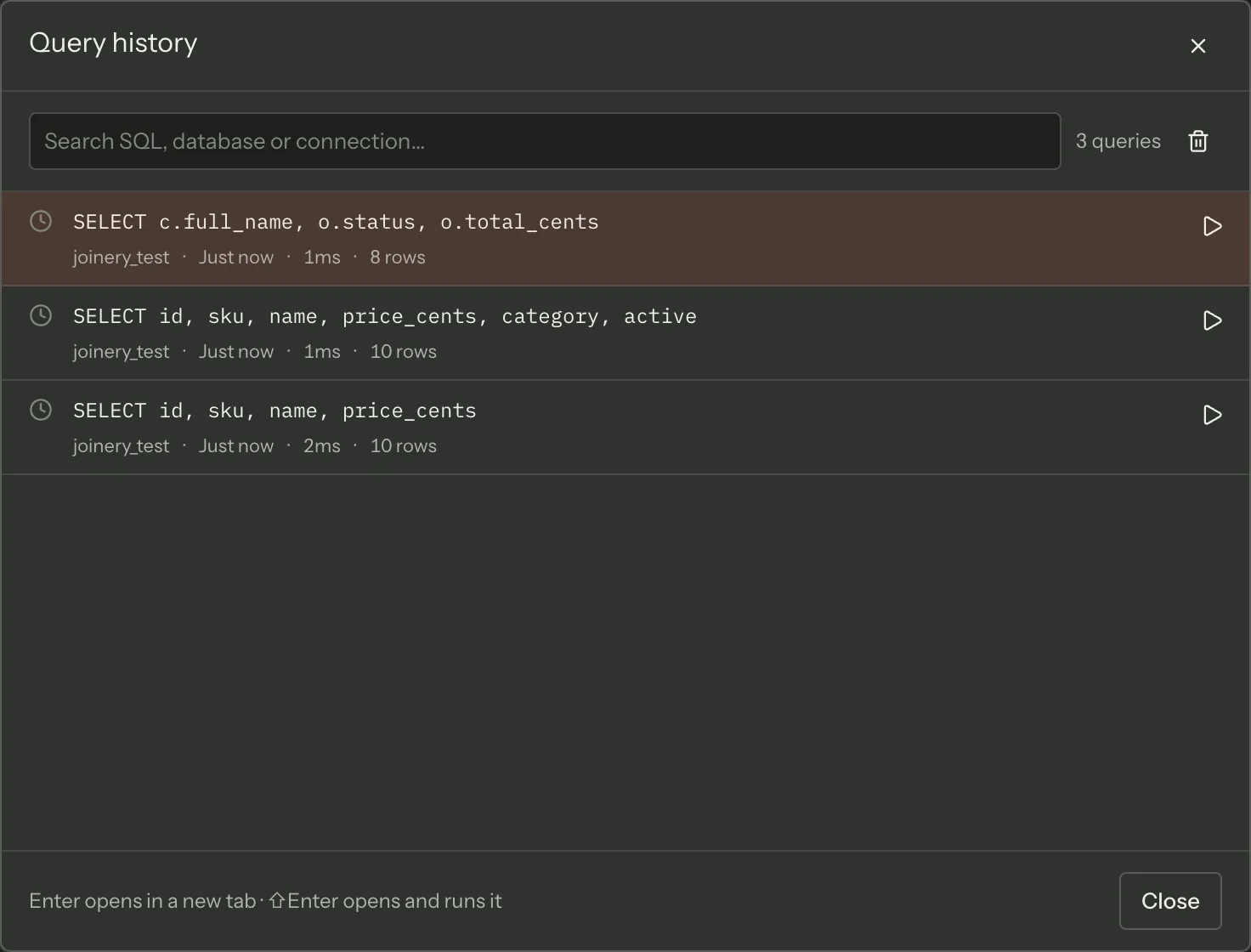
Each row is the statement’s first line (capped, with the whole thing as a tooltip), then its database, how long ago it ran, how long it took, and its row count — or, when it failed, a warning glyph and the start of the error message in red.
The relative time updates while the dialog is open.
Searching
Section titled “Searching”Typing searches the whole history, not just the rows on screen: the query goes to the main process, which matches your text against the SQL, the connection name and the database name, case-insensitively. It settles for 200ms after you stop typing so a burst of typing costs one round trip.
Without a search, the dialog loads the 100 most recent entries.
Re-opening
Section titled “Re-opening”Two actions per row:
| Action | Keys | Effect |
|---|---|---|
| Open in a new tab | Enter, or click the statement | Opens a query tab with the SQL, and stops there |
| Open and run | ⇧Enter, or the play button | Opens a query tab and executes on arrival |
↑ and ↓ move the selection, Escape closes.
A re-opened query lands on the server it was recorded against, while that connection is still open. Only if that server is not connected does it fall back to the connection you are on — and Joinery says so in a notice naming the server that was unavailable.
Careful — a redirected entry is only ever loaded, never run, whatever you pressed. ⇧Enter means “run this again”, and on a different server that is not the same act: a
DELETErecorded against staging is a different statement against production. The SQL lands in front of you, on the right server, one keystroke from running.
If nothing at all is connected, the entry cannot be opened and Joinery says so rather than making a tab that cannot execute.
Clearing
Section titled “Clearing”The bin icon in the dialog’s header clears all history. It is disabled when there is nothing to clear, and a failure to clear is reported rather than looking like it worked.
Clearing one entry is not available from this dialog.
Note — this is not the same thing as the History tab inside the results panel. That one holds snapshots of what queries returned, per query tab, and is described on Results grid.
Where this page's facts come from
| Claim | Source |
|---|---|
| ⇧⌘H, from Query ▸ Query History… and from the palette | packages/renderer/src/commands/catalogue.ts:425-433, packages/main/src/menu.ts:236-243 |
| The palette also offers the six most recent successful queries | packages/renderer/src/features/command-palette/command-palette.tsx:65, 94-117 |
| Every execute is recorded, with connection, database, SQL, time, duration, rows, error | packages/main/src/ipc/query.ipc.ts:38-63 |
| A plan request goes through the same path and so is recorded | packages/renderer/src/features/query/query-panel.tsx:294-301 |
| The FK preview is NOT recorded — it is a bound statement on its own channel | packages/main/src/ipc/query.ipc.ts:177-192, packages/renderer/src/features/query/row-detail-panel.tsx:573-599 |
| Opening the referenced row in a tab IS recorded, via the editor channel | packages/renderer/src/features/query/row-detail-panel.tsx:679-696 |
| 1,000 entries are kept, oldest first off | packages/main/src/services/config/query-history.ts:17, 60-67 |
| The SQL is capped at 10,000 characters per entry | packages/main/src/ipc/query.ipc.ts:56 |
| It is persisted to disk on a debounce and flushed on quit | packages/main/src/services/config/query-history.ts:18, 36-47 |
| A row shows the first line (capped) with the full SQL as its tooltip | packages/renderer/src/features/query-history/query-history-dialog.tsx:286-294, history-format.ts:9-14 |
| Database, relative time, duration, row count; a warning glyph and short error on failure | packages/renderer/src/features/query-history/query-history-dialog.tsx:281-311, history-format.ts:16-49 |
| The relative time ticks while the dialog is open | packages/renderer/src/features/query-history/query-history-dialog.tsx:87-98 |
| Search is main-side, over SQL, connection name and database, case-insensitively | packages/main/src/services/config/query-history.ts:83-92 |
| Searching covers the whole store rather than the loaded page | packages/renderer/src/features/query-history/query-history-dialog.tsx:6-16 |
| The 200ms debounce | packages/renderer/src/features/query-history/query-history-dialog.tsx:53-82 |
| Without a search, the 100 most recent entries are loaded | packages/renderer/src/state/query-history.ts:18 |
| Enter loads, ⇧Enter runs, ↑/↓ move, Escape closes | packages/renderer/src/features/query-history/query-history-dialog.tsx:26-27, 117-133, 221-224 |
| The statement is a button that loads; the play button runs | packages/renderer/src/features/query-history/query-history-dialog.tsx:244-256, 272-327 |
| The entry’s own connection wins while it is connected; otherwise the current one | packages/renderer/src/features/query-history/history-target.ts:1-53 |
| A redirect is announced in a notice | packages/renderer/src/features/query-history/query-history-host.tsx:70-76 |
| A redirected entry loads and never runs | packages/renderer/src/features/query-history/query-history-host.tsx:78-82 |
| With nothing connected, the entry cannot be opened and says so | packages/renderer/src/features/query-history/query-history-host.tsx:66-69, history-target.ts:40-51 |
| Clear-all is disabled when empty, and a failed clear is reported | packages/renderer/src/features/query-history/query-history-dialog.tsx:166-184 |
| Deleting a single entry is not offered by this dialog | packages/renderer/src/features/query-history/query-history-dialog.tsx:147-185 |
| Result-history snapshots are a different surface | packages/renderer/src/features/query/result-history-panel.tsx:1-32 |