

Find a database object
⌘P opens a search over the current database’s tables, views, procedures and functions. Pressing it again closes it, and Find database object in the command palette is the other way in.
It searches one database — the one the sidebar’s picker is on, for the most recently used connection. With nothing connected, or no database picked, it says so rather than showing an empty list.
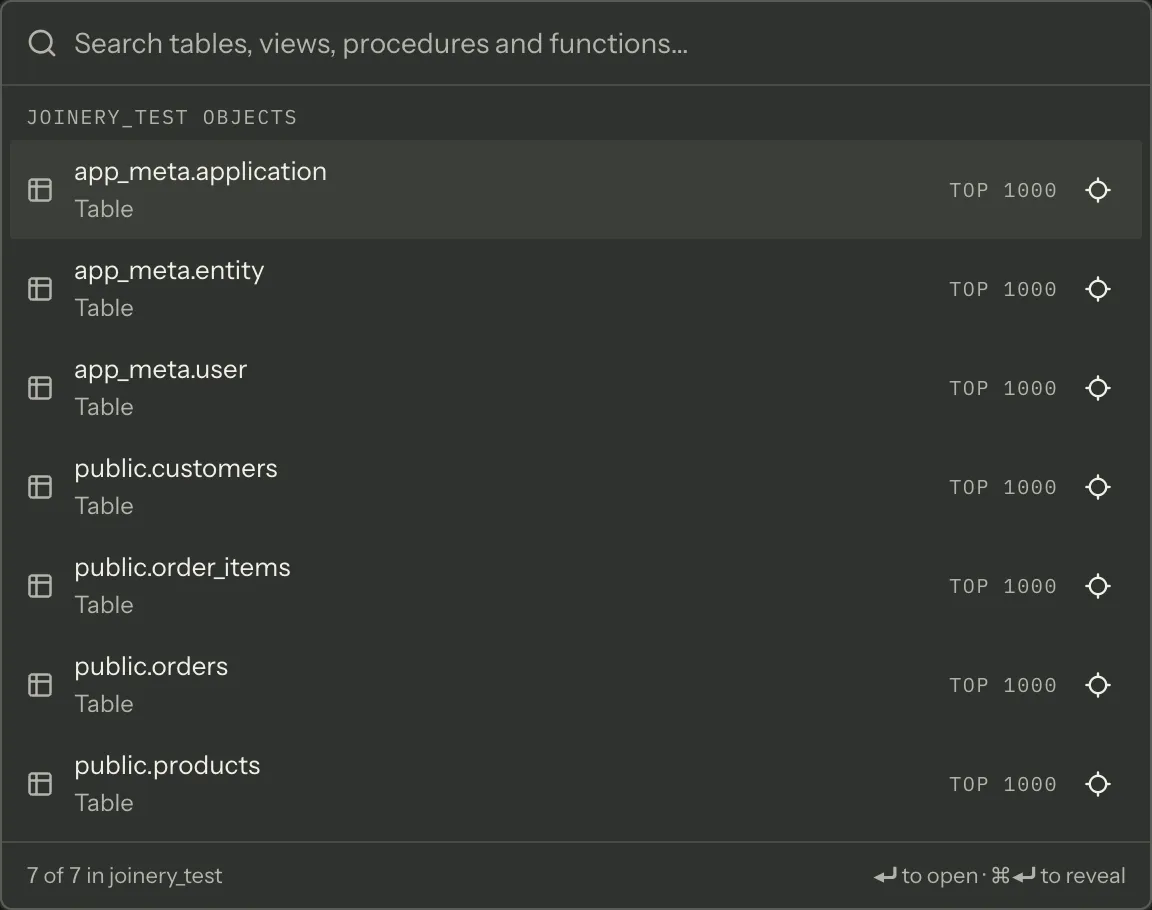
What Enter does
Section titled “What Enter does”| Object kind | What opens | Does it run? |
|---|---|---|
| Table or view | A capped SELECT of the first 1,000 rows |
Yes |
| Stored procedure | The CALL / EXEC statement |
No |
| Function | SELECT schema.fn() |
No |
Each row states its promise before you press anything — Top 1000, Call, Select — so the one
that executes is the one that says it will. A call with arguments you have not filled in must never
run itself.
The statement is generated for the connection’s engine: its quoting, its row-limit syntax, and its
default schema. On MySQL, which has no schema layer between database and table, the name is
unqualified rather than given an invented dbo.
⌘⏎ reveals instead of opening: the sidebar expands down to the object and scrolls to it, then takes keyboard focus. The row’s own reveal button does the same. This works with the sidebar collapsed — it opens.
Matching
Section titled “Matching”Typing ranks rather than filters. Three fields are scored and the best one wins: the qualified name
(sales.orders) and the bare name (orders) at full weight, and the object’s kind at 0.4 — so
typing orders finds the table rather than a schema whose name happens to match. Within a field the
ladder is:
- the text is what you typed;
- it starts with what you typed;
- a word inside it starts with what you typed —
ordersinsidesales orders; - it contains what you typed anywhere;
- your characters appear in order but apart, scored by how tightly —
ordidmatchesorder_idwell and a scattering across eighty characters badly.
Something that does not match even as a subsequence scores zero and is dropped, so an unrelated table never appears in the list. At most 50 rows are drawn.
Loading
Section titled “Loading”The index is four metadata reads — tables, views, procedures, functions — issued when the overlay opens, and only for the folders the engine actually has. They are cached under the same keys the sidebar tree uses, so opening the search after browsing the tree is usually instant, and refreshing the explorer invalidates both.
The footer counts what is showing against what was loaded, and names the database.
If one of those reads fails, the overlay says so and names the error — a failed metadata query does not get to look like an empty database. The failure is also written to the output panel (⌘J).
Where this page's facts come from
| Claim | Source |
|---|---|
| ⌘P toggles the overlay, and it is a renderer key rather than a menu accelerator | packages/renderer/src/features/object-search/object-search.tsx:70-80, commands/catalogue.ts:623-631 |
| The palette’s “Find database object” is the other producer | packages/renderer/src/features/object-search/object-search.tsx:67-68 |
| It searches the resolved database of the most recent connection | packages/renderer/src/features/object-search/object-search.tsx:63-65 |
| Disconnected or no database renders a “connect first” row | packages/renderer/src/features/object-search/object-search.tsx:186-189 |
| Tables and views open a 1,000-row SELECT and execute; routines do not | packages/renderer/src/features/object-search/object-model.ts:91-136 |
| Row promises — Top 1000 / Call / Select — are shown before Enter | packages/renderer/src/features/object-search/object-model.ts:105-107, object-search.tsx:242-250 |
| Statements come from the app’s per-engine SQL generator | packages/renderer/src/features/object-search/object-model.ts:1-16, 116-136 |
MySQL objects are not given an invented dbo schema |
packages/renderer/src/features/object-search/object-model.ts:12-16, 65-89 |
| ⌘⏎ reveals; the row’s button does the same; ordinary Enter still opens | packages/renderer/src/features/object-search/object-search.tsx:166-174, 251-266 |
| Reveal works with the sidebar collapsed | packages/renderer/src/shell/sidebar/sidebar.tsx:68-88 |
| Qualified name and bare name at full weight, kind at 0.4; the best field wins | packages/renderer/src/features/object-search/object-search.tsx:98-115, utils/fuzzy.ts:29-43 |
| The score ladder, and that a non-subsequence is dropped | packages/renderer/src/utils/fuzzy.ts:29-43 |
| At most 50 rows are rendered | packages/renderer/src/features/object-search/object-search.tsx:55-56 |
| Four folder reads, enabled only while the overlay is open, routines capability-gated | packages/renderer/src/features/object-search/object-search.tsx:300-341 |
| They share the sidebar tree’s cache keys | packages/renderer/src/features/object-search/object-search.tsx:13-22 |
| The footer counts visible against loaded and names the database | packages/renderer/src/features/object-search/object-search.tsx:175-184 |
| A failed read is named on screen and logged, not rendered as “no objects” | packages/renderer/src/features/object-search/object-search.tsx:90-96, 192-202, 286-298 |