

ERD
An ERD tab draws tables as boxes and foreign keys as arrows between them. There are two ways in, and they build different diagrams.
| Where | What you get |
|---|---|
| A table’s right-click menu ▸ Show Relationships | That table, plus everything within two foreign-key hops of it |
| ⌘K ▸ Open ERD diagram | Every table in the current database |
The palette entry has no table to start from — a palette row carries no target — so it resolves the focused connection and its selected database and opens the whole-database diagram. With no connection it says Connect to a database before opening a diagram. Opening from the sidebar also moves the database picker to that table’s database.
Reopening the same table (or the same database) focuses the tab you already have rather than opening a second one.
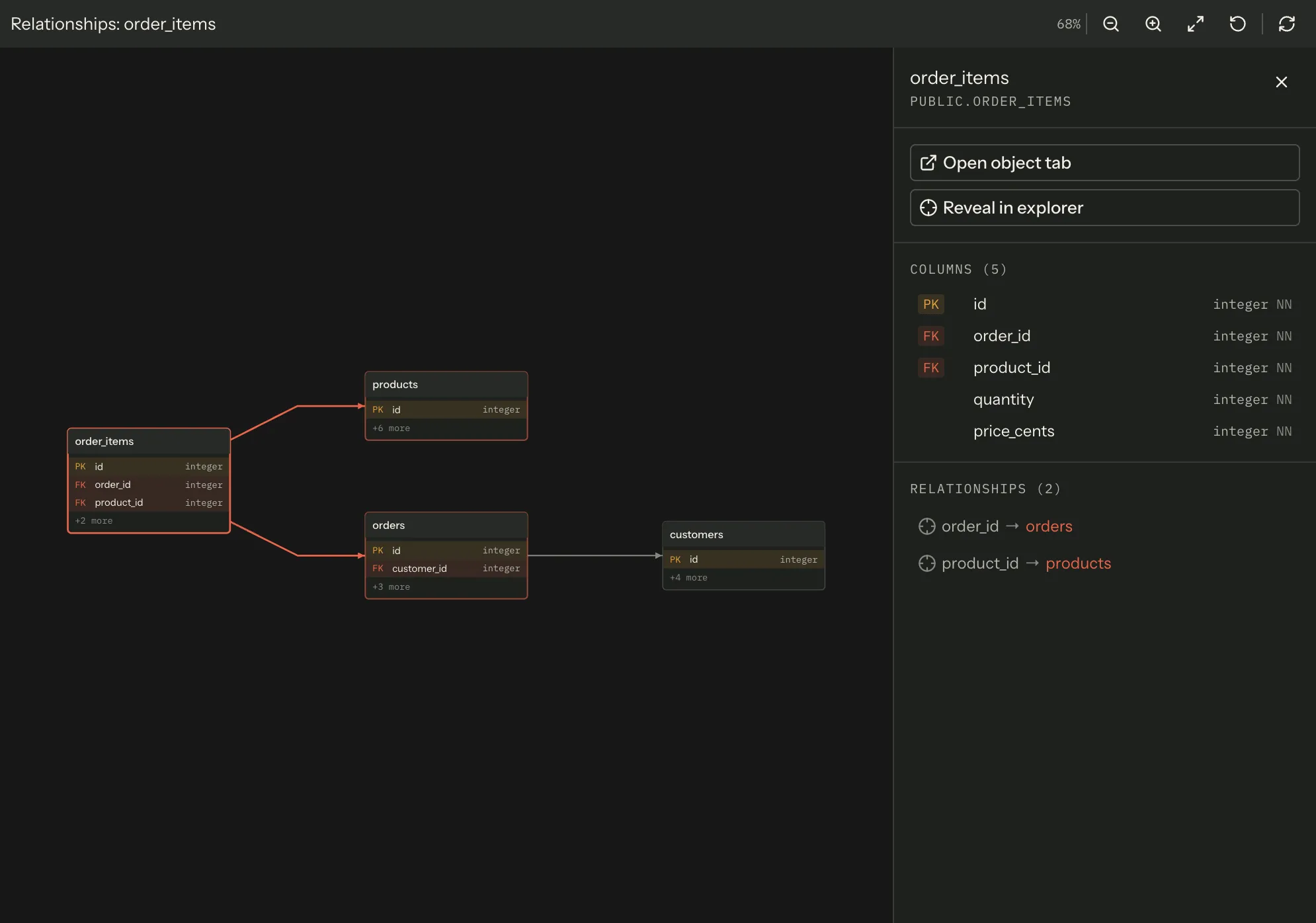
What ends up in the diagram
Section titled “What ends up in the diagram”A focused diagram follows only outgoing foreign keys. Start on an order line and you get the order, the product and the customer — its parents. Start on a lookup table that points at nothing and you get one box, because finding the tables that point at it would need a reverse-key query Joinery does not make. That asymmetry is why the sidebar opens these at two hops: two hops of parents is usually the shape you wanted.
Each hop is fetched as one round of parallel reads rather than table by table, so depth costs latency in hops, not in tables. A whole-database diagram instead walks the table list five at a time — every table costs two reads (its columns and its foreign keys), and five at a time is a deliberate ceiling on how hard a diagram leans on a shared server.
Both builds stop at 400 tables. When the cap cuts a build short the diagram says so in a strip above the canvas — This database has more tables than one diagram can show — with the count it did draw. Hitting the ceiling is reported, never silently truncated.
Boxes are 180px wide and at most 300px tall, which is 13 rows. That is nowhere near a wide table’s column count, so a box lists only the columns that explain the shape of the schema:
- primary keys, marked PK;
- foreign keys, marked FK;
- a final +N more row counting every column the box did not name.
A row carries the badge, the column name and the column type, and nothing else — which table a foreign key points at is named in the details rail, not on the box. The arrow between the boxes is the diagram’s answer to that question.
The count row is reserved a slot whenever anything is left out, so a box never paints a row through its own bottom edge.
Column types are rendered the way the server reports them, with two SQL Server conventions applied:
a length of -1 becomes (MAX), and the n-prefixed types (nvarchar, nchar) halve the reported
length, because SQL Server reports those in bytes and the declared length is characters. A length
the server did not report drops the parentheses rather than printing undefined inside them.
Hovering a box gives you its qualified name and its key counts as a native tooltip.
Moving around
Section titled “Moving around”| Input | Effect |
|---|---|
| Drag the background | Pans |
| Wheel / two-finger scroll | Zooms about the pointer |
| Pinch (a ctrl-wheel, on a trackpad) | Zooms about the pointer, five times more sensitive |
| Click a box | Selects it and opens the details rail |
| Double-click a box, or Enter with it focused | Opens that table’s object tab |
| Space with a box focused | Selects only |
| Press the background | Clears the selection |
A drag that starts on a box belongs to that box, not to the canvas — only a press into empty space pans.
The toolbar carries the current zoom as a percentage and four controls: Zoom out, Zoom in, Fit to view and Reset zoom. Zoom is clamped between 10% and 400%; the buttons step by 1.2× about the centre of the view, the wheel about the pointer. Reset returns to 100% at the origin — it is not the same as Fit.
The diagram fits itself to the pane when it first draws, and keeps refitting as you resize the pane until you move it yourself. After your first pan or zoom, resizing leaves your view alone. Fit opts back in; every other control opts out.
Only the boxes near the viewport exist in the page at any moment, so panning a 400-table diagram costs far less than the table count suggests.
The details rail
Section titled “The details rail”Selecting a box opens a rail on the right with the table’s qualified name, two actions, its columns and its relationships.
- Open object tab — the same tab a double-click opens.
- Reveal in explorer — expands the sidebar tree down to the table and scrolls to it. It is deliberately not on selection: revealing a node is up to four round trips through a lazily loaded tree, which is fine when you ask for it and wasteful on every click in a diagram you are reading.
Columns lists every column — not just the keys the box had room for — each with its PK/FK
badges, its type, and NN where the column is NOT NULL.
Relationships lists the outgoing foreign keys. A row whose target is in this diagram is a button that selects that table and brings it into view; a row whose target was never fetched (a focused diagram at depth 1 has several) is plain text, because a control that looks live and does nothing is worse than a label.
When you open a diagram from a table, that table starts selected, so the rail opens on the table you asked about.
Selecting a box also outlines its immediate neighbours. Selection and adjacency are told apart by stroke weight rather than colour, which is what makes the distinction survive a colour-blind reader.
Refresh, and what is cached
Section titled “Refresh, and what is cached”The toolbar’s Refresh drops this diagram from the cache and rebuilds it from the database.
Joinery keeps the eight most recently built diagrams in memory, keyed by what was asked for — connection, database, table, schema and depth — not by tab. Two tabs on the same table share one diagram; a tab you repoint at another table is a different one and is rebuilt. The cache exists because switching away from a tab and back would otherwise re-issue every read the diagram was built from.
Creating, renaming or deleting a database drops every cached diagram of it, in both the old and the new name.
Two engines’ worth of caveats
Section titled “Two engines’ worth of caveats”MySQL has no schema layer between database and table, so its boxes carry an unqualified name rather than an invented schema.
A diagram belongs to its own tab’s connection and database. Two ERD tabs against two servers each act on their own; the buttons never follow whichever tab happens to be in front.
Note — an ERD is read-only. It draws what the database reports and has no edit, export or print action. There is no “save this diagram” — a diagram is rebuilt from the schema, which is why Refresh is the only thing that changes what you see.
When it cannot draw
Section titled “When it cannot draw”| State | What the panel shows |
|---|---|
| No connection or no database | No database — open one from a table’s Show Relationships menu, or connect first |
| Reading | Reading the schema… |
| The read failed | Could not draw the diagram, the server’s message, and a Try again button |
| Nothing came back | Nothing to draw — the database has no tables, or the table you opened has no relationships |
A failed read is logged with its cause as well as shown; it is never reported twice.
Where this page's facts come from
| Claim | Source |
|---|---|
| A table’s menu carries “Show Relationships” | packages/renderer/src/shell/sidebar/node-menu.tsx:348-354 |
| It opens a table-focused ERD tab and moves the database picker | packages/renderer/src/shell/sidebar/node-actions.ts:232-238 |
A table-focused tab is opened at focusDepth: 2 |
packages/renderer/src/state/tab.ts:462-474 |
| The palette entry “Open ERD diagram”, with no accelerator | packages/renderer/src/commands/catalogue.ts:666-674 |
| The palette entry resolves its own connection and database and opens a whole-database diagram | packages/renderer/src/features/erd/erd-commands.tsx:24-39 |
| Its message when there is no connection | packages/renderer/src/features/erd/erd-commands.tsx:31-34 |
| Reopening the same target focuses the existing tab | packages/renderer/src/state/tab.ts:449-460 |
| A focused build follows outgoing foreign keys only | packages/renderer/src/features/erd/erd-adapter.ts:216-228, 265-272 |
| Each hop is built concurrently, one round per level | packages/renderer/src/features/erd/erd-adapter.ts:243-261 |
| Depth is clamped, and a table costs two reads | packages/renderer/src/features/erd/erd-adapter.ts:203-206, 236, 279 |
| A whole-database build walks five tables at a time | packages/renderer/src/features/erd/erd-adapter.ts:79, 297-303 |
| The 400-table ceiling, reported rather than silent | packages/renderer/src/features/erd/erd-adapter.ts:89-95, 251-253, 305 |
| The truncation strip and its wording | packages/renderer/src/features/erd/erd-panel.tsx:212-221 |
| Boxes are 180px wide, 300px tall at most | packages/renderer/src/features/erd/erd-layout.ts:49-58 |
| 13 rows is what that height leaves | packages/renderer/src/features/erd/erd-layout.ts:63-65 |
| Rows are primary keys, then foreign keys, then a “+N more” count | packages/renderer/src/features/erd/erd-layout.ts:91-119 |
| A row paints the badge, the name and the type, and does not name the FK target | packages/renderer/src/features/erd/erd-canvas.tsx:361-409 |
| The count row reserves its slot so a box never overflows | packages/renderer/src/features/erd/erd-layout.ts:99-118 |
-1 renders as (MAX); n-prefixed types halve their length |
packages/renderer/src/features/erd/erd-adapter.ts:117-136 |
| An unreported length drops the parentheses | packages/renderer/src/features/erd/erd-adapter.ts:110-115, 129 |
| The per-box tooltip carries the qualified name and both key counts | packages/renderer/src/features/erd/erd-canvas.tsx:330 |
| Drag pans; only a press on the background counts | packages/renderer/src/features/erd/use-erd-viewport.ts:198-219, use-erd-viewport.ts:295-308 |
| Wheel zooms about the pointer; a ctrl-wheel (pinch) is five times more sensitive | packages/renderer/src/features/erd/use-erd-viewport.ts:166-186, erd-viewport.ts:219-223 |
| Click selects, double-click and Enter open the object tab, Space selects | packages/renderer/src/features/erd/erd-canvas.tsx:320-327 |
| A background press clears the selection | packages/renderer/src/features/erd/erd-canvas.tsx:131-146 |
| The toolbar’s zoom readout and its four controls, plus Refresh | packages/renderer/src/features/erd/erd-panel.tsx:164-210 |
| Zoom is clamped to 0.1–4, and the buttons step by 1.2× | packages/renderer/src/features/erd/erd-viewport.ts:37-45, use-erd-viewport.ts:240-252 |
| Reset returns to the identity transform, unlike Fit | packages/renderer/src/features/erd/use-erd-viewport.ts:254-266, erd-viewport.ts:39 |
| Fit on load, and refitting stops at the first gesture | packages/renderer/src/features/erd/use-erd-viewport.ts:144-164 |
| Fit opts back in; the other controls opt out | packages/renderer/src/features/erd/use-erd-viewport.ts:254-259 |
| Only boxes near the viewport are drawn | packages/renderer/src/features/erd/erd-viewport.ts:160-181, erd-canvas.tsx:113-117 |
| The rail’s two actions | packages/renderer/src/features/erd/erd-details.tsx:73-94 |
| Reveal is deliberately not wired to selection | packages/renderer/src/features/erd/erd-panel.tsx:126-145 |
| Columns lists every column, with badges, type and an NN marker | packages/renderer/src/features/erd/erd-details.tsx:96-123, 147-168 |
| A relationship row is a button only when its target is in the diagram | packages/renderer/src/features/erd/erd-details.tsx:170-228 |
| Selecting a relationship centres the target | packages/renderer/src/features/erd/erd-panel.tsx:147-155 |
| The focus table starts selected | packages/renderer/src/features/erd/erd-panel.tsx:99-107 |
| Immediate neighbours are the only highlight, told by stroke weight not colour | packages/renderer/src/features/erd/erd-canvas.tsx:59-65, 118-128 |
| Refresh drops this diagram and rebuilds it | packages/renderer/src/features/erd/use-erd-schema.ts:121-124, erd-cache.ts:67-70 |
| Eight diagrams are cached, keyed by request rather than by tab | packages/renderer/src/features/erd/erd-cache.ts:17-25, 39-47 |
| The cache exists because a deactivated tab is unmounted | packages/renderer/src/features/erd/erd-cache.ts:1-10 |
| Create / rename / delete drops every cached diagram of that database | packages/renderer/src/features/erd/erd-cache.ts:72-90 |
| MySQL boxes carry no schema half | packages/renderer/src/features/erd/erd-adapter.ts:316-327 |
| The panel reads its own tab’s connection and database | packages/renderer/src/features/erd/erd-panel.tsx:8-13, 53-70 |
| The panel has no edit, export or print action | packages/renderer/src/features/erd/erd-panel.tsx:162-251 |
| The four body states and their exact copy | packages/renderer/src/features/erd/erd-panel.tsx:255-318 |
| A failed read is logged with its cause and shown once | packages/renderer/src/features/erd/use-erd-schema.ts:100-114 |