

Keyboard shortcuts
⇧⌘/ — or Help ▸ Keyboard Shortcuts — opens a sheet listing every binding Joinery has. The command palette has an entry for it too.
The sheet is not written by hand. Every row comes from the same table the palette and the application menus are built from, and a test compares the keystrokes in that table against what the Electron menus actually register — so a binding that changes in the app changes here, and one that disagrees fails the build.
What it shows
Section titled “What it shows”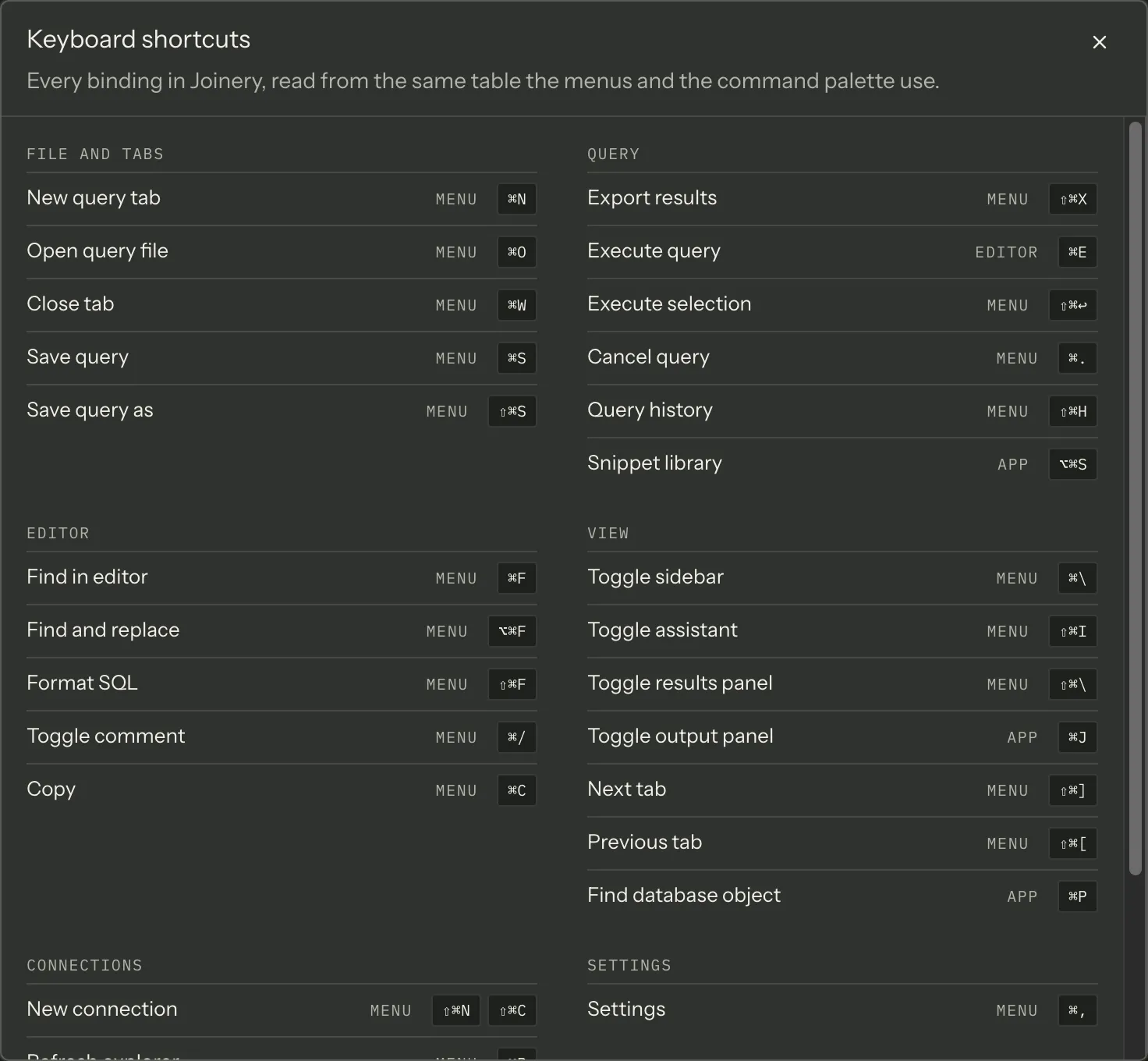
29 rows — the 27 commands that carry a keystroke, plus the two keystrokes that belong to a surface rather than to a command: the palette’s own opener, and the SQL editor’s ⌃M. They are grouped the same eight ways the palette groups its entries, and empty groups are not drawn.
Each row is the command’s name, a source column, and every binding that reaches it — not just the primary one, which is all a palette row has room for. New connection has two: ⇧⌘N (File ▸ New Connection) and ⇧⌘C (Server ▸ Connect…).
The source column
Section titled “The source column”It answers “why does this key work here but not there?”.
| Source | Bound by | Consequence |
|---|---|---|
| Menu | An Electron menu item (23 commands) | The keystroke never reaches the page at all — the menu fires and sends the command |
| App | A key listener in the window (3 commands, plus the palette’s own opener) | ⌘J, ⌘P and ⌥⌘S, and ⌘K / ⇧⌘P. These must dodge two other claimants — see below |
| Editor | Monaco itself (1 command, plus ⌃M) | ⌘E, which the menu shows but deliberately does not bind; and ⌃M, which no menu item carries at all |
Those are command counts, not keystroke counts: the 23 menu commands carry 24 bindings, because New connection has two. Two rows belong to no command at all: the palette’s opener is a fourth App row, and ⌃M is a second Editor row.
What an App binding has to dodge
Section titled “What an App binding has to dodge”Two things, and both of them win a keystroke outright.
A registered menu accelerator. Electron fires the menu item and the page never sees the keydown. This is why the snippet library is on ⌥⌘S and not ⇧⌘S: ⇧⌘S is File ▸ Save Query As, so a window-level listener on it would never have run.
A Monaco binding, while the caret is in a SQL editor. Monaco listens on each editor’s own
container element, which sits below the window listener, and it calls stopPropagation() on any
keystroke it claims. So a key Monaco binds is a key the window cannot see from inside the editor —
including keys Monaco only claims as the first half of a two-key sequence.
⌘K was exactly that. Monaco registers it as the opening keystroke of a family of two-key commands — folding, peek definition, format selection — none of which Joinery offers, so while you were typing SQL the editor swallowed ⌘K and the command palette never opened. It now works everywhere: the editor hands ⌘K back to the window and takes nothing in its place. ⇧⌘K, ⌃K and ⌘D keep Monaco’s own behaviour — those are different keystrokes.
⌘J, ⌘P and ⌥⌘S never collided with Monaco, and a test now compares every keystroke the app advertises against Monaco’s real keybinding registry, so the next collision fails the build rather than shipping.
Editor keys need the editor. The four keystrokes Monaco carries for this app — ⌘E, ⌘↩ and F5 to execute, and ⌃M below — reach it only while the caret is in a SQL editor, and with several query tabs open they act on the editor you are typing in. From the results grid or the sidebar, use Query ▸ Execute or the command palette instead; both run the active tab.
Getting out of the SQL editor
Section titled “Getting out of the SQL editor”Tab inserts a tab character in the SQL editor. That is the right thing for writing SQL and the wrong thing for a keyboard-only user, who would otherwise have no way to leave the control at all.
⌃M is the way out — the same physical keys on both platforms, written Ctrl+M on Windows.
Press it and Tab moves focus to the next element instead of indenting; press it again and Tab
indents again. The editor announces which mode it is in each time, so a screen reader says what
changed.
The app says so in two places, because an escape nobody can find is not an escape:
- the ⇧⌘/ sheet lists it under Editor as Toggle tab-focus mode, next to ⌘E;
- and the editor’s own accessible name is “SQL editor. Press Control+M to toggle tab-focus mode, so Tab moves focus out of the editor instead of indenting.” — read out when focus lands in the editor, which is where a screen-reader user meets the trap.
Known gap on Windows. Electron’s Window ▸ Minimize carries CommandOrControl+M — the same
Ctrl+M. A registered menu accelerator beats the editor, which is the Menu-beats-App rule above and
the reason ⌘E is declared without one, so on Windows the keystroke minimizes the window and never
reaches Monaco. macOS is unaffected: Minimize is ⌘M there and the escape is ⌃M. The escape and its
advertisement are correct on macOS; making it reachable on Windows is not fixed yet.
On Windows
Section titled “On Windows”Most bindings swap ⌘ for Ctrl and are otherwise the same. Five are genuinely different keys:
| Command | macOS | Elsewhere |
|---|---|---|
| Find and replace | ⌥⌘F | Ctrl+H |
| Execute selection | ⇧⌘↩ | Ctrl+Shift+E |
| Cancel query | ⌘. | Alt+Break |
| Next tab | ⇧⌘] | Ctrl+Tab |
| Previous tab | ⇧⌘[ | Ctrl+Shift+Tab |
A sixth binding is written per platform without being a different key: the snippet library is ⌥⌘S on
macOS and Ctrl+Alt+S elsewhere — the same S, with each platform’s own name for the two modifiers.
The sheet always shows the bindings for the platform you are running on. On macOS it renders them as
glyphs, in the macOS modifier order — ⌃ ⌥ ⇧ ⌘ — no matter how the binding was written. Elsewhere it
prints them as words, and resolves the cross-platform CmdOrCtrl spelling to the key you actually
press: a binding written CmdOrCtrl+N reads as Ctrl+N. The
reference table prints the same thing.
Note — the keyboard shortcuts reference is the same list on this site, generated from the same table, with the macOS and Windows bindings side by side rather than one platform at a time.
Where this page's facts come from
| Claim | Source |
|---|---|
⌃M toggles tab-focus mode, through the command path rather than getAction |
packages/renderer/src/editor/sql-editor.tsx:508-550 |
| On Windows the same keystroke is Window ▸ Minimize’s registered accelerator, so it never reaches Monaco | packages/main/src/menu.ts:402 (role: 'minimize', every platform); Electron’s minimize role declares accelerator: 'CommandOrControl+M' |
| The editor’s four keys are scoped to the editor holding focus, and released when its tab closes | packages/renderer/src/editor/sql-editor.tsx:104-139, 441-450, 561-565, editor/sql-editor.spec.tsx — ‘keybinding lifetime’ |
| Pressing it frees Tab from the editor, verified by driving the real app | tests/e2e-react/a11y.spec.ts — ‘⌃M frees Tab from the SQL editor’ |
| The sheet is built from the command table PLUS the surface-shortcut list, and ⌃M is in the second | packages/renderer/src/features/shortcuts-dialog/shortcuts-dialog.tsx:79, 95, features/command-palette/palette-actions.ts:121-146 |
| ⌃M is listed under Editor, next to ⌘E, and the sheet says Monaco binds it | packages/renderer/src/features/command-palette/palette-actions.ts:131-145, features/shortcuts-dialog/shortcuts-dialog.spec.tsx — ‘lists the editor’s way out of the Tab trap’ |
| The editor’s accessible name names the escape, and Monaco reads it out on focus | packages/renderer/src/editor/sql-editor.tsx:242-253, editor/sql-editor.spec.tsx — ‘advertises the ⌃M tab-focus escape’ |
| ⇧⌘/ opens the sheet, from the menu and from the palette | packages/renderer/src/commands/catalogue.ts:614-622, features/shortcuts-dialog/shortcuts-dialog.tsx:117-125 |
| Every row is derived from the command table plus the surface-shortcut list | packages/renderer/src/features/shortcuts-dialog/shortcuts-dialog.tsx:69-108 |
A test compares those accelerators with what menu.ts registers |
packages/renderer/src/commands/catalogue.ts:31-45, commands/catalogue.spec.ts |
| 27 commands carry a binding, and the two surface shortcuts add one row each | packages/renderer/src/commands/catalogue.ts:272-803, features/command-palette/palette-actions.ts:121-146 |
| Rows are grouped the same eight ways, and empty groups are not drawn | packages/renderer/src/features/shortcuts-dialog/shortcuts-dialog.tsx:110-115 |
| Every binding is shown, not just the primary | packages/renderer/src/features/shortcuts-dialog/shortcuts-dialog.tsx:79-93, commands/catalogue.ts:904-914 |
| New connection is ⇧⌘N and ⇧⌘C | packages/renderer/src/commands/catalogue.ts:274-283, packages/main/src/menu.ts:58, 254 |
| The three sources and their meanings | packages/renderer/src/commands/catalogue.ts:144-157 |
| 23 menu-sourced commands, 3 renderer-sourced, 1 editor-sourced | packages/renderer/src/commands/catalogue.ts:239-242, 272-803 |
| Those 23 commands carry 24 bindings, because New connection has an alternate | packages/renderer/src/commands/catalogue.ts:274-283, features/shortcuts-dialog/shortcuts-dialog.tsx:79-93 |
| The renderer-sourced three are ⌘J, ⌘P and ⌥⌘S | packages/renderer/src/commands/catalogue.ts:559-568, 623-631, 632-642 |
| The palette’s opener is rendered under App as well, as a fourth row | packages/renderer/src/features/shortcuts-dialog/shortcuts-dialog.tsx:95-108, features/command-palette/palette-actions.ts:121-129 |
⌘E is declared in the menu with registerAccelerator: false and bound by Monaco |
packages/main/src/menu.ts:238-239, packages/renderer/src/editor/sql-editor.tsx:495-499 |
| ⌥⌘S rather than ⇧⌘S, because ⇧⌘S is Save Query As | packages/renderer/src/commands/catalogue.ts:637-639, packages/main/src/menu.ts:101 |
| The five commands with a genuinely different non-macOS binding | packages/renderer/src/commands/catalogue.ts:349, 413, 421, 574, 582 |
The sixth per-platform binding is the same key: Cmd+Option+S / Ctrl+Alt+S |
packages/renderer/src/commands/catalogue.ts:639 |
| Accelerators are formatted for the running platform, with macOS modifier order | packages/renderer/src/commands/catalogue.ts:849-902 |
Off macOS the formatter prints Ctrl for the cross-platform spellings |
packages/renderer/src/commands/catalogue.ts:852-863, 884-891 |
Electron maps CmdOrCtrl to Command on macOS and Control elsewhere |
Electron accelerator reference |
| Monaco listens on each editor’s container and stops propagation on a key it claims | monaco-editor/esm/vs/editor/standalone/browser/standaloneServices.js:260-269, 293 |
| A keystroke Monaco claims only as a chord prefix still consumes the keydown | monaco-editor/esm/vs/platform/keybinding/common/keybindingResolver.js:271-277, platform/keybinding/common/abstractKeybindingService.js:206-212 |
| ⌘K opens a family of two-key Monaco commands, so the editor used to swallow it | packages/renderer/src/editor/monaco-default-keybindings.spec.ts — ‘⌘K is a chord prefix in Monaco, which is the whole of J-73’ |
| The editor hands ⌘K back with a null-command keybinding rule, and ⇧⌘K, ⌃K and ⌘D are untouched | packages/renderer/src/editor/sql-editor.tsx:452-493, editor/sql-editor.spec.tsx — ‘releases ⌘K, so the palette’s own shortcut reaches the window’ |
| ⌘K is no longer consumed in the editor, so it reaches the window listener that opens the palette | packages/renderer/src/editor/sql-editor.spec.tsx — ‘releases ⌘K, so the palette’s own shortcut reaches the window’, features/command-palette/command-palette.tsx:79-92 |
| Every advertised keystroke is compared against Monaco’s real registry | packages/renderer/src/editor/monaco-default-keybindings.spec.ts — ‘no shortcut the app owns is swallowed by Monaco’ |