

Object explorer
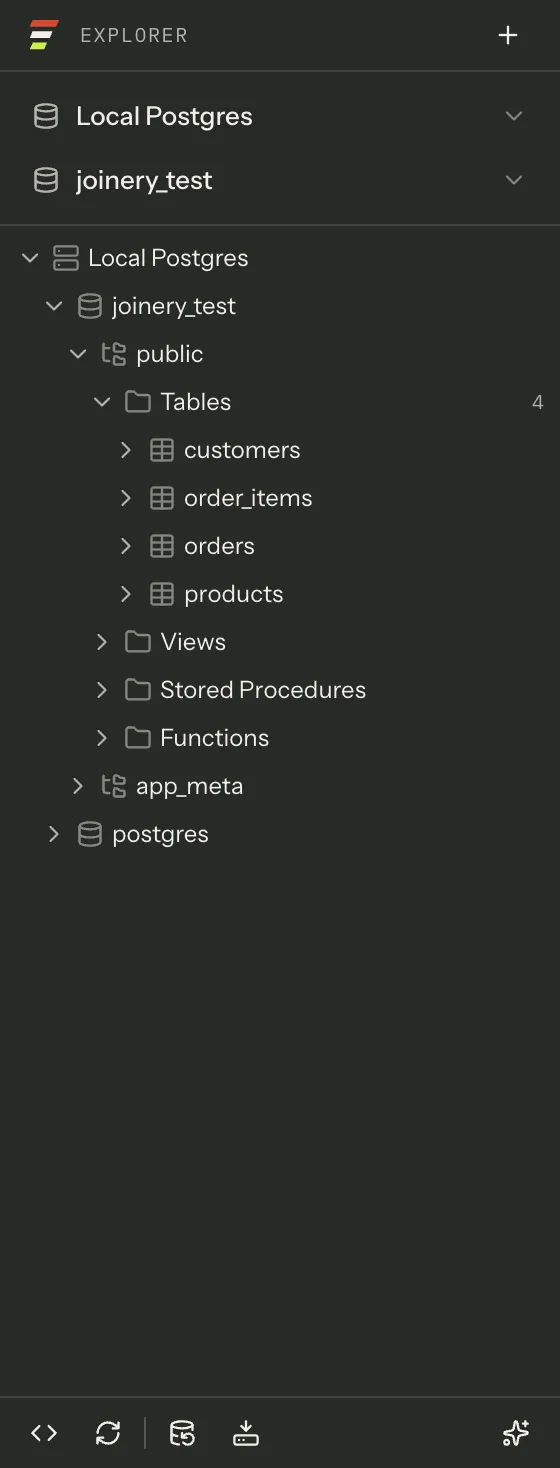
The sidebar is titled Explorer and holds four things stacked: a connection picker, a database picker, the tree, and a strip of actions along the bottom. ⌘\ hides and shows the whole pane.
The tree
Section titled “The tree”Nodes nest in this order:
server└── database └── schema ├── Tables │ └── table │ ├── Columns │ ├── Indexes │ ├── Keys │ ├── Constraints │ └── Triggers ├── Views ├── Stored Procedures └── FunctionsStored Procedures, Functions and Triggers are only offered on engines that have them — the folder list is built from the connection’s reported capabilities, not assumed.
Children load when you expand, and not before. A folder that has not been fetched still shows its twisty, because the server said it has children long before Joinery pays to list them; a spinner replaces the twisty while a fetch is in flight. Folders show their loaded child count beside the name; tables and views do not, because a number next to a table name would read as a row count.
Primary-key and foreign-key columns get their own glyph, which is what the eye is looking for in a list of forty columns.
The tree is virtualised — only the rows in view exist in the page — so a server with hundreds of databases costs the same as one with two.
Clicking and typing
Section titled “Clicking and typing”| Input | Effect |
|---|---|
| Click | Selects the row |
| Click the twisty | Expands or collapses |
| Double-click | Opens a table, view, procedure or function; expands anything structural |
| Right-click | Opens that row’s menu, and selects the row it opened on |
| ↑ / ↓ | Moves focus |
| Home / End | First and last row |
| → | Expands; if already expanded, steps into the first child |
| ← | Collapses; if already collapsed, jumps to the parent |
| Enter | Selects and activates — the same as a double-click |
| Space | Selects only |
Focus and selection are separate on purpose: arrow-keying through the tree does not open or select anything until you press Enter or Space.
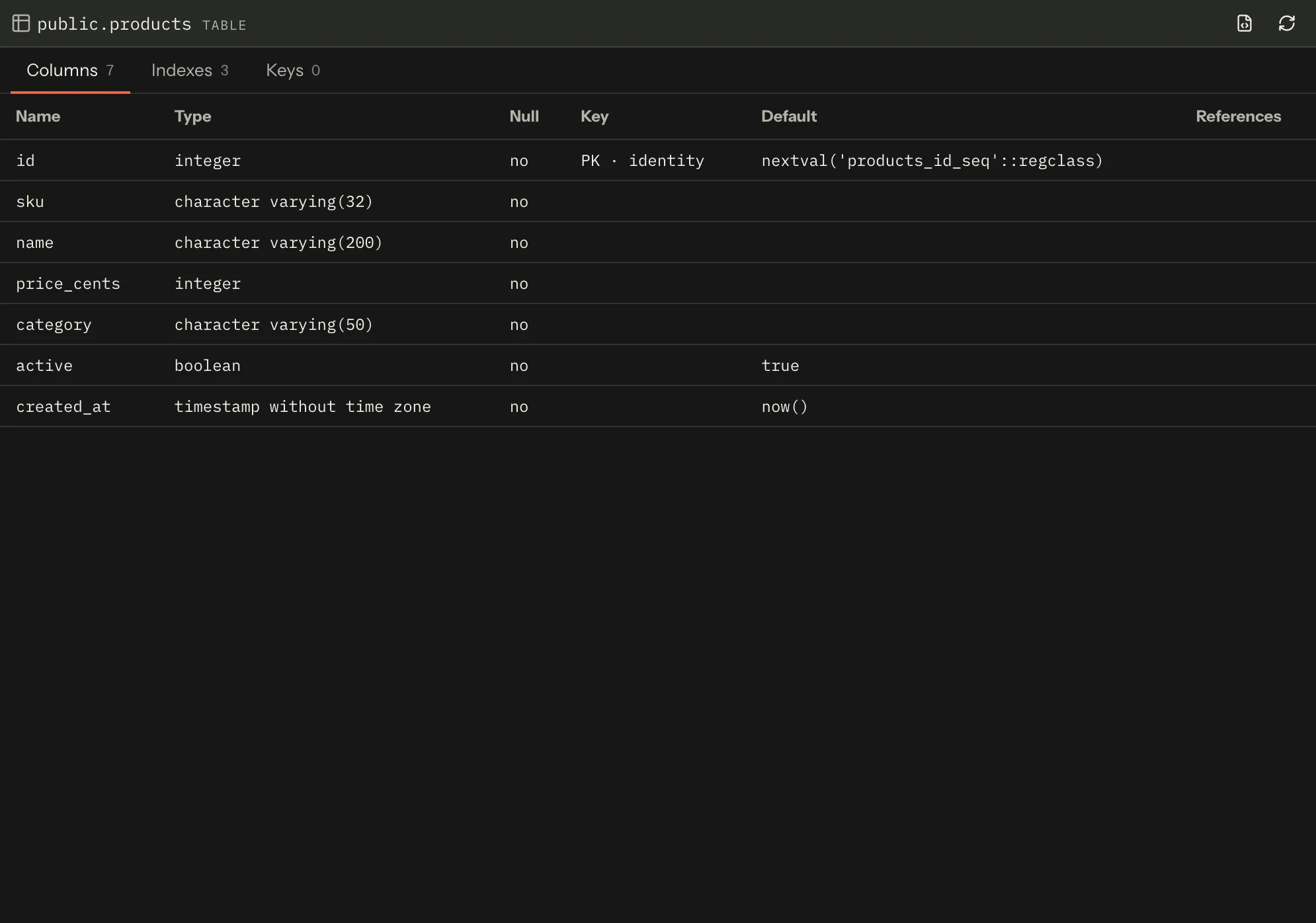
Double-clicking a table opens its object tab, not just its twisty. That tab has Columns, Indexes and Keys sections; views, procedures and functions get a Definition section instead of (or as well as) those. A table has no definition to fetch — Script Table as CREATE is how you get its DDL.
The right-click menus
Section titled “The right-click menus”Seven node types have a menu — server, database, folder, table, view, procedure, function. Columns, indexes and keys have none.
An action the engine cannot do is greyed out rather than offered and then refused after the click: on a server that hosts one fixed database, New Database… is disabled, and Radix skips it on the keyboard path too. The row itself does not say why — the command palette is the surface that states reasons.
| Node | Menu |
|---|---|
| Server | New Query · New Database… · Restore Database… · Refresh · Edit Connection… · Disconnect |
| Database | New Query · Backup Database… · Restore Database… · Compare Schemas… · Refresh · Rename… |
| Folder | Refresh |
| Table | Select Top 1000 Rows · Edit Top 200 Rows · Script Table as CREATE / SELECT / INSERT · Show Relationships · Refresh |
| View | Select Top 1000 Rows · Edit Top 200 Rows · Script View as CREATE / ALTER / SELECT · Refresh |
| Procedure | Execute Stored Procedure… · Script Procedure as CREATE / ALTER · Refresh |
| Function | Script Function as CREATE / ALTER · Refresh |
Only Select Top 1000 Rows runs on open. Edit Top 200 Rows, every Script as… item and
Execute Stored Procedure… all open a query tab with the statement in it and leave running it to
you — Execute Stored Procedure… writes the call, it does not make it.
The generated SQL is per engine: quoting, the row-limit syntax and the default schema all follow the connection, and MySQL — which has no schema layer between database and table — gets an unqualified name rather than an invented one.
A menu action always names its own node’s connection and database. Acting on a node under one server while a tab on another has focus cannot route the operation to the wrong server. Opening a query from a database node also moves the database picker to that database, so the footer’s actions follow.
Note — there is no Properties… item and no Delete… item. Both used to be offered and neither ever worked: each sent a command no part of the app listens for, so clicking it did nothing at all in a released build. Rather than leave a row that lies, they were removed until the surfaces behind them ship. The commands are still registered, which is why the command palette can still list Server properties and Database properties — greyed out, naming what owes them. The palette is the surface that can say “not wired yet”; a right-click row cannot.
Rename… is unaffected, and is still greyed out on a system database and on an engine that does not support database management.
Refresh
Section titled “Refresh”There are three refreshes and they are not the same:
- A menu’s Refresh drops the main process’s metadata caches for that node’s connection, then re-reads that node.
- The footer’s refresh button re-reads the focused connection’s database list and then the selected node — “refresh what I am looking at”.
- ⌘R / Server ▸ Refresh additionally refreshes the server node itself.
Dropping the caches first is what makes a Refresh mean something: the main process holds list metadata for 60 seconds, and without the drop a Refresh would hand back the rows you were already looking at.
The footer
Section titled “The footer”Five actions: New query, Refresh the explorer, Back up a database, Restore a database, and a toggle for the assistant. The first four need an open connection; backup and restore additionally need an engine that supports them, and backup needs a database selected.
New query resolves the database the same way ⌘N does — your last selection, then the profile’s configured default if it still exists, then the first database the server returned.
Revealing an object
Section titled “Revealing an object”Find a database object can expand the tree down to an object and scroll to it, even when the sidebar is collapsed at the time — the pane opens, the ancestors expand one round trip at a time, and the row takes keyboard focus so the arrow keys carry on from there. If an ancestor is not there — a server that is not connected, a schema you cannot see — the walk stops and says so.
Where this page's facts come from
| Claim | Source |
|---|---|
| The sidebar is headed “Explorer” and holds picker, picker, tree, action strip | packages/renderer/src/shell/sidebar/sidebar.tsx:105-138 |
| ⌘\ toggles the sidebar | packages/renderer/src/commands/catalogue.ts:525-532 |
| Node hierarchy server → database → schema → folder → object → column/index/key | packages/renderer/src/state/explorer.ts:2, 486-517 |
| Table sub-folders: Columns, Indexes, Keys, Constraints, Triggers | packages/renderer/src/state/explorer-folders.ts:37-48 |
| Procedures, Functions and Triggers folders are capability-gated | packages/renderer/src/state/explorer-folders.ts:25-48 |
Children load on expand; hasChildren and unfetched children are separate facts |
packages/renderer/src/shell/sidebar/explorer-tree.tsx:9-16, 141-177, ui/tree.tsx:16-22 |
| A spinner replaces the twisty while a fetch is in flight | packages/renderer/src/ui/tree.tsx:20-22, shell/sidebar/explorer-tree.tsx:148-149 |
| Folder-ish nodes show a child count; tables deliberately do not | packages/renderer/src/shell/sidebar/explorer-tree.tsx:88-100, 163-168 |
| Key columns get their own glyph | packages/renderer/src/shell/sidebar/explorer-tree.tsx:102-113 |
| The tree is virtualised | packages/renderer/src/ui/tree.tsx:23-27 |
| Click selects, twisty or double-click expands, Enter activates | packages/renderer/src/shell/sidebar/explorer-tree.tsx:17-23, 202-227 |
| Arrow / Home / End / Enter / Space behaviour, including “step into” and “jump to parent” | packages/renderer/src/ui/tree.tsx:396-449 |
| Focus and selection are separate | packages/renderer/src/ui/tree.tsx:32-37 |
| Right-click selects the row it opened on | packages/renderer/src/shell/sidebar/node-menu.tsx:18-20, 112-127 |
| Double-clicking a table opens its object tab | packages/renderer/src/shell/sidebar/explorer-tree.tsx:206-227, node-actions.ts:217-230 |
| The object tab’s sections, and that a table has no Definition section | packages/renderer/src/features/object-detail/object-panel.tsx:23-29, 106-116, 253-274 |
| Seven node types have a menu; columns, indexes and keys have none | packages/renderer/src/shell/sidebar/node-menu.tsx:77-97 |
Unsupported actions are a plain disabled item, refused on the keyboard path too |
packages/renderer/src/shell/sidebar/node-menu.tsx:7-13, 184-191 |
| A context-menu row has no affordance for stating a reason | packages/renderer/src/ui/context-menu.tsx:54-68 |
| The seven menus’ items | packages/renderer/src/shell/sidebar/node-menu.tsx:157-444 |
| Only “Select Top 1000 Rows” auto-executes | packages/renderer/src/shell/sidebar/node-actions.ts:11-18, 44-46, 130-134 |
| “Execute Stored Procedure…” writes the call and does not run it | packages/renderer/src/shell/sidebar/node-actions.ts:145-152 |
| Generated SQL is per engine, including MySQL’s missing schema layer | packages/renderer/src/shell/sidebar/node-actions.ts:55-94, features/object-search/object-model.ts:5-16 |
| A menu action carries its own node’s target rather than “the focused connection” | packages/renderer/src/shell/sidebar/node-menu.tsx:14-17 |
| Opening a query from a database node moves the database picker | packages/renderer/src/shell/sidebar/node-actions.ts:95-110 |
| No menu here offers Properties… or Delete… any more | packages/renderer/src/shell/sidebar/node-menu.tsx:22-31, 224-284, 309-317 |
| Nothing subscribes to the properties or delete-database commands, and none of the four has a producer | packages/renderer/src/commands/registry.ts:392-397, 414-416, 483-488, 492-495 |
| The commands stay registered, with their payload shapes | packages/renderer/src/commands/registry.ts:121-126, 134-135, 232, 242-248 |
| Rename… is disabled on a system database and where management is unsupported | packages/renderer/src/shell/sidebar/node-menu.tsx:224-232, 271-281 |
| The palette greys out an unowned command and names its owner — but only lists Server / Database properties, not the sidebar-only pair | packages/renderer/src/features/command-palette/palette-model.ts:17-25, 144-154, commands/catalogue.ts:462-469, 507-514, 762-769, 786-794 |
| A menu Refresh drops main’s caches first, then re-reads the node | packages/renderer/src/shell/sidebar/node-actions.ts:279-304 |
| The footer’s refresh re-reads the database list and the selected node | packages/renderer/src/shell/sidebar/node-actions.ts:346-365 |
| ⌘R also refreshes the server node | packages/renderer/src/commands/catalogue.ts:453-461, shell/sidebar/node-actions.ts:347-352 |
| Main’s list metadata is cached for 60 seconds, which is why the drop comes first | packages/main/src/services/sql/metadata.ts:83-89 |
| The footer’s five actions and their disabled conditions | packages/renderer/src/shell/sidebar/sidebar.tsx:146-228 |
| New query resolves the database in three stages | packages/renderer/src/shell/sidebar/node-actions.ts:112-128 |
| Reveal expands ancestors one at a time, focuses the row, and reports a missing ancestor | packages/renderer/src/shell/sidebar/node-actions.ts:241-277, shell/sidebar/sidebar.tsx:68-88 |
| Reveal uncollapses the sidebar first, which is why it works from a collapsed pane | packages/renderer/src/shell/shell-commands.tsx:162-169 |